
What Is an Infostealer?
An infostealer is malware designed to quietly collect saved logins, browser cookies, and other account data from an infected device and send it to an attacker. It doesn’t lock files or crash systems. Its whole value is that you don’t notice it, while your accounts get handed to someone else.
Infostealer vs. keylogger, RAT, spyware and banking Trojan
Infostealers overlap with several older malware types, but they differ in what they collect and how they work.
| Malware Type | What It Mainly Does | How It Differs from an Infostealer |
|---|---|---|
| Infostealer | Grabs stored passwords, cookies, tokens, wallets and system details in a single sweep, then exfiltrates them | Takes what is already saved on the device, often within minutes of infection |
| Keylogger | Records keystrokes as you type | Captures new input over time, but misses anything already stored in the browser |
| RAT (remote access trojan) | Gives an attacker live control of the machine | Interactive and noisy; an infostealer is usually smash-and-grab |
| Spyware | Monitors activity broadly, such as screens, browsing and location | Surveillance-focused; credential theft is a side effect, not the point |
| Banking Trojan | Targets online banking sessions and financial fraud | Narrower in scope, aimed at financial sites |
Many modern infostealers borrow features from the others, which is why detection names often blur the lines.
Why infostealers are classed as Trojans and spyware
Infostealers are classed as Trojans because they usually arrive disguised as something you wanted, such as cracked software, a fake installer, or a browser extension. They are classed as spyware because they secretly gather information from the device and send it elsewhere. That dual nature is why antivirus detections often read like “Trojan.InfoStealer” or “Spyware.InfoStealer,” and why a Trojan horse that steals data can fairly be called spyware as well.
A real-world example of an infostealer infection
An illustrative case: an employee downloads a “free” version of a paid design tool onto a personal laptop that also holds their work logins. The installer works, so nothing looks wrong. In the background, the stealer collects every saved password and session cookie in the browser, bundles them into an archive, and uploads it within minutes. The employee never sees a warning, but the company’s cloud, email, and VPN accounts are now exposed through a device IT doesn’t manage. The scenario is hypothetical, but it matches the path documented in real investigations, covered below.
How Infostealers Work
Infostealers reach devices mainly through content people choose to run or click. The most common routes are cracked or pirated software. These malicious ads lead to fake download pages, fake browser or system update prompts, booby-trapped browser extensions and developer packages, and phishing emails or messages with attachments or “fix it” instructions. Attackers favor these because the victim does the installing, which sidesteps many technical defenses.
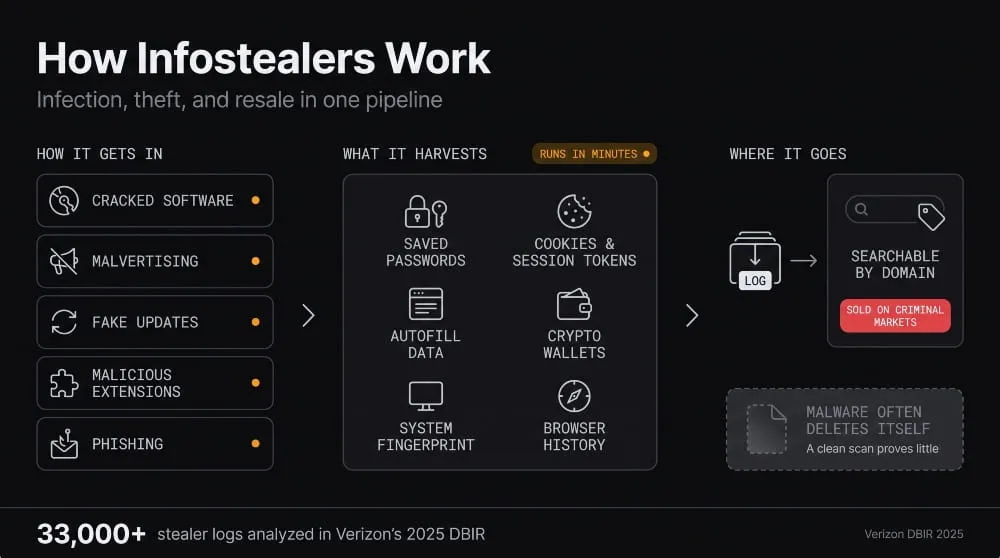
What they harvest: saved passwords, browser cookies and session tokens, autofill data, crypto wallets, system fingerprints
A typical infostealer collects:
- saved passwords from browsers and some password stores
- browser cookies and session tokens
- autofill data such as names, addresses and card details
- cryptocurrency wallet files and extensions
- a system fingerprint covering the device, IP address, installed software and location
Cookies and fingerprints matter as much as passwords. Together they let an attacker imitate the victim’s browser closely enough to avoid some security checks.
How stolen “logs” are packaged and sold
A “log” is the bundle of data a stealer collects from a single victim. Operators package logs and list them on criminal marketplaces and Telegram-style channels, usually searchable by domain so buyers can find logins for a specific company’s VPN, email, or cloud platform. Some operators rent the stealer as a service and take a cut of resale, so the people running campaigns and the people exploiting the data are often different actors. Verizon’s 2025 report analyzed more than 33,000 stealer logs, which gives a sense of the scale at which this data circulates.
Do infostealers delete themselves after exfiltration?
Many do, but not all. Because the goal is a one-time data grab, many stealers remove their files or terminate shortly after exfiltration, so a clean scan afterward proves little. Other variants stay resident to keep collecting new data or load additional malware. In both cases, assume the data has already left the device, whether or not the malware is still there.
How Infostealers Lead to Account Takeover and MFA Bypass
Session cookie theft and why it sidesteps MFA
Stolen session cookies can let an attacker continue a logged-in session without ever seeing a password or MFA prompt. MFA is checked at login, and once the service issues a session token, the browser presents that token on later requests. A thief holding a valid token can present it from another machine. This is why session theft is treated differently from simple password leaks, and why token binding and short session lifetimes are increasingly recommended.
How infostealer malware leads to account takeover
The path from infection to takeover is short. The stealer exfiltrates credentials and cookies, the log is sold or shared, and a buyer filters for valuable targets such as admin accounts, VPNs, or cloud consoles. They then log in with the stolen password or hijack the existing session. From there, attackers typically read email, move laterally, steal data, or deploy ransomware. The takeover looks like a normal login, so it often generates no alerts.
Why changing passwords from a clean device matters
If you change passwords on a device that still has the stealer running, the malware can capture the new credentials as you type them. Recover from a separate, trusted device, and sign out of all sessions and revoke tokens, because a password change alone doesn’t always invalidate a stolen session. Clean the infected machine, or rebuild it, before using it for sensitive logins again.
Infostealer-driven breaches and cloud data leaks (Snowflake-style incidents)
The 2024 Snowflake customer incidents are the best-documented example. Mandiant reported that attackers accessed customer environments using credentials stolen via infostealer malware, with most coming from historical infections dating back to 2020. Mandiant notified approximately 165 potentially exposed organizations. Mandiant also noted that a single compromised contractor laptop can give attackers access across multiple organizations. The lesson is that credentials stolen years earlier were still valid because nobody rotated them.
Infostealers by Platform
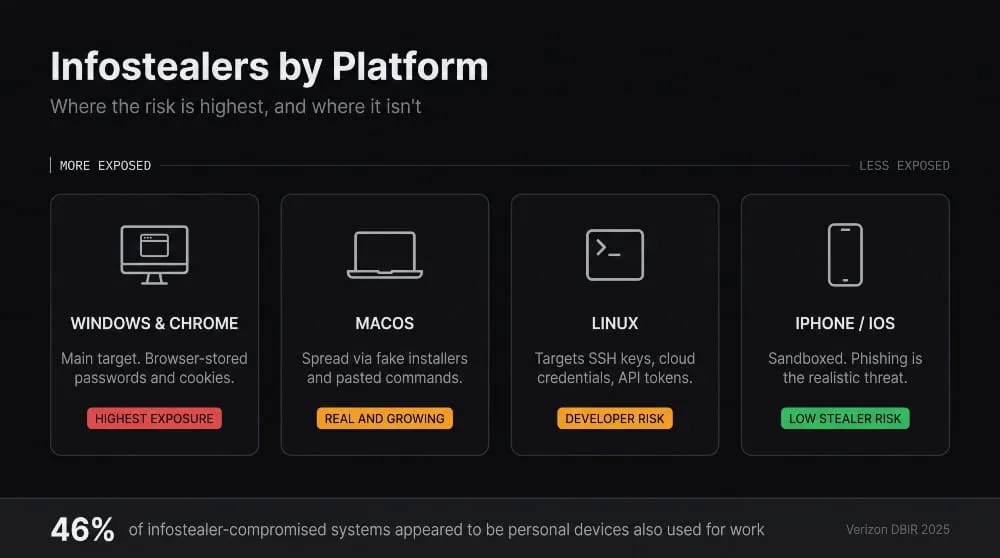
Windows and Chrome infostealers
Windows is the main target because of its market share and the volume of cracked software and malvertising aimed at it. Most infostealers go after Chromium-based browsers like Chrome and Edge, where saved passwords and cookies are stored in predictable locations. Browser vendors have added protections around stored data, and stealer developers have repeatedly adapted, so the protections reduce risk but don’t eliminate it.
macOS infostealers
Macs are a real target, not an exception. Mac-focused stealers typically spread through fake installers, trojanized apps, and deceptive “fix” instructions that trick users into pasting commands into Terminal, bypassing the platform’s usual app checks. They target the browser, the Keychain, and crypto wallets. The idea that Macs don’t get malware is outdated, and the same safe-sourcing habits apply.
Linux infostealers
Linux infostealers exist but are less common, mostly because fewer desktop users are available to target. They matter more on developer workstations and servers, where they look for SSH keys, cloud credentials, API tokens, and configuration files. For organizations, the exposure usually comes through developer machines and CI/CD environments rather than everyday browsing.
iPhone/iOS: what is and isn’t realistic
On a standard, non-jailbroken iPhone, a traditional infostealer is unlikely, because iOS sandboxes apps from each other and limits what installed software can read. The realistic iPhone risks are different: phishing pages that capture credentials directly, malicious profiles or configuration changes, and malware on jailbroken devices. If you are searching “infostealer iPhone,” the practical advice is to keep iOS updated, avoid sideloading, and watch for phishing, not to run a malware scanner.
How to Check for an Infostealer (Detection)
Signs of infection on a PC or Mac
Infostealers are designed to be quiet, but some signs appear: unexpected login alerts or password reset emails, accounts signed out without reason, new devices appearing in account security settings, unfamiliar processes or browser extensions, and sudden slowdowns after installing questionable software. Because the damage happens off the device, the strongest signal is often on the account side rather than the machine.
Infostealer scanners and endpoint detection: what they catch and miss
Antivirus and endpoint detection tools catch many known stealers, especially when they are updated frequently. They can miss new variants, custom-packed builds, and malware that has already run and removed itself. A clean scan is reassuring but not conclusive. If you installed something suspicious, treat the credentials stored on that device as exposed even if nothing is found, and don’t rely on a single scanner.
How to check whether your credentials already appeared in an infostealer database
Checking an infostealer exposure database tells you whether your credentials have been stolen, regardless of whether the infection is still on your machine. For individuals, breach-notification services cover some of this. For organizations, a better approach is to search infostealer log data for corporate domains, which dedicated monitoring does. Results should be read by recency: a recent infection means urgent action, while an old entry means checking that those credentials were rotated.
Detection for IT teams: EDR alerts and log review
IT teams can look for EDR alerts on credential-store access by unusual processes, unexpected archive creation followed by outbound uploads, logins from new locations or devices shortly after a suspicious download, and impossible-travel patterns. Identity-provider logs often reveal the takeover even when the endpoint never raised an alert, so review sign-in logs alongside endpoint data. Unmanaged and personal devices are a blind spot, and external exposure monitoring helps teams cover them.
How to Remove an Infostealer and Recover
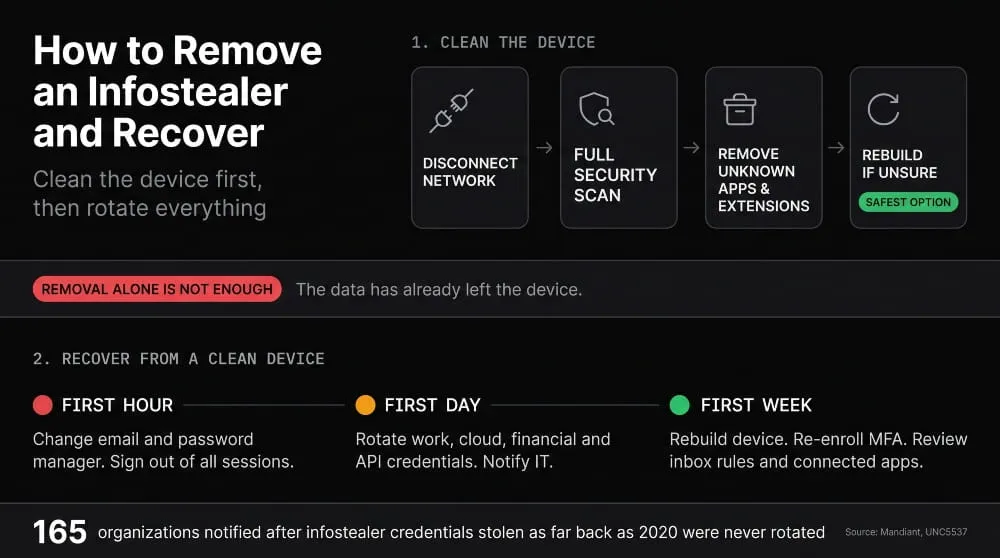
Step-by-step infostealer malware removal
Removal is only one part of recovery. In order:
- Disconnect the device from the network.
- Run a full scan with a reputable security tool and remove what it finds.
- Remove unfamiliar browser extensions and recently installed software.
- If you can’t be confident the system is clean, back up essential files and rebuild the device from a clean install.
When the stakes are high, such as a work device or an admin account, a clean reinstall is the more reliable choice.
Why removal alone isn’t enough: rotate every credential and invalidate sessions.
Removing the malware doesn’t undo the theft, since everything it collected is already in someone else’s hands. Recovery means rotating every password stored or used on the device, starting with email, banking, password managers, cloud and work accounts, and revoking active sessions and tokens everywhere. Mandiant’s Snowflake findings show what skipping this step costs: credentials from infostealer infections remained valid, in some cases years later, because they weren’t rotated.
What to do after an infostealer infection (first hour, first day, first week)
A short incident-response playbook for organizations
For organizations, the sequence is: isolate the endpoint, identify every account and system the user could reach, revoke sessions and rotate credentials in priority order (privileged and shared accounts first), review identity-provider logs for sign-ins since the likely infection time, and hunt for follow-on activity such as new mailbox rules, OAuth grants, and data exports. Treat it as an identity incident, not just a malware cleanup. Document what was exposed and when, because that record matters for compliance and client communication.
How to Prevent and Protect Against Infostealers
User-level habits: software sourcing, extension hygiene, browser password storage
The most effective personal habits are simple: install software only from official sources, avoid cracked or pirated programs entirely, keep browser extensions to a minimum and review them periodically, and be skeptical of “fix” instructions that ask you to paste commands. Use a dedicated password manager instead of saving credentials in the browser, since browser stores are the first thing stealers look for. Keep work and personal browsing separate where you can.
Technical controls: EDR, application allow-listing, phishing-resistant MFA, short session lifetimes
For organizations, the most important controls are endpoint detection and response on managed devices, application allow-listing to block unapproved installers, phishing-resistant MFA such as passkeys or hardware keys, and shorter session lifetimes with re-authentication for sensitive actions. Conditional access that checks device compliance also helps, because it can deny a stolen session from an unmanaged machine. Verizon’s 2025 report found that 30% of systems compromised by infostealers appeared to be enterprise-managed, while 46% appeared to be employee-managed devices also used for work. Hence, BYOD policy deserves as much attention as managed endpoints.
Reducing the damage radius when an infection happens
Assume an infection will eventually happen and limit what it can reach. Use unique passwords per service so one theft doesn’t cascade; give admins separate accounts for privileged work; restrict access by network location or device where possible; and keep permissions tight so a single compromised laptop can’t open every door. The aim is that a stolen login is useful for as little as possible, for as short a time as possible.
Infostealer Data, Leaks and Databases
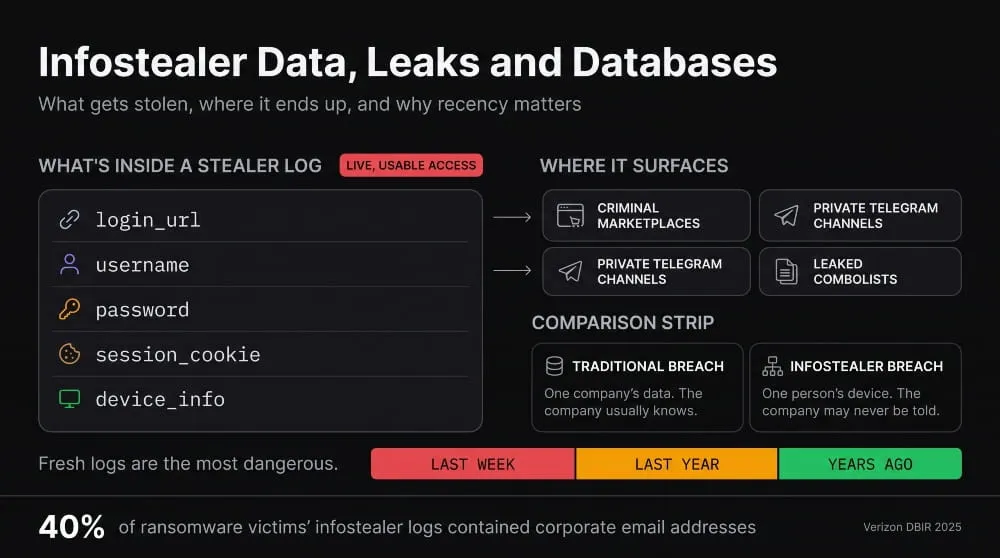
What infostealer databases contain and where they surface
Infostealer databases hold stolen log data: login URLs, usernames, passwords, cookies, autofill entries, and device metadata. They surface on criminal marketplaces, private Telegram channels, forums, and in leaked “combolist” compilations. The most useful entries pair a working credential with the exact login page, which is why log data is more actionable to attackers than a generic list of email and password pairs.
Infostealer breaches vs. traditional database breaches
A traditional breach exposes data held by one company, such as a leaked customer table. An infostealer breach exposes data held by one person’s device, spanning every service they use. The compromise is distributed across thousands of victims, so the affected organization may never know because it wasn’t the one breached. Companies learn about it only if they look for their own domains in the data.
Why recent infections matter more than old combolists
Fresh infostealer logs are far more dangerous than old compilations, because recent cookies and passwords are more likely to work still. Attackers often recycle combolists from earlier breaches, which have low hit rates. A log from last week can contain live sessions and current passwords. Prioritize exposure by recency, and treat old entries as a rotation check rather than an emergency.
Infostealer Trends and Threat Intelligence (2024–2026)
How infostealer activity has changed year over year
Credential theft has stayed a dominant theme across recent reporting. Verizon’s 2025 report found stolen credentials were the initial access vector in 22% of the breaches reviewed, down from 31% in the prior period, and secondary coverage of the 2026 report says exploitation of software vulnerabilities overtook credential theft as the leading initial access vector for the first time in the report’s history. That doesn’t mean stolen credentials stopped mattering. It means attackers are mixing methods, and credentials remain a core ingredient, particularly for ransomware.
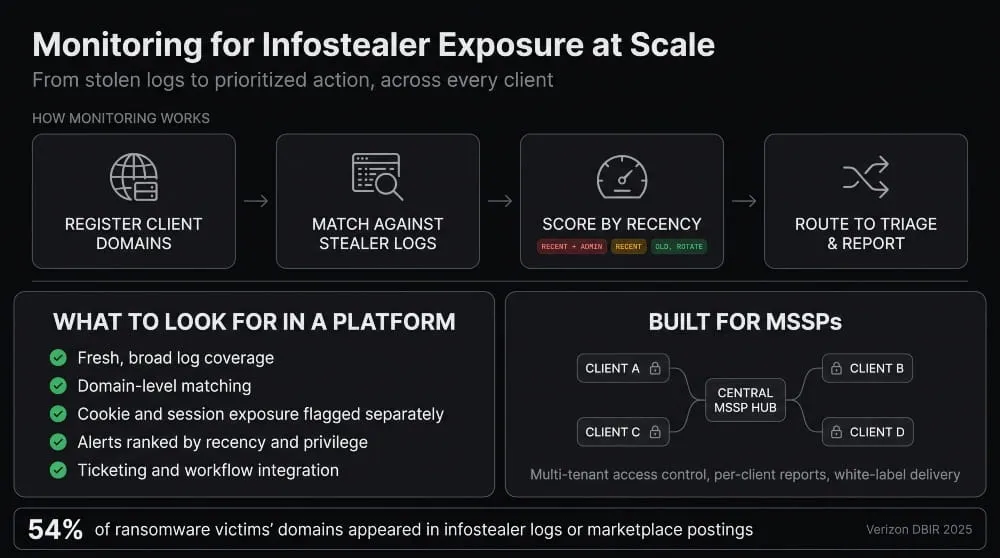
One link stands out: Verizon found that 54% of ransomware victims it examined had their domains appear in at least one infostealer log or marketplace posting. For defenders, infostealer exposure serves as an early warning signal for later attacks.
Sector exposure, including healthcare
Any sector with large numbers of staff, contractors, and third-party users is exposed, and healthcare remains a recurring concern because clinics, billing vendors, and affiliated practices often share systems and use personal devices. The risk is less about stealers uniquely targeting healthcare and more about the volume of logins to sensitive systems spread across loosely managed endpoints. Any organization with heavy BYOD use and high-value data should assume it has some exposure.
Infostealer attacks by recent campaign type, without teardown-level family analysis
Recent campaigns cluster around a few delivery themes: fake software cracks and game cheats, malvertising that impersonates popular tools, fake “fix this error” prompts, and trojanized developer packages and extensions. The families behind them change often as takedowns and rebrands reshuffle the market, so tracking the delivery pattern is more durable than tracking any one malware name.
Monitoring for Infostealer Exposure at Scale
Infostealer intelligence: what it is and what it tells you
Infostealer intelligence is data collected from stolen logs, matched against your domains, and used to tell you which of your people and systems have been exposed and when. A good feed tells you which accounts were affected, what type of data was taken, how recent the infection was, and, ideally, which device it came from. That turns a vague worry about leaked credentials into a specific, prioritized list.
What to look for in platforms that monitor infostealer data
When comparing platforms, the most useful questions are about coverage and actionability: how fresh and broad the log sources are, whether matching works at the domain level, how alerts are prioritized by recency and privilege, whether cookie and session exposure is flagged separately from passwords, and how well it integrates with ticketing and response workflows. Be cautious of tools that report volume without telling you what to do next.
How MSSPs monitor client domains for infostealer-sourced credentials
MSSPs usually monitor by registering each client’s domains, then continuously matching them against infostealer and breach data and routing high-severity hits into their existing triage process. The challenge is doing it across many clients at once without mixing data or overwhelming analysts. Multi-tenant access control, per-client reporting, and white-label delivery make it scalable. You can see how this works in Mispar’s monitoring feature, and the dark web monitoring guide covers the broader approach to continuous exposure tracking.
Frequently Asked Questions (FAQ)
What is an infostealer?
An infostealer is malware that secretly copies saved passwords, cookies, autofill data, and wallet details from a device and sends them to an attacker. It’s built to run quietly and often disappears after collecting what it came for.
Can infostealer malware bypass MFA?
It can bypass MFA indirectly. Rather than breaking the MFA step, infostealers steal session cookies that prove you already passed it, letting attackers reuse an authenticated session. Phishing-resistant MFA, short session lifetimes, and session revocation reduce this risk.
How do I know if I have an infostealer?
Often you won’t see it on the device. Look for unexpected login alerts, password reset emails, unfamiliar devices in your account settings, or unknown extensions and processes after installing questionable software. If you suspect it, scan the device, then check whether your credentials show up in an exposure database.
How do I remove an infostealer?
Disconnect the device, run a full scan with a reputable security tool, and remove unfamiliar software and extensions. For work devices or high-risk accounts, rebuilding from a clean install is safer. Then, from a clean device, change your passwords and sign out of all sessions.
Do antivirus tools detect infostealers?
Often, yes, particularly for known variants. But new or custom-packed samples can slip through, and a stealer that has already run and removed itself may leave nothing to find. A clean scan doesn’t prove your credentials are safe.
Are Macs and iPhones affected?
Macs are affected: macOS infostealers exist and are commonly spread through fake installers and pasted “fix” commands. Standard, non-jailbroken iPhones are far less exposed to traditional infostealers, though phishing and malicious profiles remain real risks.