
Account takeover (ATO) is when an attacker gains control of a legitimate online account and uses it as if they were the owner. It usually starts with stolen or guessed credentials, a tricked victim, or a hijacked session, and it ends with fraud, data theft, or a foothold inside a larger network. This guide explains how account takeover works, how to detect it, which defenses actually hold up, and where managed security providers fit.
What Is Account Takeover?
Account takeover (ATO) definition in plain terms
Account takeover is the unauthorized use of a real account by someone who is not its owner. The account, its history, and its trust level are all genuine, which is exactly why ATO is hard to spot: the login often looks valid. The target can be an email inbox, a bank or payment account, a cloud tenant, a social profile, a retail login, or an internal business application.
Account takeover fraud vs account takeover attack
An account takeover attack is the intrusion: the steps an attacker takes to get control of the account. Account takeover fraud is what happens afterward, such as moving money, placing orders, redeeming stored value, or impersonating the owner to deceive others. The same incident carries both labels. Security teams tend to say attack when they focus on how access was gained, and fraud teams say fraud when they focus on the loss.
Account takeover vs identity theft (and application / account-creation fraud)
Account takeover hijacks an account that already exists, while identity theft more often means using someone’s personal data to open something new. Opening a fraudulent credit line or a new account with stolen details is application or account-creation fraud, and the victim may not know it exists. The two overlap in practice, since a taken-over email account can supply the personal data needed for identity theft, and a stolen identity can be used to reset access on existing accounts.
Why account takeover is a growing cybercrime problem
Account takeover keeps growing because the raw material is abundant and cheap. Credentials leak constantly through breaches and infostealer malware; people still reuse passwords across services, and attackers can automate login attempts at scale. Social engineering has also moved past passwords: criminals now talk victims into handing over the one-time codes that MFA depends on. Each of these makes a valid login easier to obtain than a technical exploit.
How Account Takeover Attacks Work
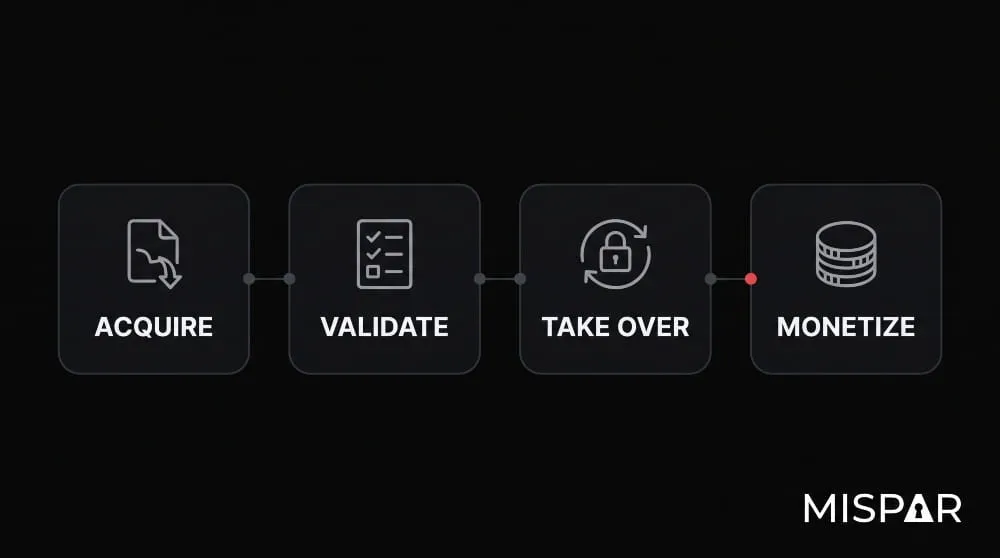
Stage by stage: credential acquisition, validation, takeover, monetization
Most account takeover attacks follow four stages. In credential acquisition, the attacker obtains logins from breach dumps, infostealer logs, phishing pages, or by guessing. In validation, automated tooling tests those credentials against target login pages to find which ones work. In takeover, the attacker signs in and locks the owner out, typically by changing the password, recovery email, phone number, or MFA method. In monetization, the account is drained, used to commit fraud, sold, or used to attack the owner’s contacts and employer.
Common vectors: credential stuffing, phishing, infostealer malware, SIM swap, session hijacking, password spraying
| Vector | How It Leads to Takeover |
|---|---|
| Credential stuffing | Leaked username and password pairs are replayed against other services, exploiting password reuse. See credential stuffing. |
| Phishing | Fake login pages or messages capture passwords and often one-time codes. See credential theft. |
| Infostealer malware | Malware on a device harvests saved passwords, cookies, and tokens. See infostealer malware. |
| SIM swap | An attacker takes over the victim’s phone number to receive SMS codes and reset links. |
| Session hijacking | A stolen session cookie or token lets the attacker skip the login and MFA entirely. |
| Password spraying | A few common passwords are tried across many accounts to avoid lockouts. See password spraying. |
A small number of vectors account for most takeovers, and each feeds the acquisition or takeover stage differently.
Credentials obtained through any of these often surface later as leaked credentials or compromised credentials, which is why exposure is such a useful early signal.
Brand impersonation and social engineering routes
Brand impersonation is the leading social engineering route to account takeover: the attacker poses as a trusted company so the victim volunteers access. The FBI’s November 2025 public service announcement describes criminals impersonating financial institutions through texts, calls, emails, and fake websites to get victims to share credentials and verification codes. The victim effectively authorizes access, which is why technical controls alone do not close this route. Convincing fake support pages and urgent “suspicious activity” messages are the typical lures.
Account takeover scenarios and examples
Three illustrative scenarios show how the stages play out. In the first, a customer reuses a password that appeared in an old breach, an automated tool finds it works on a retail account, and the attacker redeems stored loyalty value. In the second, an employee’s laptop is infected with infostealer malware, the stolen session cookie opens their Microsoft 365 mailbox without a password prompt, and the attacker sets up forwarding rules and sends payment-change requests to finance. In the third, a caller posing as a bank fraud agent talks a victim into reading out a one-time code, and the attacker uses it to approve a transfer. These are composites, not specific cases, but each matches a pattern defenders see repeatedly.
Account takeover attempts vs successful takeovers.
An account takeover attempt is a login or recovery action that tries to gain access, while a successful takeover produces a valid session for the attacker. Most attempts fail because most replayed credentials are stale. That is why attempt volume and success rate need to be tracked separately: a surge in failed logins signals an active campaign, and a handful of successes inside that surge marks the accounts that need immediate action.
Types of Account Takeover
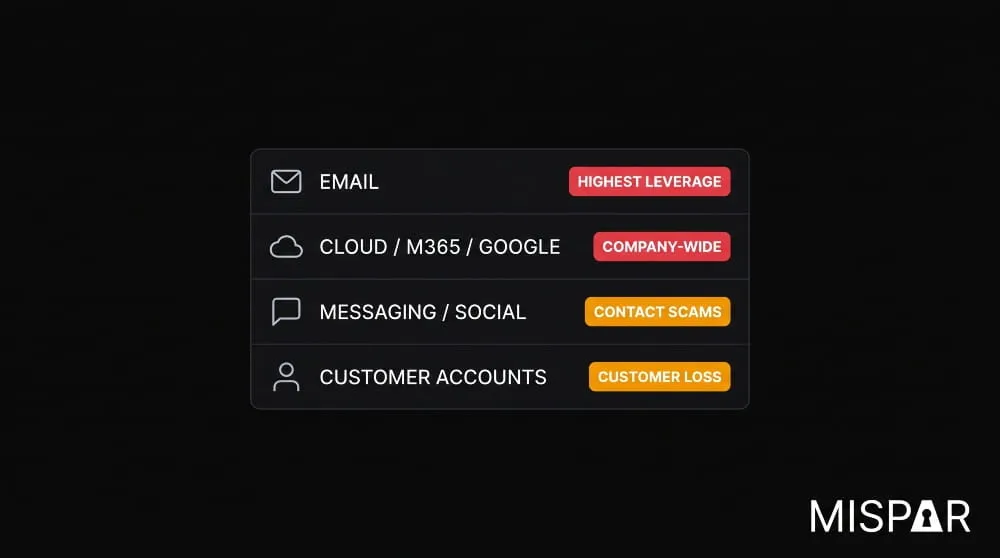
Email account takeover
Email account takeover is the highest-leverage form because email controls password resets for nearly everything else. Once an attacker owns an inbox, they can reset other accounts, read sensitive threads, and impersonate the owner. Hidden forwarding rules and deleted security alerts are common signs that the mailbox is being used quietly.
Cloud and Microsoft 365 / Google account takeover
Taking over a Microsoft 365 or Google Workspace account gives an attacker access to mail, files, calendars, and connected apps in one step. For businesses, this can turn a single stolen login into a company-wide incident. Attackers often add OAuth app permissions or new MFA methods, so they keep access after the password is changed.
Messaging and social account takeover, including WhatsApp scams
Messaging and social accounts are taken over mainly to scam the owner’s contacts. In the common WhatsApp scam, an attacker starts a registration on the victim’s number and then tricks them, often by posing as a friend or support, into sharing the six-digit verification code. With that code, the attacker moves the account to their own device and messages contacts asking for money. Social profiles are also taken over to spread fraud or to hijack business pages.
Online and customer account takeover
Customer account takeover targets the accounts a business holds for its users, such as retail, travel, media, and financial logins. Attackers favor accounts that hold stored payment methods, points, or personal data. For the business, the cost comes as chargebacks, support load, and damaged trust, even though the customer’s own password was the weak point.
Account Takeover Statistics and Business Impact
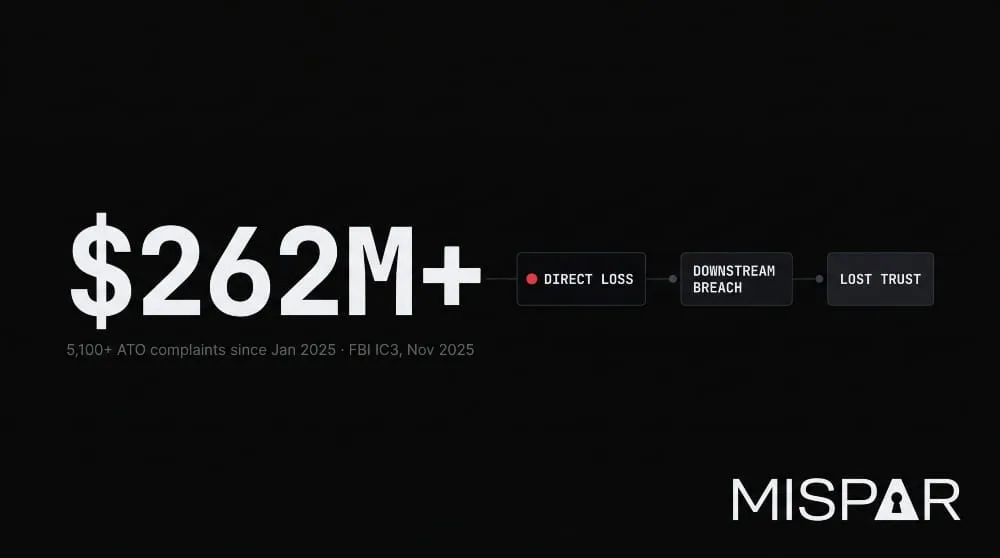
Key account takeover fraud statistics
The FBI’s Internet Crime Complaint Center reported in a public service announcement dated 25 November 2025 that it had received more than 5,100 complaints of account takeover fraud since January 2025, with reported losses exceeding $262 million. The FBI also noted that most of these cases relied on social engineering, with victims handing over credentials or one-time codes.
Verizon’s 2026 Data Breach Investigations Report adds the credential angle. Credential abuse fell to 13% of breaches as the initial access vector, partly because the report added a new pretexting category that absorbed some of its share. However, it still appeared somewhere in the attack chain in 39% of breaches. Stolen credentials remain a factor in a large share of incidents even when they are not the first step.
Costs: financial loss, downstream breaches, lost trust
The cost of account takeover has three layers. Direct loss is the money or value taken from the account. Downstream breach cost appears when a taken-over mailbox or cloud account becomes the entry point for a wider compromise, including fraud against partners and customers. Lost trust is the slowest to repair: customers who lose an account, or clients whose provider missed a takeover, tend not to give a second chance.
Risk assessment: what makes an account high-risk
An account is high-risk when compromise would be both likely and costly. Likelihood rises with reused or previously exposed passwords, SMS-only MFA, no MFA, weak recovery paths, and exposure to infostealer-prone devices. Impact rises with administrative privileges, access to payments or payroll, control over email, and shared or service accounts that nobody reviews. Ranking accounts on those two dimensions shows where to apply the strongest controls first.
How to Detect Account Takeover
Account takeover signals and red flags
The clearest red flags are changes the owner did not make. These include password reset emails or MFA prompts nobody requested, new device or location alerts, altered recovery email or phone number, unfamiliar mailbox rules or forwarding addresses, sent messages the owner does not recognize, and transactions or payout details that changed unexpectedly. Contacts reporting strange messages from the account is another strong indicator.
Behavioral and login-risk signals
Behavioral signals catch account takeover when the credentials are valid, but the behavior is not. Useful signals include impossible travel between logins, a new device or browser fingerprint, logins routed through residential proxies or anonymizers, unusual login hours, and rapid sequences such as a login followed straight away by a password change and a payout change. No single signal is conclusive, so detection works best when you combine several into a risk score.
Detection methods
Detection methods layer on one another. Sign-in log analysis in the identity provider shows where and how accounts are being accessed. Velocity and rate monitoring on login endpoints surface stuffing and spraying campaigns. Device intelligence and behavioral analytics compare each session to the user’s normal pattern, and mailbox and OAuth audits find persistence an attacker left behind. Together they cover both the entry attempt and the aftermath.
Monitoring for leaked credentials as an early warning
Monitoring for leaked credentials detects the risk before an attacker uses it. When a staff or client credential shows up in a breach dump, infostealer log, or underground listing, a forced reset closes the door before a login attempt ever happens. This is the earliest point in the chain where an organization can act, and it depends on continuous source coverage rather than a one-time check. See dark web monitoring for how exposed credentials are found and what to do with them.
Alerts and first-minute response
A good account takeover alert tells the responder what happened, which account is affected, and what to do, in that order. In the first minutes, the priorities are to end the attacker’s session, force a password reset, and check for changed recovery details and new mailbox rules. Automating session revocation and reset for high-confidence alerts shortens the window in which the attacker can act.
How to Prevent Account Takeover
Best practices checklist
The most effective controls are the basic ones applied consistently.
- Use unique passwords for every account, stored in a password manager.
- Require MFA everywhere, with phishing-resistant methods for administrators and finance roles.
- Screen passwords against known breached lists at creation and on a schedule.
- Rate-limit and monitor login endpoints, and block legacy authentication.
- Lock down recovery paths such as backup email, phone number, and helpdesk resets.
- Audit mailbox rules and OAuth app grants regularly.
- Train people to recognize brand impersonation and never to share one-time codes.
Passwords and reuse hygiene
Password reuse is what turns one breach into many takeovers, so ending reuse removes most of the fuel for credential replay. A password manager makes unique passwords practical, and breached-password screening rejects values already circulating in leaks. For organizations, checking staff and client credentials against exposure data catches the reused or leaked ones before attackers do.
Stopping credential stuffing and password spraying
Stuffing and spraying are stopped by controls on the login endpoint, not by user behavior. Rate limiting, bot detection, and breached-password checks blunt stuffing, while spraying requires monitoring across accounts because it stays under per-account lockout thresholds. Alert on many accounts failing from the same source and on low-and-slow patterns over time.
Phone and SIM-swap safeguards
SIM-swap protection starts with the carrier. Setting a port-out or account PIN, enabling the carrier’s number-lock feature where available, and removing SMS as the only recovery or MFA method all reduce exposure. Authenticator apps or hardware keys remove the phone number from the trust chain entirely.
Session and token protection
Session and token protection matters because a stolen cookie bypasses both the password and MFA. Keep session lifetimes short for sensitive apps, revoke all sessions when a password changes, and use conditional access that checks device health and location. Reducing infostealer malware exposure on endpoints is part of this, since that is where most stolen sessions originate.
Does MFA Stop Account Takeover?
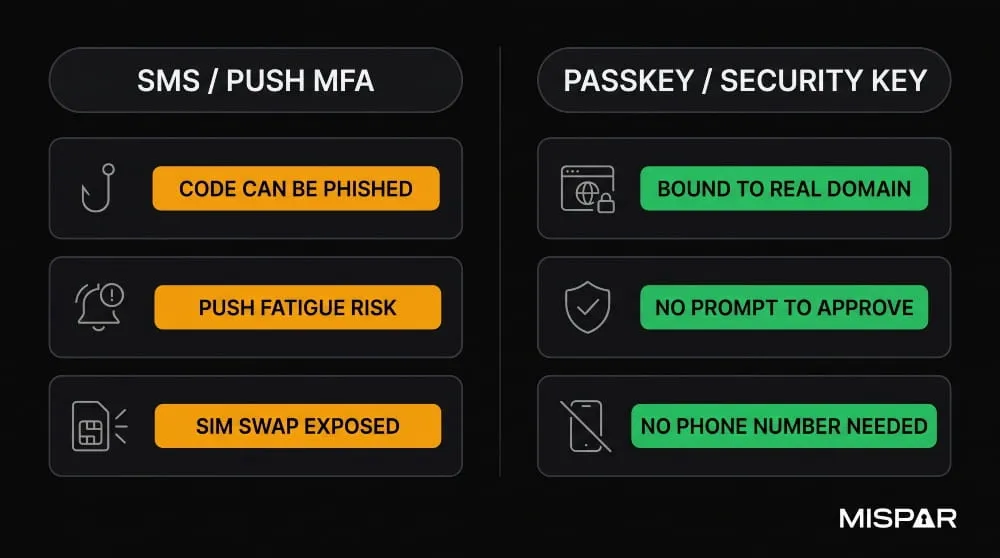
What 2FA and MFA reduce, with evidence
MFA stops the most common automated account takeover methods but does not stop all of them. A second factor defeats password-only attacks such as credential stuffing, spraying, and password reuse, making it the single most effective baseline control. It does less against attacks that capture the second factor or the session. The FBI’s account takeover announcement describes victims being manipulated into giving up verification codes, and Verizon’s 2026 report still finds credential abuse across a large share of breaches. Hence, MFA reduces risk without eliminating it.
Why MFA fails: phishing kits, MFA fatigue, session theft
MFA fails in four recurring ways. Adversary-in-the-middle phishing kits relay the login in real time and capture both the password and the one-time code. MFA fatigue floods the victim with push prompts until they approve one. Session theft takes the authenticated cookie after login. And social engineering of help desks or victims bypasses the factor by asking for the code or a reset directly. SMS codes are the weakest factor because they are also exposed to SIM swapping.
Phishing-resistant options
Phishing-resistant MFA ties authentication to the legitimate site so a fake page cannot reuse it. FIDO2 security keys and passkeys do this by cryptographically binding the login to the real domain. Prioritize them for administrators, finance, and executives, then expand. Number matching and context in push prompts are a reasonable interim improvement, and SMS should remain a last-resort fallback.
Account Takeover Protection: Solutions, Software and Services
Categories of account takeover protection solutions
Account takeover protection solutions fall into a handful of categories that address different stages of an attack. Identity and access controls such as MFA and conditional access harden the login. Bot management and web application firewalls protect login endpoints from automated abuse. Fraud and risk scoring tools evaluate each session, and email security tools block impersonation and phishing. Credential exposure monitoring finds leaked logins before use, and identity threat detection and response watches for misuse after login. Most real programs combine several.
Identity threat detection and response
Identity threat detection and response (ITDR) monitors identity systems for signs that an account is being misused, then triggers containment. It looks at sign-in patterns, privilege changes, new MFA enrollments, and token activity across the identity provider and connected apps. It is most valuable for catching takeovers that used valid credentials, where perimeter controls saw nothing wrong.
AI and behavioral analytics
AI and behavioral analytics build a baseline for each user and flag sessions that deviate from it. Their strength is catching valid-credential logins that rule-based tools miss. Their limits are real: they need enough data to learn normal behavior, they can produce false positives, and attackers adapt. Treat them as one signal that feeds a decision, not a verdict.
Account takeover protection for brands and consumers
Brands protect customer accounts by screening passwords against breached lists, rate limiting and bot-checking logins, requiring step-up verification for risky actions like payout or address changes, and alerting customers when sensitive details change. Consumers get the most protection from unique passwords in a manager, passkeys or an authenticator app, account change alerts, and a carrier PIN or number lock to block SIM swaps.
What to look for in a provider (criteria, not rankings)
The right provider covers the entry points that matter to you and responds fast. Useful criteria include coverage across login, email, and cloud identity; the ability to detect misuse of valid credentials; automated responses such as session revocation; transparency about how false positives are handled; integrations with your existing logging and identity stack; and clear data-handling terms. For service providers reselling protection to clients, multi-tenant management and branding control also matter.
Account Takeover Prevention for MSSPs and Their Clients
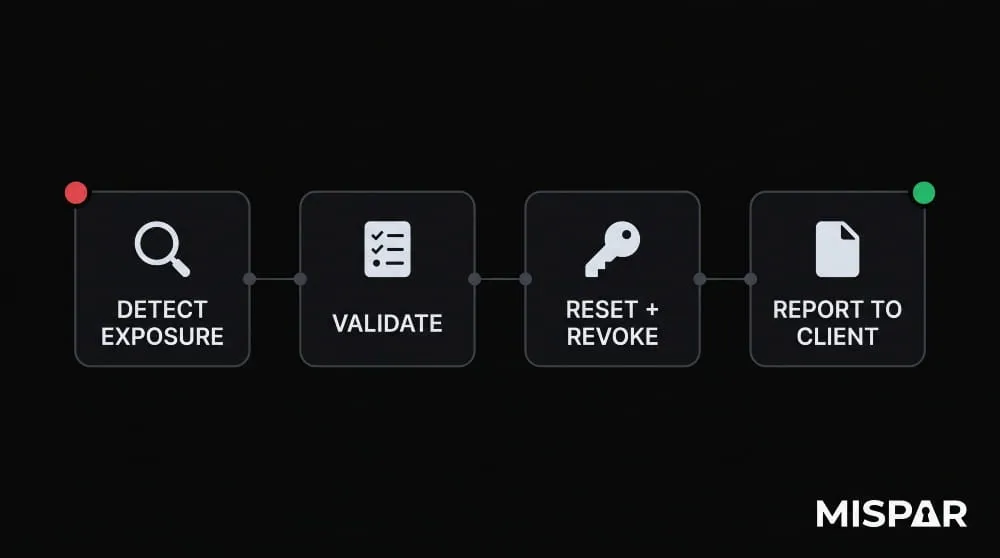
Why ATO belongs in a managed security offering
Account takeover belongs in a managed security offering because credential exposure becomes a client incident. Clients rarely ask about infostealer logs or breach dumps, but they do ask whether their accounts were compromised and what was done about it. Detecting exposure early, resetting affected accounts, and reporting on the outcome gives an MSSP a recurring, easy-to-explain service tied directly to client risk and compliance questions.
Monitoring for exposed credentials before takeover happens
Monitoring for exposed credentials lets an MSSP act while the credential is still only a risk. The workflow is simple: detect client-domain credentials appearing in breaches, stealer logs, or underground sources; confirm they are valid and current; force a reset and revoke sessions; then document the action for the client. Dark web monitoring is the source of the exposure data, and the platform’s monitoring capabilities turn it into alerts a team can work on.
Outsourcing account takeover prevention vs building in-house
Building exposure monitoring in-house means collecting from many sources, normalizing and validating the data, and staffing analysts to triage it, which is a high fixed cost. Using a wholesale platform shifts that to a per-client model and lets the MSSP focus on response and client relationships. The deciding factors are coverage breadth, how fast new exposures are surfaced, whether the service can be delivered under your own brand, and how well it fits your existing workflow. Mispar is a wholesale platform MSSPs resell under their own brand, built around continuous credential and dark web monitoring.
What to Do After an Account Takeover
Immediate containment steps
The first step after an account takeover is to cut the attacker’s access from a clean device. Reset the password, revoke all active sessions and tokens, and remove any MFA methods you did not add. Then check recovery email and phone, mailbox forwarding rules, and connected app permissions, since attackers use these to return. Contact the bank, payment provider, or platform right away if money or other accounts are involved.
Account takeover fraud investigation and recovery
Investigation answers three questions: how the attacker got in, what they accessed, and what they changed or took. Preserve sign-in logs, mailbox audit data, and transaction records before they roll off. Build a timeline from the first suspicious login, and note which data and contacts were exposed so affected parties can be notified. Report fraud losses to the financial institution and to the FBI’s IC3, and follow any legal or regulatory notification duties that apply.
Preventing a repeat
Preventing a repeat means fixing the root cause, not just the one account. If the entry was a reused password, check the person’s other accounts and force resets; if it was infostealer malware, clean or rebuild the device before restoring access. If it was a phishing lure, update training and email filtering. Then add monitoring for that user and domain so a recurrence is caught early.
Frequently Asked Questions (FAQ)
What is account takeover?
Account takeover is when an attacker gains unauthorized control of someone’s legitimate online account and uses it as the owner. It is typically achieved with stolen credentials, phishing, stolen sessions, or SIM swapping, and it is used for fraud, data theft, or further attacks.
Is account takeover a form of identity theft?
Account takeover is closely related to identity theft but is not the same thing. It hijacks an existing account, while identity theft more often involves using personal data to open new accounts or credit. One can lead to the other.
How does account takeover happen?
Account takeover happens when an attacker obtains valid access to an account and locks the owner out. Common routes are credential stuffing with leaked passwords, phishing for logins and one-time codes, infostealer malware that steals sessions, password spraying, and SIM swapping.
How do you detect account takeover?
You detect account takeover by watching for changes the owner didn’t make and logins that break the user’s normal pattern. Unrequested password resets, new devices or locations, altered recovery details, and unfamiliar mailbox rules are the clearest signs, and monitoring for leaked credentials provides earlier warning.
Does 2FA prevent account takeover?
2FA prevents many account takeovers but not all of them. It blocks attacks that rely on a stolen or reused password alone. However, phishing kits, MFA fatigue, session theft, and social engineering can still get around it. Phishing-resistant methods such as passkeys and security keys close most of those gaps.
What is the difference between account takeover and credential stuffing?
Credential stuffing is one method of account takeover, not a separate thing. Account takeover is the outcome, where an attacker controls someone’s account, and credential stuffing is one way to get there by replaying leaked username and password pairs against other sites. See the credential stuffing guide for how those attacks work.
How do you stop account takeover fraud?
You stop account takeover fraud by combining prevention, detection, and fast response. Use unique passwords, phishing-resistant MFA, breached-password screening, login rate limiting, session protection, and monitoring for exposed credentials, and have a ready process to revoke sessions and reset accounts the moment an alert fires.