
Credential theft is the unauthorized capture of login details, such as passwords, session tokens, API keys, or service account secrets, that lets an attacker sign in as a legitimate user. Attackers favor it because a valid login looks like normal activity, which makes it harder to detect than most exploits. This guide explains how credentials get stolen, the techniques behind each method, the warning signs, and how to stop it.
What Is Credential Theft?
Credential theft definition
Credential theft is obtaining someone’s authentication data without permission and using it to access systems, accounts, or data. The stolen data is called stolen credentials. Attackers can obtain them directly from a person through phishing, from a device through malware, from memory on a compromised server, or from a database someone else has already breached.
The theft itself is only the first step. Value comes from what the attacker does next: logging in, moving through the network, selling the access, or reusing the same password elsewhere.
What counts as a credential
A credential is anything that proves identity to a system. Most people think of usernames and passwords, but modern environments rely on much more: session tokens and cookies that keep a user signed in, API keys and access tokens used by applications, service account secrets used by automated processes, SSH keys, and single sign-on (SSO) assertions that grant access to many apps at once.
This matters because attackers no longer need your password if they can take the token that proves you already authenticated. Machine credentials are also a growing target, since they are often long-lived, overly privileged, and rarely monitored.
Credential theft vs credential compromise vs credential abuse
These three terms describe different points in the same event. Credential theft is taking the credential. Credential compromise is when a credential is exposed or in someone else’s hands, whether an attacker steals it or it leaks through a third-party breach. Credential abuse is when an attacker uses it, for example, to log in, escalate privileges, or move laterally.
An attacker can compromise a credential without targeting you directly, and it can sit unused for months before they abuse it. Treating them as separate stages helps teams decide where to detect and where to respond.
Why attackers target credentials instead of exploits
Attackers target credentials because a working login bypasses most security controls that watch for malicious behavior. There is no malware to flag and no vulnerability to patch, only a user who appears to be doing their job.
The scale of the problem is well documented. Verizon’s 2026 Data Breach Investigations Report found stolen credentials involved in 36% of all breaches, and credential abuse appearing at some point in 39% of breach progressions, the highest of any action it tracked. Exploiting vulnerabilities did overtake credential abuse as the most common initial access method for the first time, at 31% versus 13%, but that figure only measures how attackers get in. Once inside, attackers still use credentials to move.
Stolen Credentials: Meaning, Statistics and Where They End Up
Stolen credentials meaning
Stolen credentials are logins, tokens, keys or session data that an attacker has taken without the owner’s permission and can use to sign in as that person or system. The term covers a password phished from an employee, a session cookie copied from an infected laptop and a service key lifted from a code repository. It differs from leaked credentials in that theft points to an attacker who took them, while a leak can also be accidental.
Stolen credentials statistics
Verizon’s 2026 Data Breach Investigations Report found stolen credentials involved in 36% of breaches and credential abuse at some point in 39% of breach progressions. Half of the ransomware victims in its data had a credential or infostealer event in the 95 days before the attack. Stolen logins also stay useful for a long time: GitGuardian’s State of Secrets Sprawl 2026 report found that 64% of credentials confirmed valid in 2022 had still not been revoked in 2026.
Where stolen credentials end up
Stolen credentials usually end up in stealer logs, combolists, paste sites and criminal marketplaces, where they are sold, shared or tested against other services. Initial access brokers package working logins and resell them to ransomware operators and fraud groups. Once a stolen credential is in circulation it can be copied indefinitely, which is why leaked credentials matter long after the original theft.
How Credential Theft Works (Attack Lifecycle)
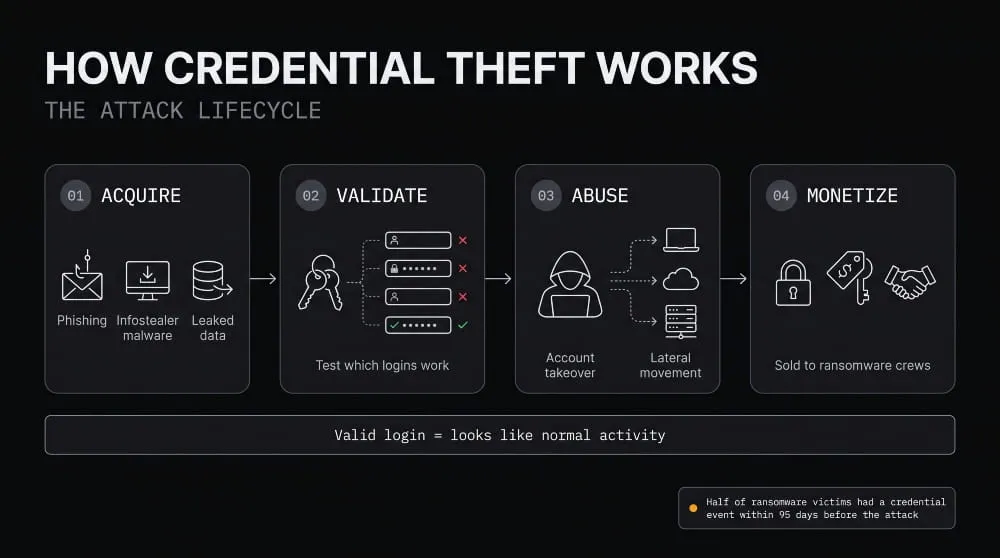
Stage 1: Acquire
In the acquire stage, attackers collect credentials through phishing, malware, or leaked data. Phishing tricks someone into entering login credentials on a fake page. Malware, especially infostealers, silently copies saved passwords and session cookies from a device. Leaked data comes from breaches of other services and is traded or sold in criminal marketplaces.
Stage 2: Validate and test access
After acquiring credentials, attackers check which ones work. They test them against login pages, VPNs, cloud consoles, and email, often using automation to try many accounts quickly. This stage is why a single stolen password can lead to several compromised accounts, since people reuse passwords across services. Automated testing of leaked logins at scale is covered in detail in our guide to credential stuffing.
Stage 3: Abuse
Once an attacker validates a credential, they use it. Common outcomes include account takeover, business email compromise, privilege escalation, and lateral movement toward more valuable systems. A valid login also lets attackers return after an initial containment effort because the credential keeps working until someone revokes it.
How attackers monetize stolen credentials
Attackers monetize stolen credentials in four main ways: using them directly for fraud or data theft, selling them to other criminals, handing access to ransomware operators, or reusing them to attack additional accounts. A specialized group called initial access brokers packages working logins and sells them, so the people who deploy ransomware often never perform the theft themselves.
Verizon’s 2026 report shows how tightly this connects to extortion: half of ransomware victims in its data had a credential or infostealer event in the 95 days before the attack.
Credential Harvesting: What It Is and How It Works
Credential harvesting definition and meaning
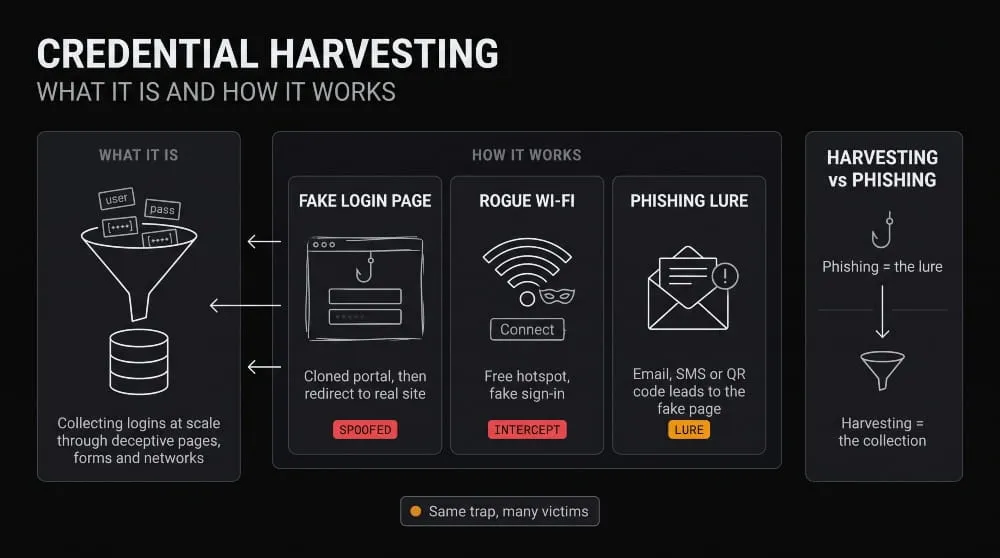
Credential harvesting is the large-scale collection of login details, usually through deceptive pages, forms, or networks, rather than a targeted attack on one person. It is a volume-based credential-theft method: set up the trap once, then collect whatever victims enter.
Fake login pages and cloned portals
The most common harvesting method is a fake login page that copies a real one, such as a Microsoft 365 sign-in, a bank portal, or a company VPN. Victims reach it through an email link, text message, QR code, or search ad. When they enter their details, the page records them and often forwards the user to the real site so nothing seems wrong.
Some modern kits also sit between the victim and the real service, capturing the session token along with the password, which defeats basic multi-factor authentication.
Rogue Wi-Fi and fake hotspot harvesting
An attacker can set up a free Wi-Fi network with a trusted-looking name and redirect connecting users to a fake sign-in page. Anyone who enters an email and password to “connect” hands them over. Public places such as airports, hotels, and cafes are typical settings. The practical defense is to avoid logging in to important accounts on unknown networks and to use a VPN or mobile data instead.
Harvesting vs phishing: what is the difference
Phishing is the delivery method, and harvesting is the goal. Phishing is the deceptive message that lures a victim, while credential harvesting is what happens when the victim’s login details end up in the attacker’s hands. Phishing can also deliver malware or request payments instead of credentials, and harvesting can happen without email, such as through a rogue hotspot.
Real-world harvesting scenarios
Typical scenarios include a fake “shared document” email that leads to a cloned Microsoft sign-in page, a text message about a missed delivery that asks for account details, and a spoofed IT notice telling staff their password is about to expire. In each case, the lure is ordinary and urgent, and the page looks routine. That is what makes them effective.
Credential Abuse: How Attackers Use Stolen Logins
What is credential abuse?
Credential abuse is the use of a stolen, leaked or guessed credential to access an account or system the attacker does not own. It is the stage after theft, and it is where the damage happens: account takeover, data theft, fraud and lateral movement. Because the login is valid, abuse often looks like ordinary activity until someone checks where it came from.
Common forms of credential abuse
The most common forms are signing in to email or cloud accounts, reusing one password across other services, escalating from a normal account to an administrator account, and moving sideways to systems that trust the first one. Attackers also abuse credentials to create persistence, such as adding a forwarding rule, a new MFA device or a new app consent, so access survives a password reset.
How to spot and stop credential abuse
Spotting abuse means comparing each sign-in with the account’s normal pattern: location, device, time and the systems touched. Stopping it relies on phishing-resistant MFA, conditional access that challenges unusual sign-ins, short session lifetimes and fast revocation of tokens when an exposure is found. Monitoring for exposed logins outside your network closes the gap before the first abuse attempt.
Credential Phishing
What is credential phishing?
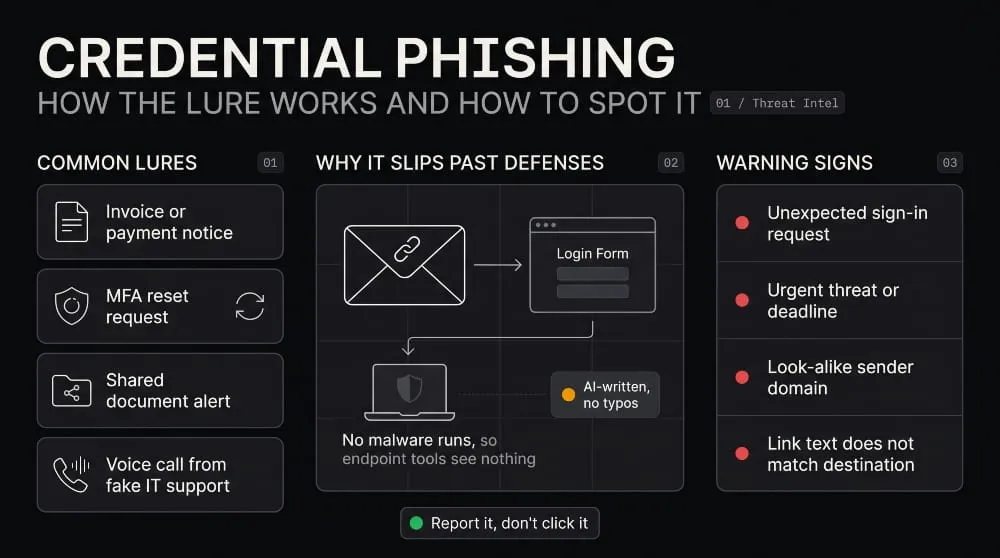
Credential phishing is a phishing attack designed specifically to steal login details by persuading someone to enter them on a fake page or reply with them directly. It is the most common way credentials are harvested because it requires no technical access to the victim’s device.
Common lures
The lures that work best look like routine work. Invoice and payment notices create urgency around money. MFA reset requests exploit the fact that users expect those prompts. Shared document alerts mimic collaboration tools people use daily. Voice phishing, or vishing, uses a phone call from someone posing as IT support to talk the victim through handing over a code or password.
AI-generated phishing and why it bypasses filters
Generative AI removes the spelling errors and awkward phrasing that once made phishing easy to spot, and it lets attackers write personalized messages in any language at scale. Because each message can be unique, filters that look for known text patterns or repeated templates have less to match against. Detection has to rely more on sender behavior, link reputation, and user reporting.
Credential phishing emails that bypass EDR
Endpoint detection and response (EDR) tools monitor devices for malicious activity, but a credential phishing email often involves none. The victim opens a link in a browser and types a password into a web page. No malware runs, so EDR has nothing to flag. That is why email security, browser protections, and phishing-resistant authentication must complement endpoint tooling.
Warning signs for employees
Watch for unexpected requests to sign in, urgency or threats about account closure, sender addresses that differ slightly from the real domain, links whose destination does not match the displayed text, and login pages reached from a message rather than typed or bookmarked. If anything feels off, report it instead of clicking to investigate.
Credential Dumping (Post-Compromise Technique)
What is credential dumping?
Credential dumping is the extraction of stored credentials from an already compromised system, such as password hashes, tickets, or plaintext secrets stored in memory or files. Attackers use it after gaining a foothold to obtain more privileged accounts and spread further.
OS credential dumping and LSASS memory (T1003)
On Windows, the Local Security Authority Subsystem Service (LSASS) holds authentication material in memory while users are signed in. Reading that memory is a well-known way to obtain credentials, and the MITRE ATT&CK framework documents it as technique T1003, OS Credential Dumping. Defenders focus on protecting LSASS, restricting who can read its memory, and alerting on unusual access to it.
Tools attackers use
Open-source and commercial tools such as Mimikatz and gsecdump have long been used to extract credentials from Windows systems. Their presence matters mostly as a detection signal, since security teams can monitor for the behaviors and artifacts they create. Modern attackers also use built-in system utilities, which makes behavior-based detection more reliable than looking for tool names.
Credential Dumping (Post-Compromise Technique)
Credential dumping detection depends on watching the behaviors that dumping creates, not on tool names. On Windows, the clearest signal is an unexpected process opening a handle to the LSASS process, which Sysmon records as a process access event and which endpoint detection tools can alert on. Other signals include a memory dump of lsass.exe being written to disk, unusual use of built-in utilities to read process memory, and directory replication requests from an account that is not a domain controller, which can indicate that password data is being pulled from Active Directory.
Prevention supports detection. Enabling LSA protection and Credential Guard, and turning on the Microsoft Defender attack surface reduction rule that blocks credential stealing from LSASS, removes the easiest paths and makes the remaining attempts stand out. Treat any confirmed dumping event as a full credential compromise and reset the affected accounts and secrets.
NTLM credential theft and relay
NTLM is an older Windows authentication protocol that still runs in many environments. Attackers can capture NTLM authentication attempts and either crack the resulting hashes or relay them to another service to authenticate as the victim without ever knowing the password. Disabling NTLM where possible, enforcing SMB and LDAP signing, and monitoring for relay behavior reduce this risk.
Shadow credentials attack in Active Directory
A shadow credentials attack abuses an Active Directory attribute that stores key-based authentication data. An attacker with permission to write to that attribute on an account can add their own key and then authenticate as that account without changing its password, which makes the activity quiet. Limiting who can modify those attributes and auditing changes to them are the main controls.
MITRE ATT&CK Credential Access explained
Credential Access is the MITRE ATT&CK tactic covering techniques attackers use to steal account names and passwords. It includes dumping, brute force, input capture, and stealing tokens or tickets. Mapping detections to this tactic gives security teams a common way to see which credential theft methods they can and cannot currently detect.
Infostealers, Malicious Packages and Other Modern Theft Vectors
Infostealer malware (credential stealing malware) and browser-stored credentials
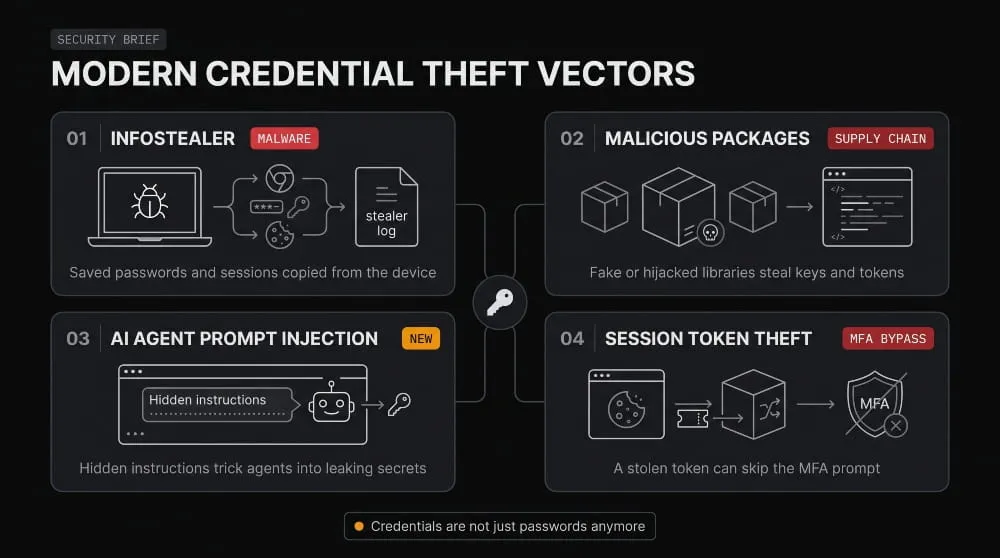
Credential stealing malware is software designed to copy saved passwords, session cookies and tokens from an infected device and send them to an attacker, and infostealers are its most common form. Infostealers are malware built to quickly copy saved passwords, cookies, and tokens from browsers and apps, then send them to the attacker as bundled logs. Attackers usually deliver them through cracked software, malicious ads, or fake updates. The risk extends beyond personal accounts, because an employee’s infected personal device can hold corporate logins and active sessions.
Verizon’s 2026 report found that infostealers surfaced an average of 2,362 breached corporate credentials per month from organizational email domains in stealer-log datasets, according to a summary of the report by Push Security.
Malicious Python and npm packages
Attackers publish packages to public repositories with names similar to popular libraries, or compromise legitimate ones, so that installing them runs code that collects credentials from the developer’s machine, such as cloud keys, tokens, and environment variables. Teams can reduce exposure by pinning dependencies, reviewing new packages, and, where possible, keeping secrets out of developer environments.
Prompt injection and AI agents leaking credentials
AI agents that can read documents, browse, and call tools introduce a newer path. Malicious instructions hidden in content the agent processes can trick it into revealing secrets it can access or passing them to an external destination. The mitigation is to give agents the minimum access they need, avoid exposing long-lived secrets in their context, and restrict what they can send outside the organization.
Session-token and cookie theft (MFA bypass)
A session token proves a user has already passed authentication, including MFA. If an attacker steals it through malware or a proxy-based phishing page, they can often access the account without being prompted again. Short session lifetimes, device binding, and conditional access policies that check device and location help limit what a stolen token can do.
Credential Replay and Credential-Based Attacks
Credential replay attack explained.
A credential replay attack reuses a valid credential, token, or captured authentication exchange to regain access. Because the credential is genuine, the system accepts it unless additional checks, such as expiry, device binding, or one-time values, prevent reuse.
Credential reuse as the force multiplier
Password reuse is what turns one stolen credential into many compromised accounts. When someone uses the same password across services, a breach of the weakest one exposes the others. Unique passwords per account, stored in a password manager, remove most of this leverage.
Stuffing vs spraying vs theft
These attacks overlap, but they work differently, so the defenses do too.
Theft produces the credentials, and stuffing and spraying are two ways to use or guess them at scale. For the full breakdown of the second, see our guide to password spraying.
Warning Signs of Credential Theft
Signs for individuals
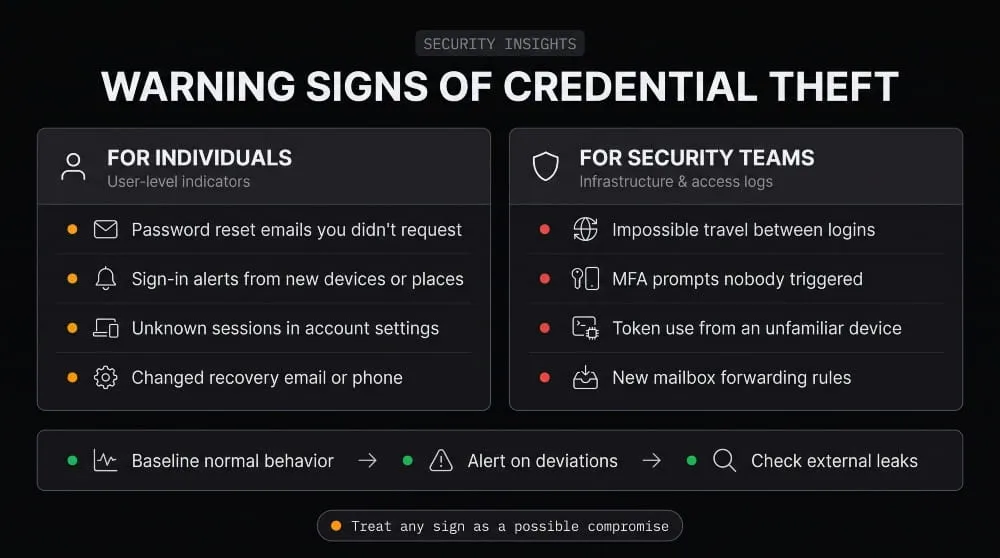
Individuals may notice password reset emails they didn’t request, login alerts from unfamiliar devices or locations, unrecognized sessions in account settings, changed recovery details, or messages sent from their account that they didn’t write. Treat any of these as a possible compromise and act on them right away.
Signs for security teams
Security teams should look for impossible travel, where one account signs in from distant locations within minutes, repeated MFA prompts a user did not trigger (often called MFA fatigue), new inbox forwarding rules, token use from an unfamiliar device, access outside a user’s normal hours or applications, and unusual access to credential stores or LSASS on endpoints.
How to detect credential theft and account takeover
Detecting credential theft depends on correlating identity signals with endpoint and network telemetry. Baseline each account’s normal behavior, alert on deviations in location, device, and privilege use, and monitor authentication logs for bursts of failures followed by success. Pair this with external monitoring for credentials appearing in leaks and stealer logs to catch exposure before an attacker uses them.
How to Prevent Credential Theft
MFA and phishing-resistant authentication
The strongest single control is phishing-resistant authentication such as passkeys and FIDO2 security keys. These bind the login to the real site’s domain, so a fake page cannot capture something usable. SMS codes and push approvals add friction but can still be phished or fatigued, so prioritize phishing-resistant methods for administrators and high-value accounts first.
Email and web protections that stop credential phishing before the click
Block the lure before a user sees it. Use email filtering with link rewriting and time-of-click analysis, enforce DMARC to limit spoofing of your own domain, and apply web filtering or browser isolation that blocks newly registered and known-malicious domains. Make reporting a suspicious message a single click.
Least privilege, credential hygiene and rotation
Limit what any stolen credential can reach. Give users and services only the access they need, remove unused accounts, avoid shared logins, and rotate secrets, especially API keys and service account credentials, so a stolen one expires quickly. Keep secrets out of code repositories and configuration files.
Honeytokens and canary credentials
Honeytokens are fake credentials, keys, or documents planted where an attacker would look, such as in a file share or a code repository. No legitimate user touches them, so any use is a high-confidence alert that someone is searching for credentials.
Canary credentials are fake logins, API keys or accounts created only to be found, so any attempt to use one is a high-confidence alert. Plant them where attackers and infostealers look: in browser password stores on endpoints, in configuration files and wiki pages, in code repositories and in directory services as a decoy service account. Because no legitimate user ever touches them, canary credentials produce very few false alerts and show you which systems an attacker has reached.
Employee awareness training that works
Training works when it is short, frequent, tied to realistic scenarios, and includes a clear, easy way to report suspicious messages. Reward reporting rather than punishing clicks, and update examples to reflect current lures, including AI-written messages and voice calls.
Credential theft protection checklist
- Enforce phishing-resistant MFA on administrator and finance accounts first.
- Require unique passwords through a company-approved password manager.
- Filter email and web traffic, and enforce DMARC.
- Protect LSASS, restrict NTLM, and limit credential caching on endpoints.
- Rotate API keys and service account secrets on a schedule.
- Shorten session lifetimes and use conditional access.
- Deploy honeytokens in sensitive locations.
- Monitor for exposed credentials outside your network.
What to Do After Credentials Are Stolen
Immediate response steps
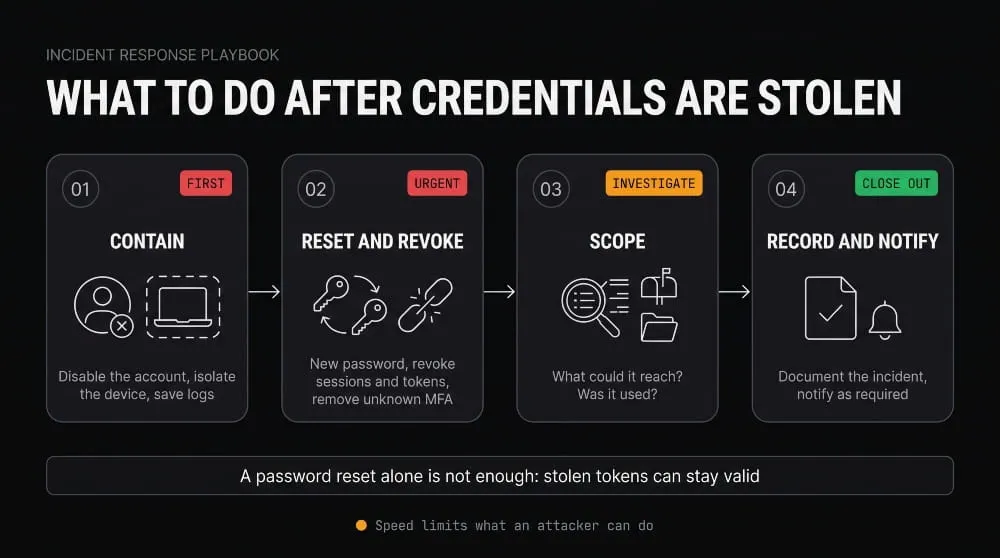
Contain first, then investigate. Disable or restrict the affected account, isolate any device suspected of malware, and preserve logs. Check what the account accessed and whether the attacker created new access such as forwarding rules, new MFA devices, or additional accounts.
Resetting credentials and revoking sessions
A password reset alone isn’t enough because stolen session tokens can remain valid. Reset the password, revoke all active sessions and tokens, remove unrecognized MFA methods, and rotate any API keys or service secrets the account could reach. Then confirm the attacker did not establish persistence elsewhere.
When stolen credentials are already circulating
Often, the first sign of a problem isn’t an alert inside your network, but credentials appearing in a leak, a stealer log, or a criminal marketplace. At that point, the exposure already exists, and the question is how quickly you find out. Continuous monitoring for your domains and employee accounts shortens that gap. For how this works in practice, see our guide to dark web credential monitoring.
Frequently Asked Questions (FAQ)
What is credential theft?
Credential theft is the unauthorized capture of passwords, tokens, keys, or other authentication data, allowing an attacker to access accounts or systems as a legitimate user.
What is the difference between credential theft and credential harvesting?
Credential theft is the broad category of stealing login details by any method. Credential harvesting is one method within it, focused on collecting many credentials at scale through fake pages, forms, or networks.
Is credential phishing the same as credential harvesting?
No. Credential phishing is the deceptive message or lure, and credential harvesting is the result of collecting the credentials victims provide. Phishing is one common way to harvest them, but harvesting can also happen through rogue Wi-Fi or malicious sites.
What is credential dumping?
Credential dumping is extracting stored credentials, such as hashes or tickets, from a system an attacker has already compromised, usually to gain higher privileges and move to other systems.
How do attackers monetize stolen credentials?
They use them directly for fraud or data theft, sell them on criminal marketplaces, supply them to ransomware operators through initial access brokers, or reuse them against other services.
How can businesses prevent credential theft?
Businesses can prevent it by deploying phishing-resistant MFA, filtering phishing at the email and web layers, protecting credential stores on endpoints, applying least privilege with regular rotation, and monitoring for exposed credentials outside their network.
What is a credential-based attack?
Placement: add to the FAQ at the end of the page, after “What is credential dumping?”. You can also use the first sentence as the opening line of the “Credential Replay and Credential-Based Attacks” H2.
What is a credential-based attack?
A credential-based attack is any attack that uses a valid login, token or key to gain access instead of exploiting a software flaw. It includes phishing and harvesting to obtain credentials, stuffing, spraying and replay to use them, and dumping to extract more from a compromised system.