
Dark Web Monitoring | Detecting Leaked Credentials Before Attackers Use Them
September 5, 2026
Dark web monitoring is a security process that continuously scans hidden marketplaces, criminal forums, and paste sites for your organization’s stolen credentials, employee email addresses, and other sensitive data. It alerts you the moment a match is found, often weeks or months before that data is used in an attack. Unlike antivirus software or a firewall, it doesn’t stop a breach from happening; it tells you a breach has already happened somewhere else, on a vendor’s system, an employee’s personal account, a third-party breach you never heard about, and gives you a window to change passwords, lock down accounts, and get ahead of the damage before criminals act on it.
That window matters more than most businesses realize. According to IBM’s Cost of a Data Breach Report, compromised credentials remain one of the most common initial attack vectors, and breaches that take longer to identify cost organizations significantly more to contain. Dark web monitoring exists to shrink that detection gap, turning “we found out when the ransomware hit” into “we found out the week the password leaked.”
This guide covers exactly how dark web monitoring works, the different types available for individuals versus businesses and MSPs, what tools and platforms actually do the scanning, what to do when you get an alert, and how to tell whether it’s worth paying for, or whether the free version built into your password manager already has you covered.
What Is Dark Web Monitoring?
Dark web monitoring is the practice of scanning the hidden, non-indexed corners of the internet, including criminal marketplaces, hacking forums, paste sites, and private Telegram channels, to determine whether your organization’s credentials, personal data, or corporate information have been stolen and are being sold or shared. Rather than waiting to discover a breach through a ransom note or a customer complaint, a monitoring service flags the exposure as soon as it surfaces, giving you a chance to act before criminals do.
How Dark Web Monitoring Differs From the Deep Web and Surface Web
The internet most people use every day- Google results, news sites, social media- is the surface web, and it’s fully indexed and searchable. The deep web is far larger and simply means anything not indexed by standard search engines: your online banking portal, a company’s internal wiki, a paywalled article. Most of the deep web is mundane and perfectly legal. The dark web is a small, deliberately hidden subset of the deep web that requires specialized software like Tor to access, and it’s where stolen data actually gets bought, sold, and traded anonymously. Dark web monitoring tools are built specifically to crawl and index this hidden layer, something a normal search engine and a normal person simply can’t do.
What Data Gets Exposed and Traded
The data moving through dark web marketplaces falls into a few consistent categories: login credentials (usernames and passwords, often harvested from third-party breaches with no connection to your own systems), Social Security numbers and other government ID numbers, financial data like credit card numbers and bank account details, and corporate documents ranging from internal emails to source code and customer databases. Criminals rarely use this data themselves; they sell it in bulk to other attackers who specialize in turning stolen credentials into fraud, account takeover, or full network breaches.
Key Benefits of Dark Web Monitoring Services
The core benefit is time: shortening the gap between when data is stolen and when you find out about it. Verizon’s Data Breach Investigations Report has consistently found that stolen or compromised credentials are among the most common ways attackers gain initial access to a network, which means a service that catches leaked credentials early is addressing one of the most exploited entry points in cybersecurity, not a minor edge case. Beyond early warning, dark web monitoring gives businesses a documented layer of due diligence for compliance and cyber insurance requirements, helps MSPs demonstrate ongoing value to clients, and turns an invisible, unknowable risk- data you have no way of seeing on your own- into something you can actually monitor and respond to.
How Dark Web Monitoring Works
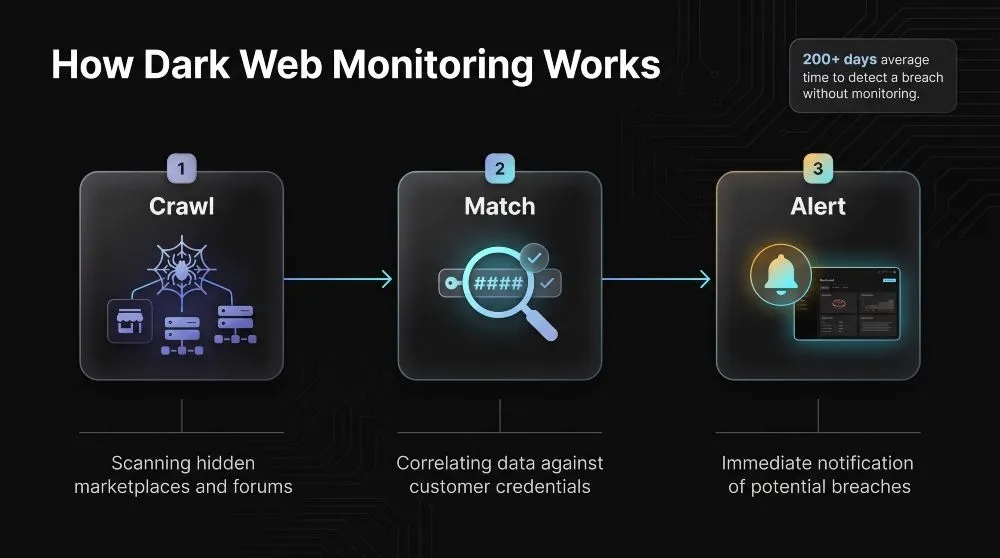
Dark web monitoring works by continuously crawling hidden marketplaces and forums for stolen data, automatically matching what it finds against the credentials and information you’ve asked it to watch, and alerting you the moment it finds a match. It’s a three-stage pipeline: collection, matching, and alerting, that runs in the background around the clock, so exposure gets caught without anyone having to go looking for it.
Crawling Marketplaces, Forums, and Paste Sites
The first stage is data collection, and it’s the part that sets dark web monitoring tools apart from what a person could do manually. Specialized crawlers, often built on the same Tor-based access the criminal sites themselves require, continuously index dark web marketplaces where stolen data is bought and sold, hacking forums where breach data gets discussed and dumped, paste sites where attackers post credential lists for anyone to grab, and increasingly private Telegram and Discord channels where a lot of trading has moved. Some services also pull from data breach repositories and known leak databases, since a large share of exposed credentials never technically touch the “dark web” at all; they surface in breach dumps that are indexed and cross-referenced in the same way.
Credential and Identity Matching
Collecting raw data is only useful once it’s matched against what you actually care about. The platform takes the domains, email addresses, employee names, or other identifiers you’ve registered and continuously checks incoming data against that list, typically using hashed comparisons so your actual credentials aren’t the thing being searched against a criminal database. When a match turns up- your company domain attached to a leaked password, an employee’s email in a fresh breach dump- the system flags it as a verified exposure rather than a false positive, which is what makes automated matching far more reliable than any manual search could be.
Real-Time Alerts and Reporting
The final stage is turning a match into something actionable. A good dark web monitoring service sends a real-time alert via email, a dashboard notification, or an integration with a security platform, identifying what was exposed, where it was found, and how severe the risk is so that the right person can respond immediately rather than discovering it during a routine check-in. Alongside individual alerts, most services generate ongoing reports that track exposure trends over time, which matters for a simple reason: one industry analysis found that it takes organizations an average of more than 200 days to identify a breach, and real-time detection is specifically built to collapse that timeline from months to hours.
Types of Dark Web Monitoring
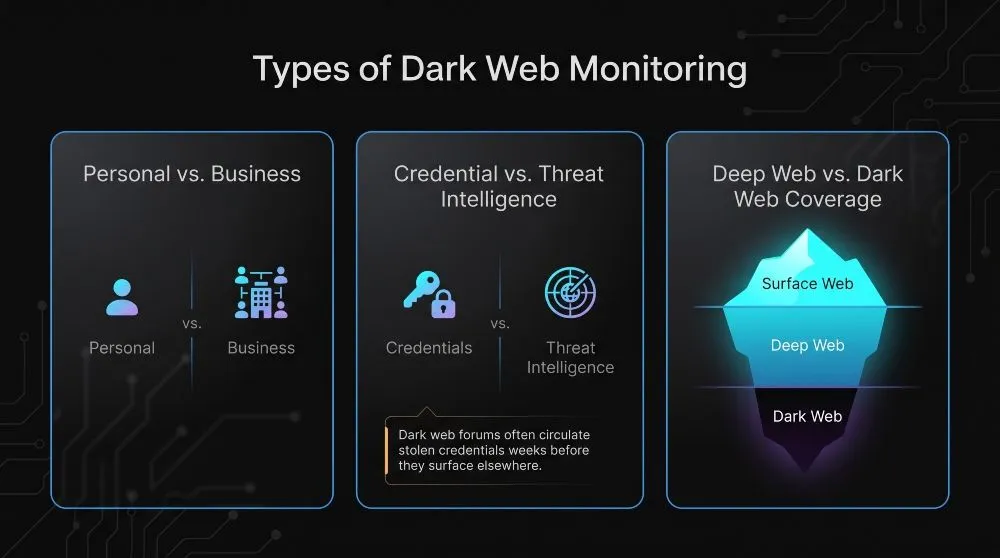
Dark web monitoring isn’t a single product; it splits into a few distinct categories depending on who’s being protected, what kind of data is being tracked, and how much of the hidden internet a tool actually covers. Choosing the right type matters more than choosing the biggest feature list, since a tool built for one use case often does a poor job at another.
Personal vs. Business/Enterprise Monitoring
Personal dark web monitoring, the kind bundled into password managers, antivirus suites, and identity theft protection plans, watches a handful of email addresses and personal identifiers for one individual or family, and it’s built to be simple and mostly passive. Business and enterprise monitoring works at a completely different scale: it tracks entire company domains, every employee email address, executive names, brand mentions, and sometimes customer data, and it’s built to feed alerts into a security team’s existing workflow rather than a single inbox. For an MSP managing dozens of clients or a company with hundreds of employees, personal-grade tools simply don’t have the domain-wide visibility or the alerting infrastructure the job requires.
Credential Monitoring vs. Broader Threat Intelligence
Credential monitoring is the narrowest and most common form; it specifically watches for usernames, passwords, and account details tied to your domain or employees showing up in breach dumps and marketplace listings. Broader threat intelligence platforms do that, but also track chatter about your organization by name, early signs that your company is being targeted or discussed as a potential victim, leaked source code or internal documents, and emerging attack techniques relevant to your industry. Credential monitoring answers “has our data leaked?” Threat intelligence answers the harder question: “Are we being targeted, and how?” Most businesses start with the former before graduating to the latter as their security program matures.
Deep Web vs. Dark Web Coverage
Not every monitoring tool actually covers the dark web itself; some only index deep web sources like breach databases, misconfigured cloud storage, and paste sites, which are far easier to crawl but miss the marketplaces and forums where much of the active credential trading happens. Tools that genuinely cover the dark web use Tor-based access to reach hidden marketplaces and closed criminal forums, which is technically harder to build and maintain, but it’s where fresher and more actionable exposure data tends to surface first. When evaluating a service, it’s worth asking directly what sources it actually crawls. A study by cybersecurity researchers has found that dark web forums often circulate freshly stolen credentials for weeks before that same data appears in more easily indexed deep web breach repositories, which is exactly the lead time a deep-web-only tool would miss.
Dark Web Monitoring for Business, Enterprise & MSPs
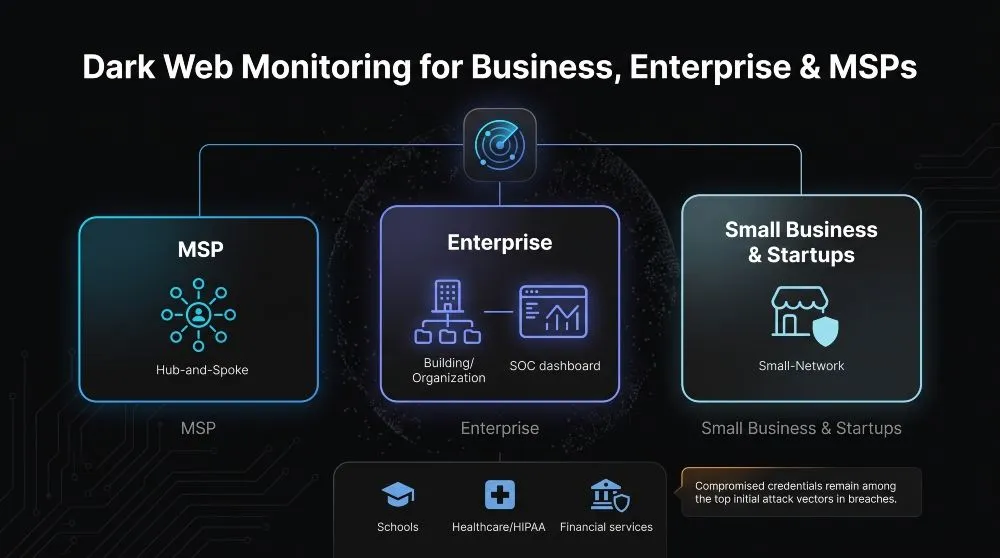
Dark web monitoring for business, enterprise, and MSP environments works the same way at its core, crawling for exposed data and alerting on matches. Still, it’s built to operate at organizational scale, across multiple domains and clients, with the reporting and integration a security-focused business actually needs. What changes isn’t the underlying technology; it’s the scope, the stakes, and who’s on the receiving end of the alert.
Why MSPs Need Dark Web Monitoring for Client Protection
For an MSP, dark web monitoring isn’t just another line item; it’s often the first concrete, visible proof of value a client sees, because a leaked-credential alert is tangible in a way that “we patched your servers” rarely is. Managed service providers are also uniquely exposed: a single compromised credential at one MSP can cascade to every client on their books, which is exactly the kind of supply-chain risk regulators and cyber insurers have started paying close attention to. Bundling dark web monitoring alongside password management gives an MSP a natural, low-friction way to catch a problem, a client’s employee reusing a leaked password, before it becomes the kind of incident that’s much harder to explain after the fact.
Enterprise-Scale Monitoring and SOC Integration
At the enterprise level, dark web monitoring stops being a standalone alert feed and becomes one input into a much larger security operation. Large organizations need monitoring that can track every subsidiary domain, thousands of employee identities, and executive-level exposure simultaneously, with alerts routed directly into a SOC’s existing tools, SIEM platforms, ticketing systems, and incident response workflows, rather than a separate dashboard someone has to remember to check. The value here is less about the individual alert and more about correlation: a leaked credential means something very different when it’s cross-referenced against unusual login activity or a known attack campaign already on a SOC’s radar.
Small Business and Startup Use Cases
Smaller companies and startups often assume dark web monitoring is an enterprise-only tool. Still, the risk calculus actually runs the other way: a small business rarely has the security headcount to detect a compromised account by any other means. A single leaked password can be enough to take down a company without enterprise-grade recovery resources. For a startup handling customer data or fundraising documentation, an affordable monitoring service that watches company domains and founder/employee accounts closes a gap that would otherwise go completely unnoticed until it’s already caused damage.
Industry-Specific Needs (Schools, Healthcare/HIPAA, Financial Services)
Certain industries carry monitoring obligations that go beyond general good practice. Healthcare organizations subject to HIPAA have a regulatory duty to safeguard patient data, and a leaked credential tied to an EHR system is a compliance event, not just a security one. Financial services firms face similar pressure from regulators and cyber insurance underwriters, who increasingly require evidence of active credential monitoring as a condition of coverage. Schools and educational institutions, meanwhile, hold large volumes of student and family data with comparatively thin IT budgets, making them frequent targets and making early detection disproportionately valuable. Across all three, dark web monitoring does double duty: it’s a security control and a documented piece of due diligence that feeds directly into compliance reporting, SOC 2 audits, and cyber insurance renewals.
Dark Web Monitoring Tools & Software
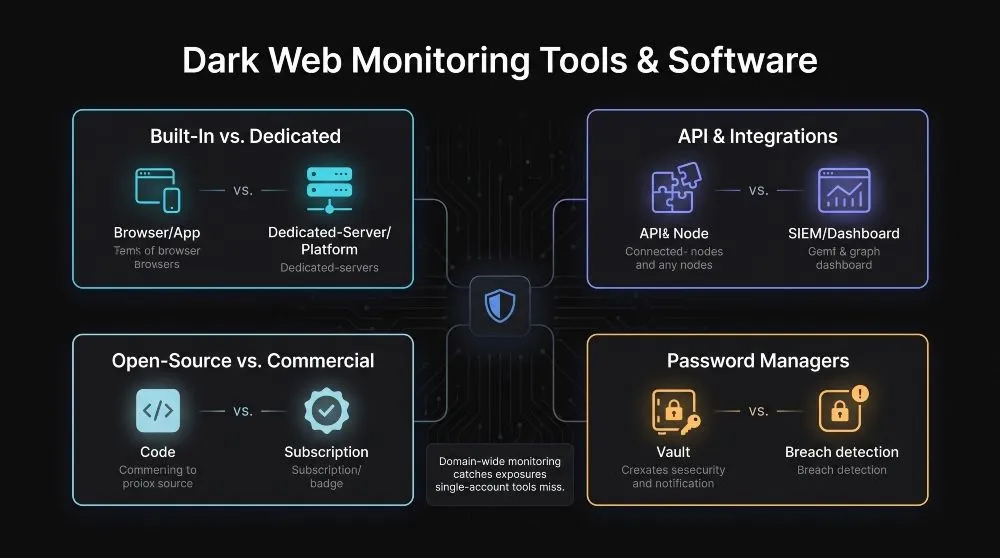
Dark web monitoring tools range from free features already built into software you use every day to dedicated platforms designed specifically to scan the dark web at scale, and the right choice depends on how much you need to monitor and how seriously you need to act on what’s found. The tooling landscape breaks down into a few clear categories, each with a different tradeoff between convenience and coverage.
Built-In vs. Dedicated Platforms
Built-in dark web monitoring, the kind included in a password manager, browser, or antivirus suite, typically checks a small set of email addresses against known breach databases and is genuinely useful as a baseline. Still, it’s usually limited in scope and update frequency. Dedicated dark web monitoring platforms exist specifically to solve this problem at depth: they crawl a far wider range of marketplaces and forums, monitor entire domains rather than individual addresses, and refresh their data continuously rather than on a periodic schedule. The practical difference shows up the moment you need to protect more than a handful of accounts; built-in tools weren’t designed for domain-wide or multi-client visibility, and trying to stretch them that far usually means missing exposures a dedicated platform would have caught.
API and Integration Options
For businesses and MSPs, how a monitoring tool connects to everything else matters as much as what it detects. A platform with a solid API lets exposure data flow directly into a SIEM, a ticketing system, or a client-facing dashboard, instead of living in a separate inbox that someone has to check manually. This kind of integration is what turns a monitoring tool from a standalone alert feed into an actual part of a security workflow, the difference between a human noticing an email and a system automatically opening a ticket, notifying the right person, and starting a documented response.
Open-Source vs. Commercial Tools
Open-source dark web monitoring tools exist and can be genuinely capable for technical teams willing to run and maintain their own crawling infrastructure. Still, they typically require real engineering effort to keep current, since dark web sources shift, disappear, and reappear constantly. Commercial tools trade that setup burden for a subscription, in exchange for continuously maintained crawlers, curated data sources, and support when something goes wrong. For most businesses and MSPs, the calculation comes down to whether the internal engineering time saved by a commercial platform outweighs the subscription cost. For most, it is, since dark web infrastructure maintenance isn’t a core competency worth building in-house.
Password Managers With Dark Web Monitoring
A growing number of password managers now bundle dark web monitoring directly into their platforms, checking stored credentials against breach databases and flagging any that appear in a leak. This pairing makes practical sense: a password manager already knows every account you’re trying to protect, so it’s a natural place also to flag when one of those accounts has been compromised elsewhere. It’s a strong starting point for individuals and small teams. However, the same scope limits apply; a password manager’s monitoring typically covers the accounts stored in it, not an entire company domain or every employee who might reuse a password outside the tool altogether.
What Happens When You Get a Dark Web Monitoring Alert
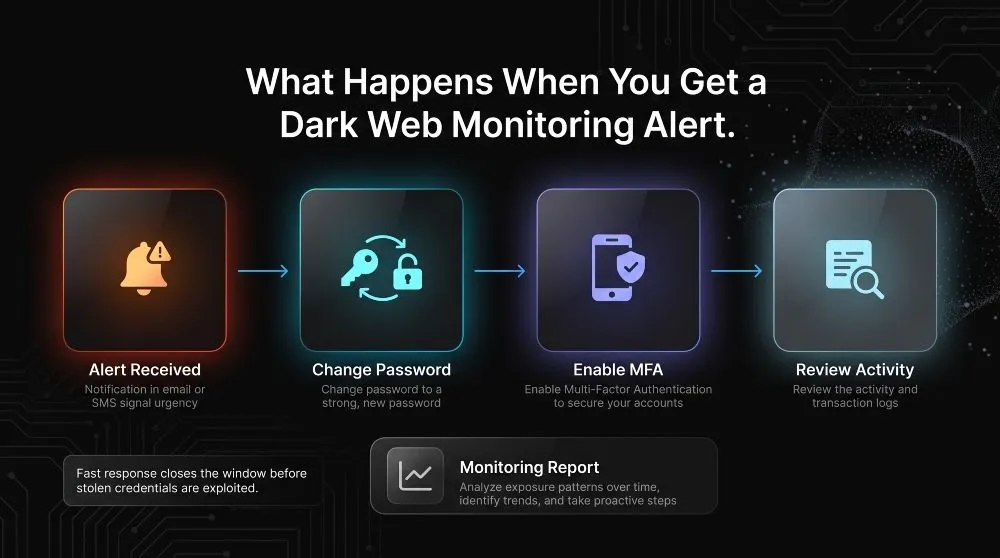
A dark web monitoring alert means one of your credentials or pieces of data has been found on a hidden marketplace, forum, or breach dump, and what you do in the next few hours matters more than the alert itself, since the goal is closing the exposure before anyone with access to that data acts on it. The alert is the easy part; a fast, correct response is where the actual protection happens.
How to Respond to a Compromised Credential Alert
The first step is always the same, regardless of scale: change the exposed password immediately and change it everywhere it’s been reused, since credential reuse is exactly what lets a single leaked password turn into several compromised accounts. From there, enabling multi-factor authentication on the affected account (if it isn’t already on) closes the gap that a password alone can’t, and checking recent account activity for anything unfamiliar, logins from unknown locations, and unexpected changes helps confirm whether the exposure has already been acted on or was caught in time. For a business or MSP, this response needs to be a documented process rather than an ad hoc scramble: knowing in advance who owns the response, how quickly accounts get locked or reset, and how the incident gets logged is what separates a five-minute fix from a multi-day cleanup. This urgency isn’t overstated; Verizon’s Data Breach Investigations Report has repeatedly found that attackers can move from initial credential compromise to further exploitation within hours, which is roughly the same window a fast response has to work with.
Reading a Dark Web Monitoring Report
Beyond individual real-time alerts, most monitoring services also generate periodic reports that summarize exposure trends rather than single incidents. A useful report typically shows what type of data was found (credentials, personal information, documents), where it surfaced, how many exposures occurred over a given period, and whether the volume is rising or falling, patterns that a single alert can’t reveal on its own. For a business or MSP, this reporting layer is often more valuable operationally than any one alert: a spike in exposures tied to a specific vendor or a repeated pattern of employee password reuse is the kind of signal that should change a security policy, not just prompt a one-off password reset.
Dark Web Monitoring vs. Related Security Tools
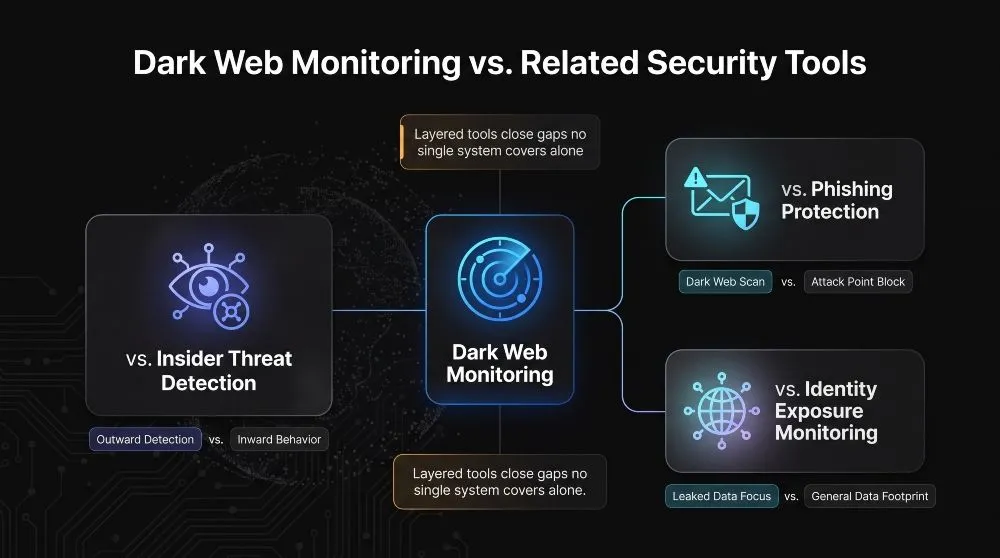
Dark web monitoring is often confused with other security tools because they all address data exposure and account compromise. Still, each one watches a different part of the problem; dark web monitoring looks outward at stolen data already in criminal circulation. In contrast, the tools it’s compared against typically look inward at behavior or at a different stage of the attack. Understanding where the boundaries sit helps clarify why most mature security programs run several of these tools together rather than treating any one as a replacement for another.
Dark Web Monitoring vs. Insider Threat Detection
Dark web monitoring watches for data that’s already left the organization and turned up somewhere it shouldn’t be; insider threat detection watches for suspicious behavior within the organization’s own systems, unusual data access, abnormal file transfers, or an employee downloading far more than their role requires. The two can actually connect directly: a dark web monitoring alert showing internal documents for sale is sometimes the first evidence that an insider threat detection system should have caught earlier but didn’t. One tool answers “did something leak,” the other answers “is someone inside doing something they shouldn’t,” and neither substitutes for the other.
Dark Web Monitoring vs. Phishing Protection
Phishing protection works at the point of attack by filtering malicious emails, flagging suspicious links, and training employees to recognize a fake login page before they enter credentials. Dark web monitoring picks up after that point has already been missed, catching credentials that a successful phishing attempt (or any other breach) has already extracted and sold. In practice, phishing protection is meant to prevent theft; dark web monitoring is the safety net when prevention doesn’t work, which is why relying on phishing protection alone leaves the exact gap that credential monitoring exists to close.
Dark Web Monitoring vs. General Identity Exposure Monitoring
Dark web monitoring specifically targets the hidden marketplaces, forums, and criminal channels where stolen data is actively traded. Broader identity exposure monitoring casts a wider net, tracking data exposed through misconfigured databases, public breach dumps, social media oversharing, data broker listings, and dark web sources. The distinction matters for scope, not seriousness: dark web monitoring tends to catch the exposures most directly tied to active criminal intent to exploit the data. In contrast, general identity exposure monitoring catches a broader range of exposure that may or may not ever be weaponized, which is why many platforms now combine both under a single “exposure monitoring” umbrella rather than treating them as separate products.
How Much Does Dark Web Monitoring Cost?
Dark web monitoring costs range from free to several thousand dollars a month, and the price mostly comes down to scope, how many identities or domains are being watched, how many data sources are crawled, and how quickly alerts need to move. There’s no single “market rate” because a tool that watches one person’s email address and a platform that monitors a 500-employee company’s entire domain solve fundamentally different problems.
Free vs. Paid Tools, What You Actually Get
Free dark web monitoring, whether it’s built into a password manager, an antivirus suite, or a service like Google One, typically checks a small number of email addresses against known breach databases periodically, genuinely useful as a baseline, but limited in both the sources it crawls and how current that data is. Paid tools justify their cost by covering more ground: continuously updated crawling across marketplaces and forums the free tools don’t touch, domain-wide monitoring instead of a handful of addresses, faster alerting, and often a support team to help interpret and act on what’s found. The gap between free and paid isn’t about whether monitoring “works”; it’s about how much of the actual exposure surface gets covered, and free tools are honest about covering only a fraction of it.
What Drives Enterprise/MSP Pricing
At the business and MSP level, pricing is usually structured per domain, per employee/seat, or per client, and it scales with a few specific factors: how many data sources are crawled, how real-time the alerting needs to be, whether the platform includes API access and SIEM integration, and whether it comes with dedicated support or a managed analyst reviewing alerts before they reach you. MSPs in particular often look for per-client or white-label pricing models, since the ability to resell monitoring as part of a broader security package, rather than paying for a single flat license, is what makes the economics work across a multi-client book of business. As with most B2B security tools, the honest answer to “what does it cost” is that it depends heavily on scope, and any vendor quoting a number before understanding your domain count and data needs is guessing.
Frequently Asked Questions (FAQ’s)
Is dark web monitoring worth it?
Yes, for most businesses, it catches leaked credentials weeks before they’re exploited, which is far cheaper than responding to a breach after the fact.
Does law enforcement monitor the dark web?
Partially. Agencies like the FBI and Europol do track major marketplaces and forums, but their focus is investigations and takedowns, not alerting individual businesses to their own exposed data.
Do I need dark web monitoring for my business?
If employees hold accounts anywhere online, the answer is almost always yes; credential reuse means a breach at an unrelated company can still expose your business.
What’s the difference between dark web monitoring and credit monitoring?
Credit monitoring watches for fraudulent activity on your credit report; dark web monitoring watches for your actual data, passwords, SSNs, and accounts showing up for sale before that fraud happens.
Do I need dark web monitoring if I already have antivirus software?
Yes, an antivirus protects your device from malware, while dark web monitoring watches for data that has already been stolen elsewhere, often from breaches unrelated to your devices.