
Dark Web Search Engines | Guide to Searching the Dark Web Safely in 2026
September 8, 2026
Dark web search engines are specialized tools, like Ahmia, Torch, and Haystak, built to index and search .onion sites that standard engines such as Google can’t reach, since regular crawlers aren’t built to navigate the Tor network. They work differently from anything on the surface web: instead of crawling the open internet, they only surface content hosted on anonymized, encrypted networks accessible through the Tor Browser. That’s a narrow slice of the internet; the Tor Network has more than 1 million active onion URLs.onion URLs as of April 2026, but this still represents a small fraction of the web overall. This guide covers how these engines work, which ones are worth using, and how to search the dark web safely, without downloading anything sketchy or exposing yourself in the process.
What Is a Dark Web Search Engine?
A dark web search engine is a tool built specifically to index and search .onion sites on the Tor network, content that Google, Bing, and other mainstream search engines never crawl. Unlike a regular search engine, it doesn’t rank pages based on backlinks or standard SEO signals; it works by crawling addresses deliberately hidden from the open web and reachable only through Tor.
Dark Web vs. Deep Web vs. Surface Web
These three terms get used interchangeably, but they describe very different layers of the internet. The surface web is everything indexed by standard search engines, the pages you’d find through a normal Google search. The deep web is far larger and includes anything not publicly indexed, like paywalled content, private databases, and email inboxes- content that’s simply unlisted, not hidden. The dark web is a small, deliberately concealed subset of the deep web, accessible only through anonymizing software like Tor. In terms of scale, the dark web is estimated to make up less than 1% of the internet, while the deep web is roughly 500 times larger than the surface web.
Why Regular Search Engines Can’t Index the Dark Web
Google and Bing rely on crawlers that follow links across the standard web and connect through conventional DNS. Dark web sites don’t work that way: .onion addresses aren’t resolved through normal DNS, and reaching them requires routing traffic through Tor’s layered encryption. Because mainstream crawlers aren’t built to navigate that network, they simply can’t see .onion content, which is exactly the gap dark web search engines exist to fill.
How to Search the Dark Web (Step-by-Step)
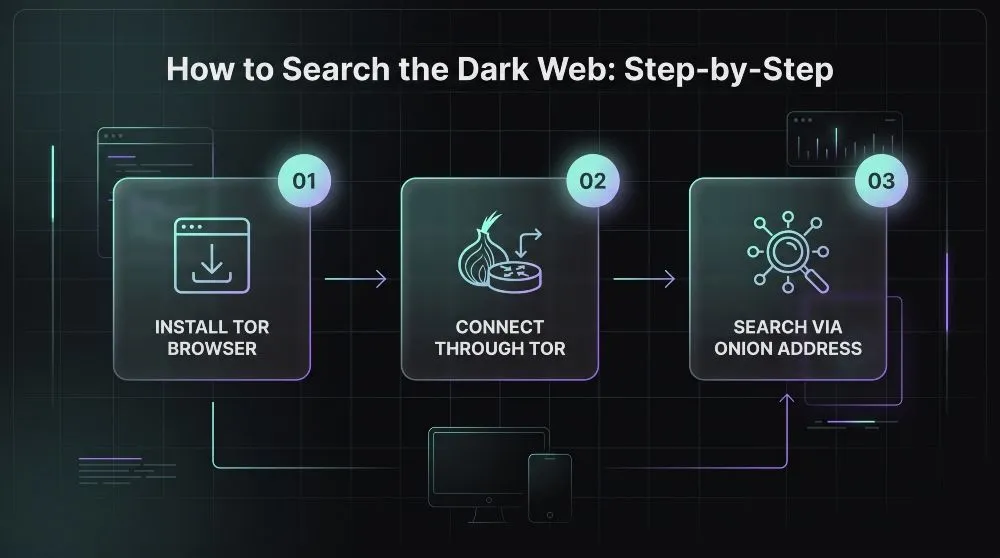
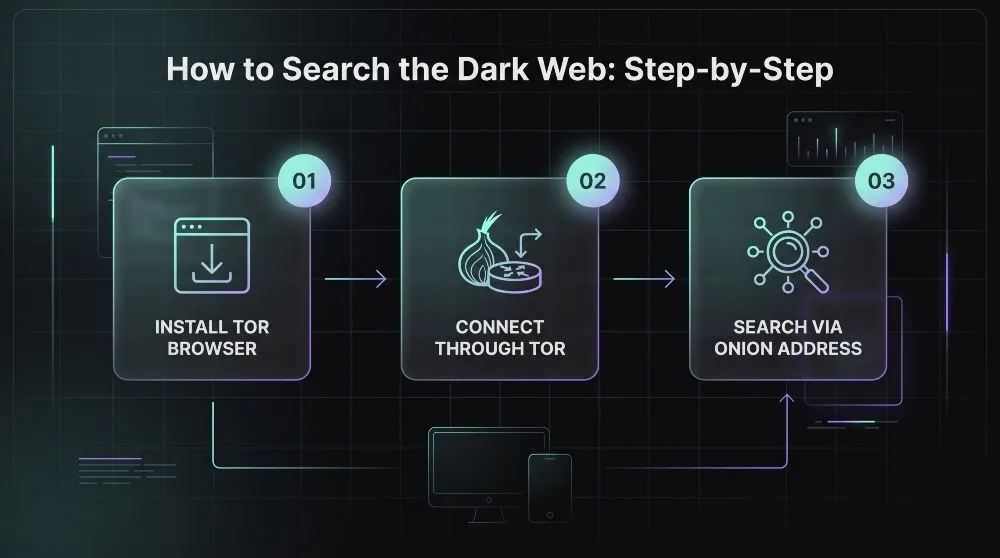
Searching the dark web requires the Tor Browser first, since regular browsers can’t resolve .onion addresses. From there, the process is similar to using any search engine; you just start from a dark web search engine’s onion address instead of Google.
What You Need First (Tor Browser Setup)
Tor Browser is the standard, free tool for accessing the dark web, and it’s only available from the official Tor Project website. Third-party download sites are a common source of malware disguised as Tor. Installation works like any browser: download, install, and launch. On first launch, Tor routes your connection through several encrypted relays before it reaches its destination, which is what makes your traffic anonymous but also why pages load more slowly than on a standard browser. This setup step alone accounts for most of the friction people run into. Tor Browser has surpassed 200 million cumulative downloads globally, which gives a sense of how many people go through this exact process.
How to Use a Dark Web Search Engine Once You’re on Tor
Once Tor Browser is running, you navigate to a dark web search engine’s .onion address the same way you’d type a URL into any browser; bookmarking it is worth doing, since these addresses are hard to remember and don’t autocomplete. From there, searching works much like a regular search engine: enter a query, review the results, and click through. The differences show up in the results themselves: dark web search engines index a far smaller, less structured set of pages. Hence, results are typically less relevant and more inconsistent than what you’d expect from Google. Sticking to a small handful of established engines (rather than following random links between them) is the safest way to limit exposure to broken, fake, or malicious pages.
Can You Search the Dark Web on Mobile (Android/iPhone)?
Yes, though it’s less common and slightly more limited than on desktop. Tor Browser has official apps for both Android and iOS, and the search process is functionally the same: install the app, connect to the Tor network, then navigate to a dark web search engine’s address. The main trade-off is performance: mobile connections are often slower and less stable, compounding Tor’s inherent latency and making desktop the more practical choice for anything beyond quick, occasional searches.
Best Dark Web Search Engines, Compared
No single dark web search engine indexes everything, and the right one depends on what you’re optimizing for: safety, coverage, or search precision. The main options fall into two camps: filtered engines that screen out illegal content, and unfiltered indexes that prioritize coverage over safety.
Ahmia, Best for Filtered, Safer Results
Ahmia is generally considered the safest starting point because it blocks entire categories of illegal content, including child exploitation material, at the index level rather than just filtering it from the display. It’s also unusually accessible; it can be reached via a standard clearnet browser, allowing you to query its index before ever switching to Tor. The trade-off is size: the same filtering yields a smaller, more curated index than the larger, unfiltered engines.
Torch, Largest Index
Torch is one of the oldest dark web search engines. It is widely regarded as having the largest practical index of any engine still active, paired with a fast, minimal interface and a long operating history. That scale comes at a cost: Torch applies essentially no content filtering, so results span the full spectrum of .onion content, with no editorial layer to remove anything illegal or malicious. It’s built for depth, not safety, useful for researchers who can handle unfiltered results, less so for casual searching.
Haystak, Best for Advanced Search Operators
Haystak pairs a large, unfiltered index with the most refined search tooling of the major engines. Its free tier covers basic search, while its premium tier adds the ability to filter searches, track history privately, and browse with stronger protections. Rather than blocking content outright, Haystak applies “safety flags” to results, giving users more context to make an informed decision before clicking through, a middle ground between Ahmia’s filtering and Torch’s raw coverage.
Candle, Not Evil, and Other Notable Options
Candle and Not Evil are smaller, more specialized engines rather than default choices. Not Evil has historically leaned toward non-commercial services and community-driven policing. Still, its reliability has become a real concern; one 2026 industry guide reports it went offline in 2024 and has not returned in a stable, verifiable form, warning that anything using the Not Evil name today may be an impersonation rather than the original service. That inconsistency is common among smaller engines in this tier; treat any that aren’t Ahmia, Torch, or Haystak as secondary tools, and verify they’re still active before relying on them.
Comparison Table
| Engine / Platform | Focus | Filtering | Ease of Use |
|---|---|---|---|
| Ahmia | Safer, research-friendly discovery | Filters illegal content at the index level | Easiest, clearnet portal available |
| Torch | Maximum index coverage | None | Simple interface, but unfiltered results |
| Haystak | Coverage + advanced search tools | Safety flags, not full filtering | Moderate, premium tier adds filters and alerts |
| Candle / Not Evil | Niche, non-commercial content | Varies | Inconsistent, availability isn’t guaranteed |
| Mispar.io Enterprise MSSP | Continuous exposure & infostealer monitoring | Automated severity scoring & risk assessment | Turnkey white-label reporting dashboard |
Can Regular Search Engines Reach the Dark Web?
No, Google, Bing, and other mainstream search engines don’t index the dark web at all. Their crawlers only follow standard web links and resolve addresses through conventional DNS, neither of which works for .onion sites, so a dark web search engine is a genuine requirement, not just a safer alternative.
Does DuckDuckGo Search the Dark Web?
No, and this is the single most common misconception about it. DuckDuckGo is the default search engine inside Tor Browser and even runs its own official .onion mirror, which leads many people to assume it can find dark web content, but it doesn’t index .onion sites at all. What it actually does is let you search the ordinary web from inside the Tor network, so your queries stay shielded from your ISP and from exit-node operators, without exposing your IP address. That’s a genuinely useful privacy layer, just not a dark web search engine; for that, you need a tool like Ahmia or Torch that specifically indexes .onion services.
Why Google/Bing Won’t Show .onion Results
Google and Bing rely on crawlers that hop between links on the standard web and resolve domains through conventional DNS, infrastructure that simply doesn’t extend to .onion addresses, which are generated cryptographically and only reachable through Tor’s routing. Even when a normal webpage mentions a specific .onion address, mainstream search engines won’t follow it or index what’s on the other end. That gap is structural, not a policy choice: it’s the reason purpose-built dark web search engines exist in the first place, and why no update to Google or Bing will ever close it.
Is It Legal and Safe to Search the Dark Web?
Using a dark web search engine and browsing what it turns up is legal in most countries, including the U.S., U.K., Canada, and the EU, but legality doesn’t mean safety, and the two questions have different answers. What you do once you’re there matters far more than the fact that you searched at all.
Is Searching the Dark Web Illegal?
No, not in most democracies. Downloading Tor Browser and using a dark web search engine to browse .onion sites out of curiosity isn’t a crime in the U.S., U.K., EU, or similar jurisdictions; law enforcement focuses on what’s transacted, downloaded, or distributed, not on the act of loading a page. There’s one sharp exception: merely viewing certain categories of content, most notably child exploitation material, is a separate, serious crime in nearly every jurisdiction regardless of intent. Outside that, the legal line tracks conduct, not the network; the same laws that apply to fraud, drug sales, or stolen data on the surface web apply identically on the dark web.
Risks of Browsing Dark Web Search Results
Legal isn’t the same as risk-free. Dark web sites frequently attempt to install tracking or credential-stealing malware the moment you load them, and unfiltered search engines like Torch do not attempt to screen that out before showing you a result. There’s also a surveillance dimension: law enforcement agencies actively monitor parts of the dark web and have, in known cases, operated seized marketplaces as “honeypots” to log the connections of everyone who visits, meaning you can end up in an investigator’s dataset without having done anything illegal yourself. None of this is unique to search engines specifically, but clicking through unfamiliar results without any screening is where most of the real exposure comes from.
How to Search the Dark Web Safely
The core safety practices are straightforward: use the official Tor Browser downloaded only from the Tor Project’s website, keep JavaScript disabled, and avoid downloading files or entering personal information on any .onion site. Favor filtered engines like Ahmia over fully unfiltered ones when you don’t need maximum coverage, since filtering removes a meaningful share of the malicious and illegal results before you ever see them. Beyond that, treat every result with skepticism by default, verify addresses through multiple sources before trusting them, and never assume a search engine has vetted a site just because it returned it.
Searching for Specific Content (Images, Videos, Files)
Dark web search engines handle text-based queries reasonably well. Still, image, video, and file search is a different story; coverage is thin, tools are limited, and results are far less reliable than what you’d get from Google Images or TinEye on the surface web.
Dark Web Image and Reverse-Image Search
A handful of dark web search engines offer basic image search, typically by indexing images alongside the text and metadata surrounding them rather than analyzing visual content directly. True reverse-image search, uploading a photo to find matches or the source, is effectively unavailable on the dark web. Academic research into the problem is direct about this. While several reverse-image search engines exist for the clearnet, no suitable equivalents exist for the darknet, largely due to uncertainty about what content such a database would contain and the legal risk of collecting it. Anyone expecting a dark web equivalent of Google’s reverse-image tool won’t find one.
Limitations of Media Search on the Dark Web
Media search on the dark web falls short of surface-web tools in almost every dimension. Indexes are far smaller, since most dark web search engines prioritize crawling text-based pages over analyzing embedded images or video, and there’s no dominant engine doing content-based visual matching the way Google, Bing, or Yandex do on the clearnet. Results also skew stale and unreliable, since .onion sites go offline or change addresses frequently, breaking any index built against them. For anything beyond simple keyword-based image lookup, dark web search engines aren’t the right tool; for legitimate reverse-image needs, a surface-web tool remains the more capable option, even when the source content originated on the dark web.
Frequently Asked Questions (FAQ’s)
Is there one “best” dark web search engine?
No, the right dark web search engine depends on what you’re optimizing for, not a single winner. Ahmia is the strongest choice when safety and filtered results matter most, Torch offers the largest practical index for maximum coverage, and Haystak sits in between with advanced search tools and optional filtering. Most experienced users keep two or three on hand rather than relying on just one, since each makes a different trade-off between safety and coverage.
Do dark web search engines index everything?
No, and it’s not close. No dark web search engine crawls the whole network; there’s no central directory of .onion addresses the way there is for the surface web, so each engine indexes only a partial, self-selected slice of what’s out there. Even the largest indexes miss private forums, invite-only marketplaces, and sites that were never linked from any crawlable source. A dark web search engine is a discovery tool for what’s been found and indexed, not a complete map of the network.
Can I use a dark web search engine on my phone?
Yes, through the official Tor Browser app for Android or iOS, the process works the same as on desktop: you reach a dark web search engine by navigating to its .onion address once connected. The main drawback is performance: mobile connections tend to be slower and less stable, which compounds the latency already inherent in Tor’s routing, making desktop the more practical option for anything beyond a quick lookup.