
Session hijacking is an attack in which someone takes over a user’s logged-in session by stealing or guessing the session ID or token that proves who they are, allowing them to act as that user without a password or MFA code. This guide explains how it works, the main types and techniques, real examples, how to detect it, and the defenses that measurably reduce the risk.
What Is Session Hijacking?
Session hijacking definition and meaning in cybersecurity
In cybersecurity, session hijacking (also called session hijack, cookie hijacking, or token hijacking) is taking over an authenticated session between a user and a service. The attacker does not break the login. They obtain the credential the service issues after login, the session ID or token, and present it as their own. The service sees a valid session and treats the attacker as the real user.
Sessions, session IDs and tokens in plain English
A website forgets who you are between requests, so after you log in it gives your browser a session ID, usually stored in a cookie, and your browser sends it back with every request. Some applications use signed tokens instead of server-side session IDs, but the principle is the same: the value works as a bearer credential, meaning whoever presents it is treated as the user. That is why a stolen session ID can be as powerful as a stolen password, and why it can bypass the login screen entirely.
Session hijack vs “my session got hijacked”: what victims notice
“Session hijack” is the attacker’s technique; “my session got hijacked” is the victim’s symptom. Typical signs include an unexpected logout, actions in your account you did not take, new-device or password-reset alerts, and changes to settings, payment details, or content. Many victims notice nothing at all, because a hijacked session is often used quietly alongside the real one. If you suspect it, treat the account as compromised and follow the detection and response steps later in this guide.
How Session Hijacking Works
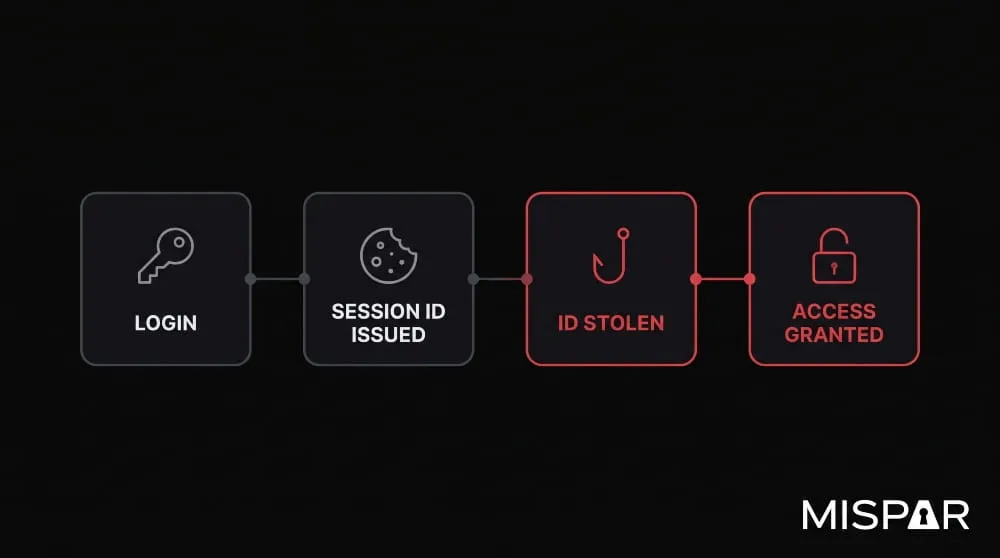
The session lifecycle: login, session ID, trust
A session starts when a user proves their identity, usually with a password and often MFA. The server then creates a session record and issues a session ID, and the browser attaches that ID to every later request. On each request, the server checks only that the ID is valid and unexpired; it does not re-verify the person. Trust is established once and carried by the ID until it expires or is revoked, and session hijacking attacks can exploit this handoff.
Where attackers get a valid session ID
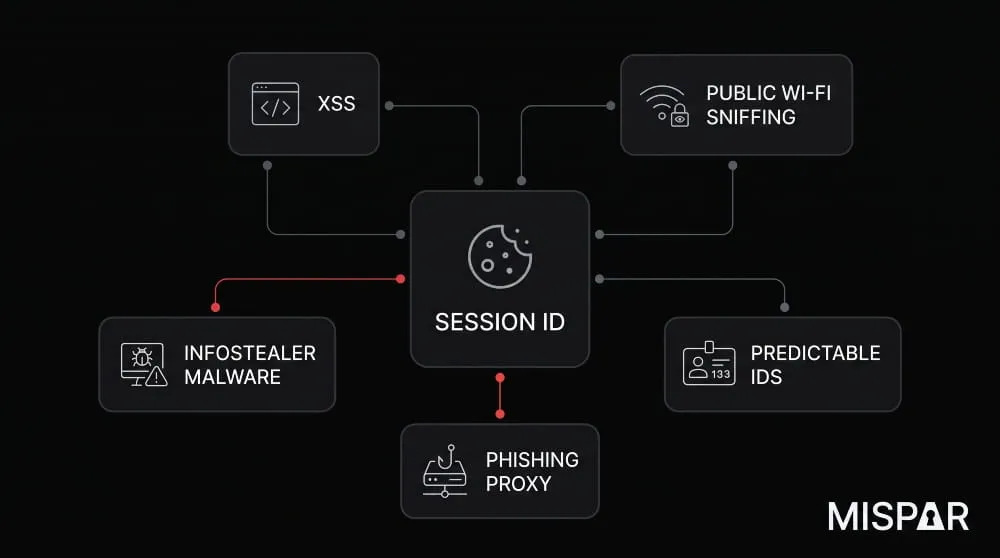
Attackers obtain a valid session ID in five main ways: reading unencrypted network traffic, running malicious script in the victim’s browser (XSS), using malware that copies cookies out of the browser, using a phishing proxy that captures the token after the victim completes MFA, and guessing or planting IDs when an application generates them poorly. Each route is covered in the techniques section below.
When session hijacking is performed (after authentication, during an active session)
Session hijacking is performed after authentication, while a session is active, because that is the only time the ID has value. How long the window stays open depends on idle timeouts, absolute session lifetimes, and whether the server can revoke a session on demand. Session fixation is a variation in the sequence: the attacker plants a known ID before login, but uses it only after the victim authenticates.
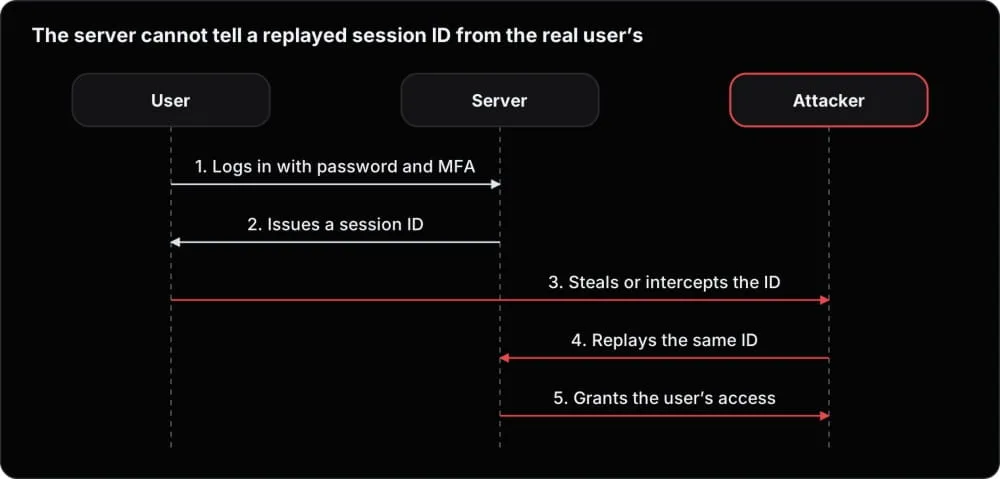
Session hijacking diagram
A session hijacking attack follows five steps: the user logs in; the server issues a session ID; the attacker intercepts or steals that ID; the attacker sends requests carrying the same ID; and the server, unable to tell the two apart, grants the attacker the user’s access. The weak point is step four, because a bearer token carries no proof of who is holding it.
Types of Session Hijacking
Active vs passive session hijacking
In an active session hijacking attack, the attacker takes control of the session and acts as the user, which may disconnect the real user or run alongside them. In a passive attack, the attacker uses the stolen session to monitor traffic and read data without changing anything, making it harder to detect. Security references commonly draw this distinction, and modern account takeover campaigns often blend both: quiet observation first, then action.
Application-level vs network-level hijacking
Application-level session hijacking targets the session ID or token inside a web application, through cookie theft, XSS, predictable IDs, or fixation. Network-level session hijacking targets the transport connection between client and server, such as a TCP session, and normally requires the attacker to sit on the network path. Application-level attacks dominate today because most traffic is encrypted, making network-level interference far less practical, while stolen browser sessions are easy to scale.
Browser session hijacking (MITRE ATT&CK T1185)
Browser session hijacking is MITRE ATT&CK technique T1185, in which an adversary with code running on the victim’s machine abuses the browser itself, for example by injecting into it. As a result, they inherit its cookies, authenticated sessions, and client certificates, then pivot through it to resources the user can reach. MITRE notes that this can bypass two-factor authentication because the attacker rides an already authenticated session. It differs from simply copying a cookie file, which MITRE tracks separately as T1539 (Steal Web Session Cookie) and T1550.004 (Use Alternate Authentication Material: Web Session Cookie).
Common Session Hijacking Techniques and Attack Vectors
Session cookie and token theft
The most common technique today is stealing the session cookie or token from where it is stored or transmitted. Attackers can steal it from the victim’s browser profile, network traffic, logs, or URLs that accidentally contain session IDs, or a phishing page that proxies the real login. Because the cookie is already authenticated, replaying it from another machine typically skips both the password prompt and the MFA challenge.
Cross-site scripting (XSS) and session hijacking
Cross-site scripting lets an attacker run their own JavaScript inside a trusted site in the victim’s browser, where the script can read any cookie not marked HttpOnly and send it out. HttpOnly cookies blunt this by hiding the cookie from scripts, but they do not make XSS harmless: injected script can still send authenticated requests from the victim’s browser while the page is open. Fixing the XSS flaw is the real remedy, and HttpOnly limits the damage in the meantime.
Sniffing on HTTP and public Wi-Fi
If a site sends session cookies over unencrypted HTTP, anyone on the same open network can capture them and replay them to take over the session, an attack often called sidejacking. This is why the Secure cookie flag and site-wide HTTPS matter: protecting only the login page leaves the cookie exposed on every later request.
Predictable or exposed session IDs
If an application generates guessable session IDs, such as sequential numbers, timestamps, or values derived from usernames, an attacker can predict valid IDs without stealing anything. OWASP requires session IDs to carry at least 64 bits of entropy from a cryptographically secure random generator, which means at least 16 truly random characters in hexadecimal. IDs also leak when placed in URLs, where they end up in browser history, logs, and referrer headers.
Malware that steals browser sessions
Infostealer malware copies saved passwords, autofill data, and session cookies from the browsers on an infected device and sends them to the attacker, who can replay the cookies from their own machine. This works even when the account has strong MFA, because the cookie was issued after MFA succeeded. Phishing emails with malicious attachments are a common way these infections start, as the examples below show.
Network-Level Hijacking: TCP/IP, SSL/HTTPS, RDP and SSH
What is TCP session hijacking?
TCP session hijacking is an attack in which someone positioned on the network path takes over an established TCP connection by working out the sequence numbers both sides are using, then injecting packets that the receiving host accepts as legitimate. Modern operating systems randomize initial sequence numbers, and encrypted protocols such as TLS and SSH make injected data useless, so classic TCP hijacking is now mostly a concern on unencrypted legacy protocols and poorly segmented internal networks.
Does HTTPS prevent session hijacking?
HTTPS prevents network-level session hijacking by encrypting traffic so cookies cannot be sniffed or injected in transit, but it does not stop hijacking at the endpoint. Cookie theft by malware, XSS, and phishing proxies that capture a token after login all work over perfectly valid HTTPS. For HTTPS to protect the session, cookies also need the Secure attribute, and sites should use HSTS so browsers never fall back to HTTP.
Remote-access session hijacking (RDP, SSH)
RDP and SSH session hijacking is the takeover of an existing remote-access session on a server, which MITRE tracks as Remote Service Session Hijacking (T1563, with RDP and SSH sub-techniques). In general, an attacker with elevated privileges on a host can attach to another user’s live or disconnected session without knowing their password and inherit that user’s access to other systems. Defenses include limiting administrative rights, ending disconnected sessions after a short time, and monitoring for unusual session attachment.
Session Hijacking vs Related Attacks
Session hijacking vs session fixation
Session hijacking steals or guesses an existing session ID, while session fixation plants a session ID the attacker already knows and waits for the victim to log in with it. The cure for fixation is regenerating the session ID at login, which makes the pre-login ID worthless. Fixation is one way to achieve a hijack, not a separate end goal.
Session hijacking vs man-in-the-middle
A man-in-the-middle attack is a position: the attacker sits between the user and the service and can read or alter traffic. Session hijacking is an outcome: the attacker ends up holding a valid session. A man-in-the-middle position can hijack a session, but hijacking can also happen without one, for example through malware or XSS.
Session hijacking vs CSRF
Cross-site request forgery (CSRF) tricks a victim’s browser into sending an unwanted request while it is logged in, and the attacker never sees or steals the session. Session hijacking gives the attacker the session itself. SameSite cookies and anti-CSRF tokens address CSRF, while Secure and HttpOnly cookies, short lifetimes, and device binding address hijacking.
The table below summarizes how session hijacking differs from the three attacks it is most often confused with.
| Attack | What the Attacker Needs | When It Happens | Primary Defense |
|---|---|---|---|
| Session hijacking | A valid session ID or token (stolen, sniffed or guessed) | After login, during an active session | HTTPS, Secure and HttpOnly cookies, short sessions, device-bound sessions, anomaly detection |
| Session fixation | A way to plant a known session ID in the victim’s browser | Planted before login, exploited after the victim authenticates | Regenerate the session ID at login |
| Man-in-the-middle | A position between the user and the service | In transit, often at login or on unencrypted traffic | TLS with HSTS, certificate validation |
| CSRF | A way to make the victim’s browser send a request | While the victim is logged in | SameSite cookies, anti-CSRF tokens |
Session Hijacking and MFA: Why Logging In Securely Isn’t Enough
How session hijacking bypasses MFA
MFA protects the moment of login, but the session cookie or token issued afterward is a bearer credential that carries no record of how it was obtained. Attackers target that credential in two ways: phishing proxies that sit between the victim and the real login page and copy the token once MFA is completed, and infostealers that lift cookies from an already signed-in browser. Replaying the stolen token from another machine then skips both the password and the MFA prompt. Microsoft’s Digital Defense Report 2024 estimated that token theft incidents had reached about 39,000 per day, far fewer than password attacks but growing as defenders harden logins.
Passkeys vs session hijacking
Passkeys defeat the phishing-proxy route because the credential is bound to the real site and cannot be handed to a lookalike page, which closes one of the main ways session tokens get captured. They don’t protect the session afterward: after a passkey login, the site still issues a cookie, and malware that steals that cookie can still replay it. Passkeys therefore fix the login, and device-bound sessions or token protection are needed to fix what comes after. Google made Device Bound Session Credentials (DBSC) generally available in Chrome on Windows in April 2026. DBSC ties a session to a hardware-held key so a stolen short-lived cookie cannot be renewed on another device, though it only protects sites that implement the server side, and support on other platforms and browsers is still rolling out.
Continuous authentication vs session hijacking
Continuous authentication re-evaluates trust throughout a session instead of only at login, using signals such as device posture, network location and behavior, and can end or step up a session when something changes. Microsoft’s Continuous Access Evaluation is one example: it lets supporting applications act on events like a revoked session or a risky location change in near real time instead of waiting for a token to expire. The trade-off is added friction and complexity, so it is usually worth applying first to administrators and high-value applications.
Session Hijacking Examples
Public Wi-Fi sidejacking
In October 2010, developer Eric Butler released Firesheep, a Firefox extension that showed how easily session cookies could be taken from users of open Wi-Fi networks. At the time, many major sites encrypted the login but not the traffic that followed, so cookies were exposed on every request, and the tool let anyone on the network take over other users’ accounts with a double-click. Butler built it to pressure sites into using HTTPS throughout, and it remains the classic illustration of why the Secure flag and site-wide HTTPS matter.
Stolen-cookie account takeovers
In March 2023, the YouTube channels of Linus Tech Tips were taken over and used to stream a cryptocurrency scam. Linus Sebastian later confirmed that the attackers used session hijacking, stealing cookies with malware delivered through a phishing email posing as a sponsorship offer, which meant they needed neither the account password nor an MFA code. The channels were restored after about a day. A recent enterprise example: between 14 July and 22 September 2026, Huntress detected 497 Microsoft 365 sign-ins across 79 organizations tied to a single token replay campaign, in which stolen tokens were replayed from a block of hosting-provider IP addresses and, in some incidents, the attacker registered a fake device in the victim’s directory.
XSS-driven session theft
XSS flaws in widely deployed software have been used in real attacks to run scripts inside victims’ sessions. In 2022, attackers exploited CVE-2022-24682, a cross-site scripting flaw in Zimbra webmail, by sending spear-phishing links that executed JavaScript in the context of the victim’s Zimbra session, putting the victim’s mailbox at risk. Cases like this show why HttpOnly alone is not enough and why patching XSS flaws matters.
Impact of Session Hijacking
Account takeover and data exposure
A hijacked session gives the attacker everything the victim could do in that account: read email and files, change settings, export data, and approve transactions. Because the session is already authenticated, attackers can also change recovery options or add an MFA method, turning temporary access into persistent control.
Fraud and lateral movement
Stolen sessions are a common first step in business email compromise and payment fraud, since mailbox access lets attackers impersonate staff to customers and colleagues. In the Huntress campaign, for example, an attacker used a compromised account to send a payroll-related email to an outside contact. From a single hijacked identity, attackers can also reach connected apps through single sign-on, which turns one cookie into broad access.
Session hijacking and insider-like behavior
A hijacked session looks like the real user doing real work, so defenders see valid activity from a legitimate account rather than an obvious intrusion, and the behavior resembles that of a malicious insider. That is why detection leans on context rather than credentials: whether the device, location, network, and activity match how this person normally works.
How to Detect Session Hijacking
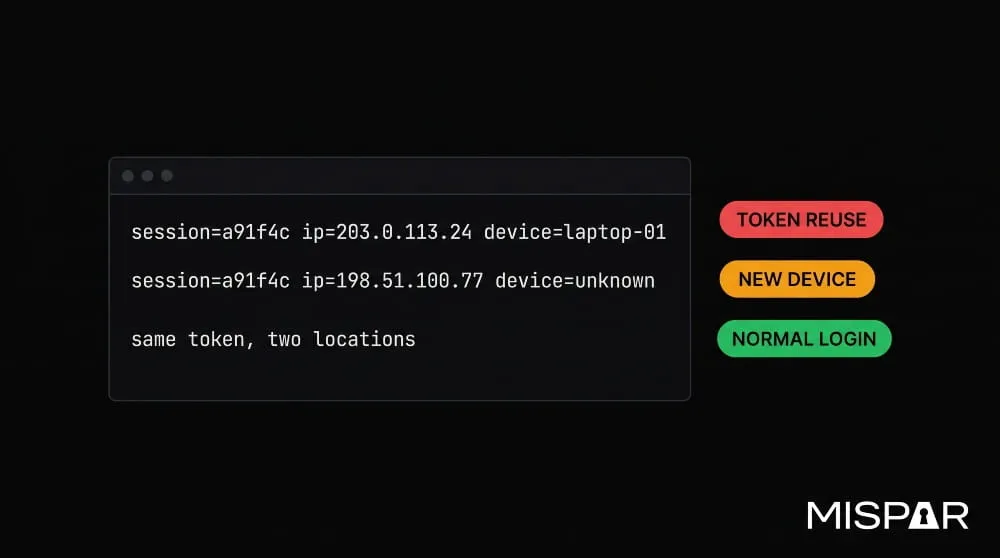
Signs of session hijacking (unexpected logouts, new devices, odd locations)
Warning signs for individuals include unexpected logouts, new-device or sign-in alerts, notices of password or recovery-email changes, messages or posts you did not send, and settings that changed on their own. Any of these on a sensitive account is a reason to act immediately, not wait for confirmation.
Detection signals (IP/device change, impossible travel, token reuse)
Security teams detect session hijacking by comparing a session’s behavior against its history: the same token appearing from a new IP address, network, or device mid-session; sign-ins that imply impossible travel; one token used from two places at once; sign-ins from hosting-provider or anonymizing infrastructure instead of residential or corporate networks; newly registered devices or MFA methods right after a sign-in; and unusual activity such as bulk downloads or new mailbox rules. No single signal is conclusive, so combine them.
What to do after session hijacking (revoke sessions, reset credentials, investigate)
After suspected session hijacking, revoke active sessions and refresh tokens on the server, because changing the password alone may not end a stolen session. Then reset credentials, remove any MFA methods, devices, app grants, or mailbox rules the attacker added, and investigate how the token was taken. If infostealer malware is suspected, clean or reimage the endpoint first and rotate every credential saved in that browser; otherwise, the attacker can steal the next session.
How to Prevent Session Hijacking
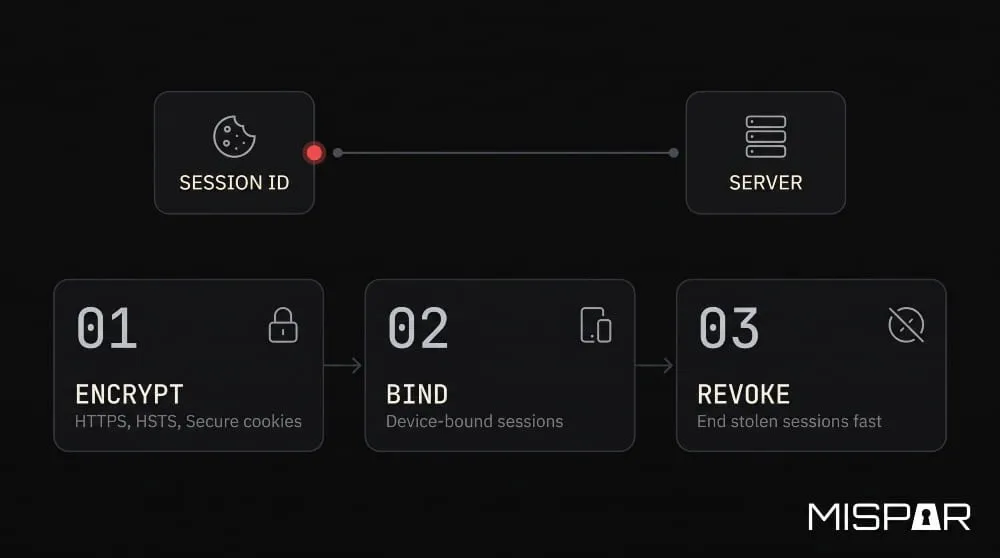
For users: avoid public Wi-Fi risk, keep browsers and endpoints clean, log out
Avoid signing in to sensitive accounts on public Wi-Fi without a VPN, keep your browser, operating system, and endpoint protection updated, treat unexpected attachments and “sponsorship” or invoice files as hostile, log out of sensitive accounts when you are finished, and use passkeys where they are offered. Endpoint hygiene matters most, since malware is now one of the most common routes to stolen sessions.
For developers: HTTPS and HSTS, cookie flags, ID regeneration, timeouts, context binding
Serve the entire site over HTTPS with HSTS; set the Secure, HttpOnly, and SameSite attributes on session cookies; issue a new session ID at login and on any privilege change; use idle and absolute timeouts and invalidate the session on the server at logout; generate IDs with the framework’s built-in secure random generator rather than Custom code; and never put session IDs in URLs. Treat IP or user-agent binding as a risk signal rather than a hard rule, because legitimate users’ IP addresses change on mobile networks. Where supported, add device-bound sessions.
Code-level notes for PHP and ASP.NET
In PHP, enable session.use_strict_mode and session.use_only_cookies, set session.cookie_secure, session.cookie_httponly and session.cookie_samesite, and call session_regenerate_id(true) immediately after a successful login. In ASP.NET Core, configure the authentication cookie with HttpOnly, a Secure policy of Always and an appropriate SameSite mode, and set sensible sliding and absolute expiry. Because cookie authentication tickets are self-contained, use a server-side ticket store if you need to revoke a stolen session before it expires. In both frameworks, rely on the built-in session ID generation instead of writing your own.
For organizations: conditional access, token protection, passkeys, continuous authentication
Require phishing-resistant authentication such as passkeys or FIDO2 keys; apply conditional access policies that evaluate risk and device compliance and, where available, token protection that binds tokens to the device; enable continuous access evaluation; shorten token lifetimes for administrators; deploy endpoint detection and keep unmanaged devices away from sensitive apps; and monitor sign-in logs for token replay. Add monitoring for exposed credentials and infostealer data so you learn about a stolen session before it is used.
Session hijacking countermeasures and mitigation checklist
- Encrypt everything: HTTPS site-wide, HSTS, and Secure cookies.
- Harden cookies: HttpOnly and SameSite, and no session IDs in URLs.
- Regenerate IDs: issue a new session ID at login and on privilege change.
- Limit lifetime: idle and absolute timeouts, with server-side invalidation at logout.
- Fix XSS: output encoding, a content security policy, and input handling.
- Bind sessions to devices: DBSC where supported, token protection in your identity provider.
- Use phishing-resistant MFA: passkeys or FIDO2 keys.
- Protect endpoints: endpoint detection, patching, and attachment controls.
- Detect and respond: log session context, alert on token reuse and impossible travel, and rehearse session revocation.
- Monitor for leaked sessions: watch for exposed credentials and infostealer logs.
Standards and References
OWASP Session Management Cheat Sheet
The OWASP Session Management Cheat Sheet is the most widely used developer reference for this topic. It requires session IDs to have at least 64 bits of entropy (16 hexadecimal characters of true randomness) and, if you create your own IDs, a secure random generator producing at least 128 bits. It recommends using the framework’s built-in session handling and covers cookie attributes, regenerating IDs after authentication, timeouts, and server-side invalidation. Use it as the baseline when reviewing an application’s session handling.
CWE and MITRE ATT&CK mapping
Session hijacking is an outcome rather than a single weakness, so CWE covers it through several entries, notably CWE-384 (Session Fixation), CWE-613 (Insufficient Session Expiration), CWE-614 (Sensitive Cookie in HTTPS Session Without Secure Attribute), CWE-1004 (Sensitive Cookie Without HttpOnly Flag) and CWE-330 (Use of Insufficiently Random Values). In MITRE ATT&CK, the relevant techniques include T1185 (Browser Session Hijacking), T1539 (Steal Web Session Cookie), T1550.004 (Web Session Cookie), T1563 (Remote Service Session Hijacking), and T1557 (Adversary-in-the-Middle).
Stolen Sessions at Scale: Why Monitoring for Exposed Tokens Matters
Infostealer logs and stolen session cookies
Infostealers package what they take from each infected device, including saved passwords, autofill data, and browser cookies, into “logs” that criminals trade or share. A log containing a still-valid session cookie is a ready-made hijack, which is why session theft is increasingly an exposure problem as much as an attack problem. Mispar’s guides to infostealer malware, credential theft, and compromised credentials explain how these logs spread and what they contain.
What MSSPs can do when a session token is exposed?
When a client’s token appears in exposed data, the response is the revoke-and-clean sequence described above, with speed as the deciding factor: identify the user and the apps in the log, revoke sessions and refresh tokens, force reauthentication, clean the endpoint, rotate every credential stored in that browser profile, and check for persistence such as new MFA methods, app grants, or mailbox rules. Continuous monitoring shortens the gap between a token appearing in criminal channels and the MSSP acting on it. Mispar helps MSSPs monitor for exposed credentials and infostealer data across their clients so they can respond before a stolen session is used.
Frequently Asked Questions (FAQ)
Is session hijacking the same as a man-in-the-middle attack?
No. A man-in-the-middle attack is a network position that lets an attacker read or alter traffic, while session hijacking is taking over a valid session. An attacker can use a man-in-the-middle position to hijack a session, but hijacking can also happen through malware, XSS, or a predictable session ID with no man-in-the-middle involved.
Can MFA stop session hijacking?
MFA alone cannot stop it, because the session token is issued after MFA succeeds and can be replayed from another device. Phishing-resistant MFA such as passkeys stops attackers from capturing tokens through phishing proxies, while device-bound sessions, short lifetimes, and anomaly detection address the stolen-token case.
Does HTTPS prevent session hijacking?
HTTPS prevents it in transit but not at the endpoint. It blocks sniffing and injection on the network, but malware, XSS, and phishing proxies can still steal cookies over valid HTTPS. Use Secure cookies and HSTS alongside it.
When is session hijacking performed?
After the user has authenticated, while the session is still valid, the attacker needs a live session ID or token, so short timeouts and server-side revocation shrink the window. Session fixation plants the ID before login but still exploits it afterward.
Which technology can protect against session hijacking?
No single technology covers it. HTTPS with HSTS protects traffic in transit; secure cookie attributes and regenerated session IDs protect the session itself; passkeys and device-bound session credentials protect against stolen tokens; and continuous access evaluation and anomaly detection catch what slips through.
How do I know if my session was hijacked?
Look for unexpected logouts, new-device or sign-in alerts, password or recovery changes you didn’t make, and activity you don’t recognize. Check your account’s active sessions or device list and sign out everywhere. In an organization, review sign-in logs for the same token or account appearing from a new IP address, device, or location.
What should I do after session hijacking?
Scan or clean the device you used first, then sign in from a clean device and revoke all active sessions. Change the password, remove any unfamiliar devices, MFA methods, app grants, or forwarding rules, and rotate other credentials saved in the same browser. Finally, review what the attacker accessed and notify affected people or customers if data was exposed.