
Dark Web Browsers | How to Get One, and How to Browse Safely
September 11, 2026
The dark web is not a hidden layer of the internet you stumble into by accident; you need a specific type of dark web browser, most commonly Tor Browser, built to route your traffic through encrypted relays and let you reach .onion sites that standard browsers like Chrome or Safari can’t load. Millions of people use one every day: the Tor Metrics Portal estimates that roughly 2.0 to 2.5 million users connect directly to the Tor network on a typical day, and the vast majority are there for privacy, not crime. Still, getting started raises real questions: which browser to trust, how to install it safely on your phone or laptop, and where the legal line actually sits in your country. This guide covers it all: what a dark web browser is, how to set one up on any device, how the major options compare, and the safety practices that separate a routine visit from a risky one.
What Is a Dark Web Browser?
A dark web browser is software built specifically to reach the encrypted, non-indexed sites that make up the dark web, pages that don’t have normal web addresses and that a standard browser can’t resolve. Instead of connecting directly to a website’s server, a dark web browser routes your traffic through a series of relays, encrypting it in layers along the way, so neither the site you’re visiting nor anyone monitoring the network can easily trace the connection back to you. The best-known example is Tor Browser, but it’s one of several tools built around this same core idea.
How Dark Web Browsers Differ From Regular Browsers (Chrome, Safari, Edge)
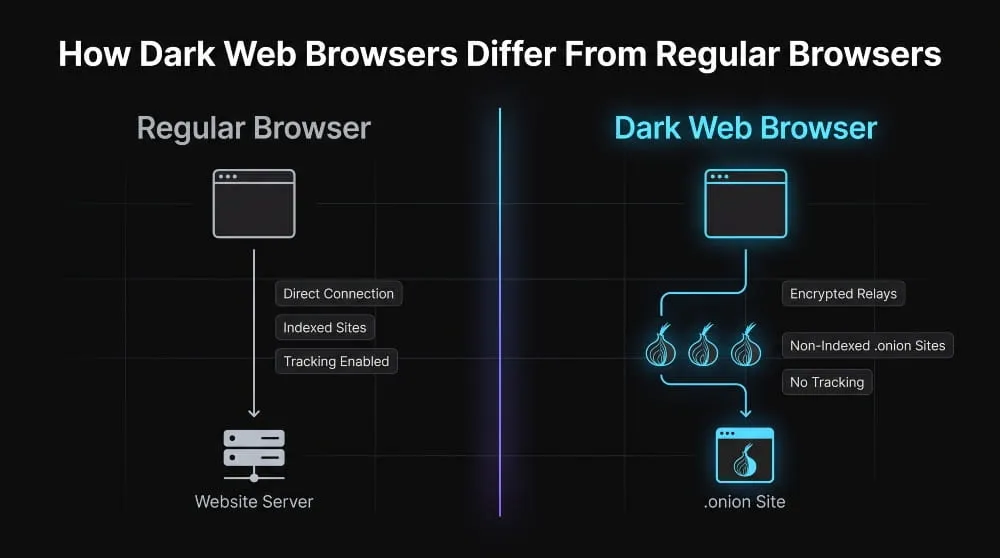
Chrome, Safari, and Edge are built for speed and convenience: they connect straight to a website’s server, cache your activity, and load .com and .org domains that are indexed by search engines. A dark web browser does the opposite on purpose. It strips out tracking features, refuses to load pages that reveal your location or device details, and bounces your connection through multiple encrypted hops before it ever reaches its destination. That extra routing also slows dark web browsing; you’re trading speed for anonymity. And because dark web sites use .onion addresses rather than standard domain names, a regular browser can’t find them; only a dark web browser can resolve and load that address space.
Tor, I2P, and Other Core Dark Web Browser Technologies
Tor Browser is the most widely used dark web browser, and it works by sending your traffic through at least three volunteer-run relays, entry, middle, and exit nodes, so no single point on the network knows both who you are and what you’re accessing. It’s free, open-source, and maintained by the nonprofit Tor Project, which reports that the network handles somewhere between 2.0 and 2.5 million daily connections worldwide. I2P (the Invisible Internet Project) takes a different approach: rather than routing you out to the regular internet, it creates a self-contained network designed mainly for anonymous communication between users within I2P itself, making it better suited to messaging and file-sharing than general browsing. A handful of other tools, like Brave’s built-in Tor mode, or search engines such as Torch and Haystak, extend or complement this same technology rather than replacing it, giving users more ways to access the same underlying anonymized network.
Is Tor Browser the Dark Web Browser?
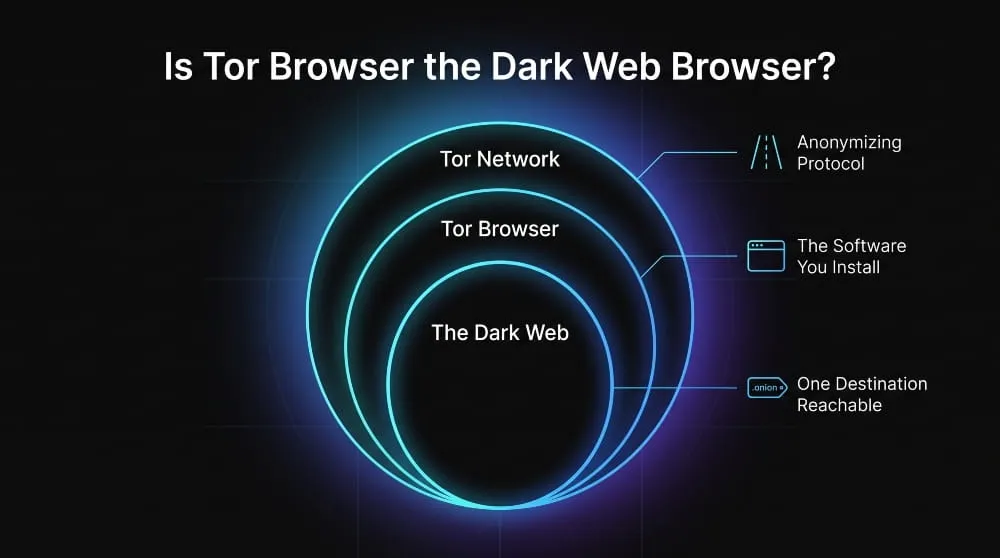
Tor Browser is the most common way people access the dark web, but it isn’t the only dark web browser, and “Tor” and “the dark web” aren’t the same thing. Tor is the anonymizing network and technology; Tor Browser is the specific application, a modified version of Firefox, that most people use to connect to it and reach .onion sites.
How Tor Routes Traffic Through the Onion Network
When you send a request through Tor Browser, it doesn’t travel straight to its destination the way a normal web request does. Instead, it gets wrapped in multiple layers of encryption and passed through at least three relays: an entry node, a middle node, and an exit node, with each relay decrypting only the layer that tells it where to send the data next. The entry node knows who you are but not what you’re requesting; the exit node knows what’s being requested but not who asked for it. That layered structure is where the name “onion routing” comes from, and it’s what makes it extremely difficult for any single point on the network to connect your identity to your activity. The Tor Project maintains roughly 8,000 volunteer-run relays worldwide to keep this routing distributed and hard to compromise.
Tor Browser vs. Regular Tor vs. “The Dark Web”, Clearing Up the Confusion
These three terms get used interchangeably, but they describe different things. “Tor” refers to the underlying network and protocol that anonymizes traffic. “Tor Browser” is the actual software, the dark web browser, that regular users install to access that network without manually configuring anything. “The dark web” refers to the destination: the collection of .onion sites that are only reachable through a tool like Tor Browser, as opposed to the “deep web,” which is just the much larger set of ordinary pages (like your email inbox or online banking) that search engines don’t index but any regular browser can still load. In short, Tor Browser is the vehicle, Tor is the road network, and the dark web is one particular neighborhood you can reach by driving on it; most Tor traffic never goes there at all.
How to Get and Use a Dark Web Browser
Getting a dark web browser up and running takes about five minutes, and the process is almost identical to installing any other application; the only real difference is where you download it from and a few settings worth checking before you start browsing.
Step-by-Step: Downloading and Installing Tor Browser
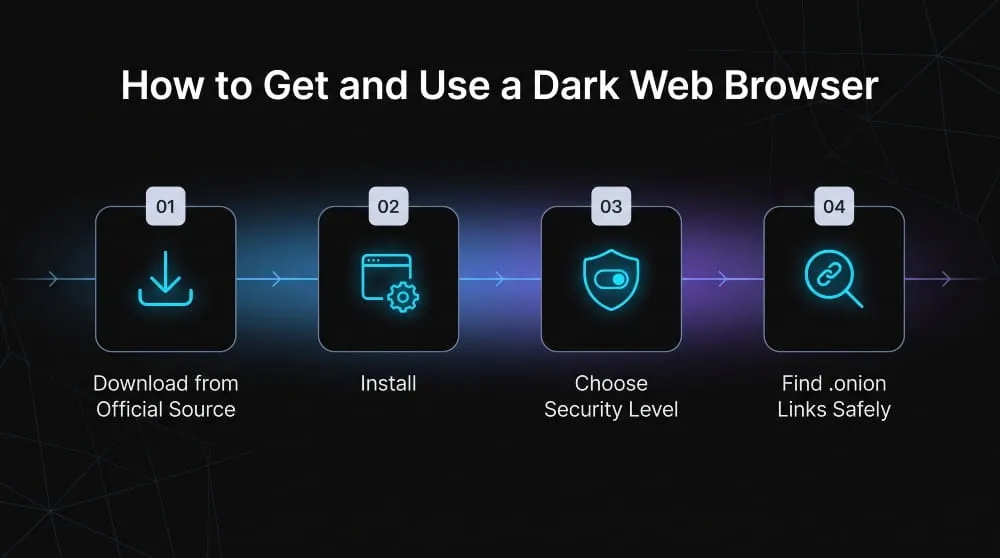
The only safe source for Tor Browser is the official Tor Project website (torproject.org). Third-party download sites and app store listings have historically been used to distribute malware disguised as Tor, so this step matters more than it might seem. From there, the process is straightforward: select your operating system (Windows, macOS, Linux, or Android), download the installer, and run it like you would any other application. On desktop, that means opening the downloaded file and following the setup prompts; on Android, it means installing the official Tor Browser app listed under the Tor Project’s developer name on Google Play or F-Droid. iPhone users need a separate step: since Apple doesn’t allow the true Tor Browser on iOS, the Tor Project recommends the Onion Browser app, a Tor-compatible browser built specifically for iOS. Once installed, no account or sign-up is required; the browser is ready to use as soon as it opens.
First-Time Setup and Configuration Tips
The first time you open Tor Browser, it will ask whether to connect directly or configure a connection; most users in most countries can click “Connect” and be routed onto the network within a few seconds. If you’re in a location where Tor is blocked or heavily monitored, choose “Configure Connection” instead and enable a bridge, which disguises your Tor traffic. This makes it harder for a network operator to detect and block. It’s also worth checking the browser’s built-in security level, found in the shield icon in the toolbar, which offers three settings, Standard, Safer, and Safest, that progressively turn off features like JavaScript and video playback in exchange for stronger protection against tracking and exploits. Leaving the browser window at its default size (rather than maximizing it) is a small but genuinely useful habit, since screen resolution is one detail sites can otherwise use to identify individual users.
Finding and Navigating .onion Links Safely
Dark web sites use .onion addresses instead of ordinary domain names, and because Google or Bing doesn’t index them, you generally need a direct link or a dark-web-specific search engine, such as Ahmia or Torch, to find them in the first place. Typing a guessed .onion address rarely works, since these addresses are long, randomly generated strings rather than memorable names. The safest approach is to stick to links from sources you already trust, a known organization’s official .onion mirror, for instance, rather than clicking links pulled from forums or unfamiliar directories, since spoofed and scam .onion sites that mimic legitimate ones are common. Avoiding downloads from unfamiliar sites and never entering personal or financial information on a page you can’t verify are the two habits that prevent most dark web browsing problems.
Dark Web Browsers by Device
A dark web browser works a little differently depending on the device you’re using, and the setup steps, along with the risks, shift most noticeably between mobile and desktop.
Android and iPhone Access
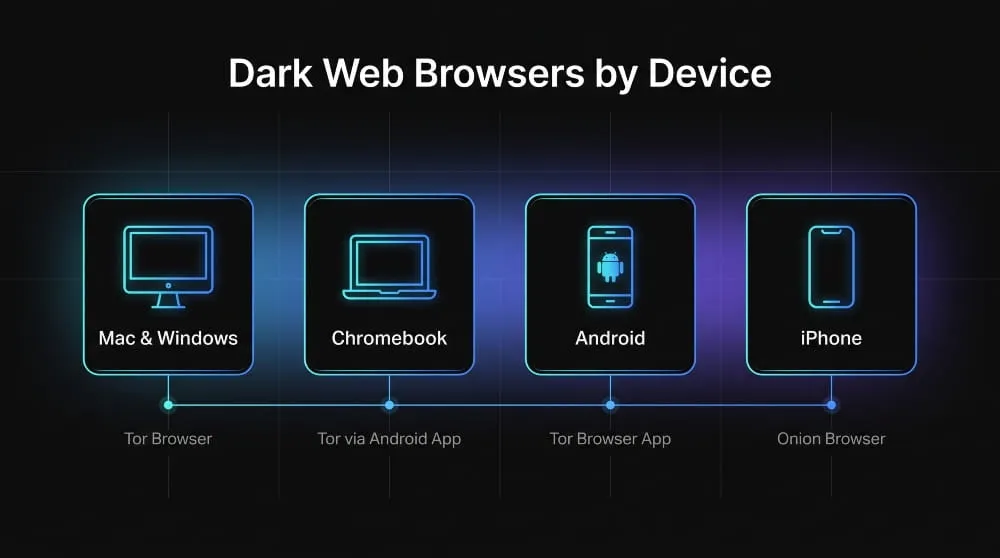
On Android, the official Tor Browser app functions almost identically to its desktop counterpart. You can install it directly from Google Play or F-Droid under the Tor Project’s own developer listing. iPhone is a different story: Apple’s platform restrictions mean the true Tor Browser isn’t available on iOS. Hence, the Tor Project points iPhone users to Onion Browser, a separate app built by an independent developer in coordination with the Tor Project to provide Tor-routed browsing within Apple’s constraints. Mobile access has grown enough to make up a meaningful share of overall Tor use; mobile devices are estimated to generate around 40% of daily Tor network traffic. Either way, the same rule applies on both platforms: only install from the official app listing, since dark web browser apps are a common target for impersonation.
Mac, Windows, and Chromebook Access
Tor Browser installs and runs the same way across Mac and Windows: download it from torproject.org, run the installer, and open it like any other application, with no special configuration required for either operating system. Chromebooks are more limited: Chrome OS doesn’t support Tor Browser natively, so the practical option is running the Android version of Tor Browser through a Chromebook’s built-in Google Play support, where available, rather than expecting a desktop-equivalent install. Across all three, performance and safety are consistent as long as the browser comes from the official source; the underlying Tor network doesn’t treat one operating system as safer than another.
Why “Free Dark Web Browser Apps” on App Stores Are Often Risky
Searching an app store for a “free dark web browser” often surfaces apps with no connection to the Tor Project at all, knockoffs designed to look official, sometimes bundling ad trackers, sometimes doing far less to protect your identity than they claim, and in some documented cases actively distributing malware. Because the real Tor Browser is already free and open-source, a paid or ad-heavy alternative has no legitimate reason to offer anything better. The safest habit is to treat the developer name on the listing as the deciding factor, not the app icon or description; only an app published by the Tor Project (or, on iOS, the verified Onion Browser developer) should be trusted to actually route traffic through the Tor network the way it claims to.
Best Dark Web Browsers Compared
Tor Browser remains the default choice for most people, but it isn’t the only tool for anonymized access, and each alternative trades off speed, simplicity, or scope in different ways.
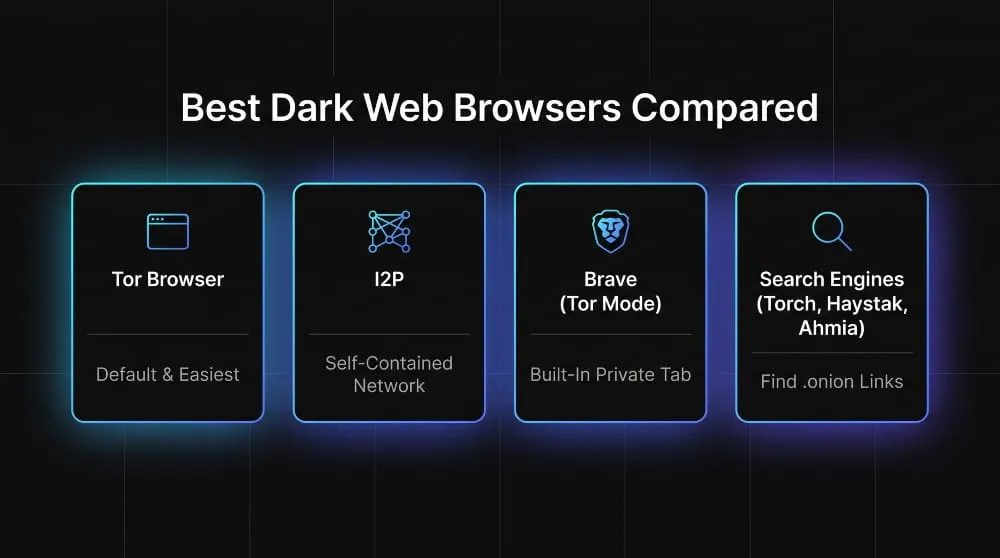
Tor Browser
Tor Browser is the most widely used dark web browser because it asks almost nothing of the user: install it, open it, and it automatically handles onion routing, relay selection, and .onion address resolution. It’s free, open-source, maintained by the nonprofit Tor Project, and updated regularly to patch the fingerprinting and de-anonymization exploits researchers actively look for. For anyone whose goal is “access the dark web safely without configuring anything,” it’s the starting point, and for most users it’s also the ending point; the other options below solve for a narrower use case rather than a better general one.
I2P
I2P (the Invisible Internet Project) takes a different design approach: instead of routing you out to the regular dark web, it builds a self-contained, peer-to-peer network where most traffic stays inside I2P itself. That makes it well suited to anonymous messaging, file-sharing, and hosting “eepsites” (I2P’s version of .onion sites). Still, it’s a less direct fit for someone who wants to browse existing .onion dark web content; I2P and Tor overlap in purpose but serve largely separate ecosystems. It requires a bit more setup than Tor Browser and, as a result, has a smaller, more technical user base.
Brave (Built-In Tor Mode)
Brave is a mainstream privacy browser that includes an optional “Private Window with Tor” mode, letting users route a single browsing tab through the Tor network without installing separate software. It’s a convenient middle ground for someone who wants occasional Tor-level privacy alongside their normal browsing. Still, it doesn’t route all of Brave’s traffic through Tor by default. It lacks some additional hardening, like Tor Browser’s fingerprinting resistance and fixed window size, that makes the dedicated Tor Browser the safer choice for navigating .onion sites.
Search Engines Built for the Dark Web (Torch, Haystak, Ahmia)
Because .onion sites aren’t indexed by Google or Bing, finding them requires a search engine built specifically for the dark web. These tools aren’t browsers themselves, but they’re the companion piece most dark web browsing depends on. Tor and Haystack are longstanding options that index a broad range of .onion sites with minimal filtering. At the same time, Ahmia takes a more curated approach, actively excluding sites associated with illegal content from its results. None of these replace Tor Browser; they run inside it, like Google inside Chrome, and choosing one over another mostly comes down to how much filtering you want between you and the raw index of .onion sites.
Is It Legal and Safe to Browse the Dark Web?
Using a dark web browser is legal in most countries, including the United States, the UK, and across the EU. What’s illegal is not the act of browsing but specific content or activity you might access once there, the same way owning a car is legal but driving it into a bank isn’t.
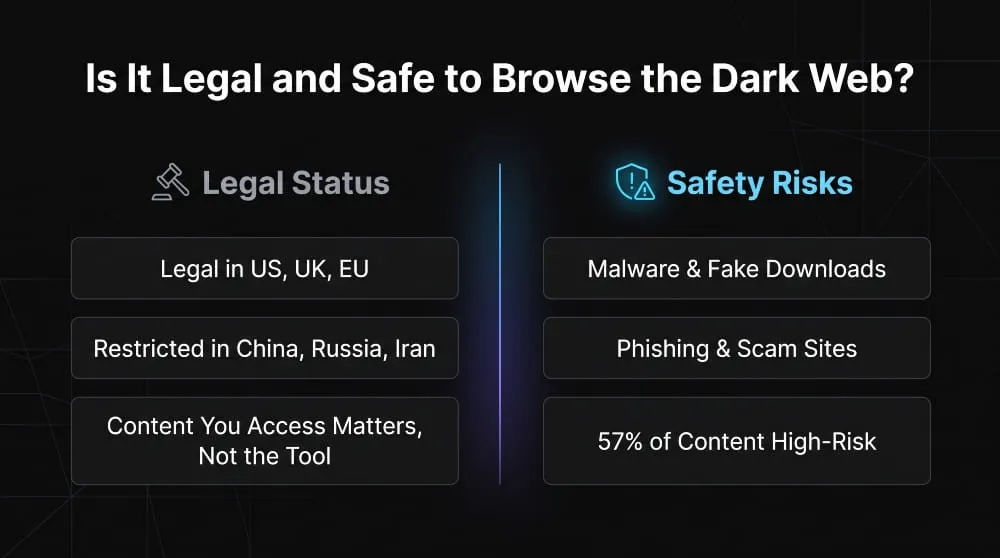
Legal Status by Country (Browsing vs. What You Access)
In the US, UK, Canada, Australia, and most of the EU, downloading and using Tor Browser carries no legal risk on its own; courts and regulators have consistently treated the tool itself as neutral, comparable to a VPN or a web browser. The line moves to what you do with it: buying illegal goods, accessing child exploitation material, or participating in fraud is prosecuted the same way it would be anywhere else on the internet, dark web or not. A smaller number of countries, including China, Russia, Iran, and Belarus, restrict or actively block Tor access at the network level as part of broader internet censorship, making the tool itself harder to use rather than illegal to possess. Anyone unsure about their specific jurisdiction should treat this as a starting point, not a substitute for checking local law, since enforcement and restrictions do shift.
Real Risks: Malware, Scams, and Exposure
The practical risks of dark web browsing have little to do with legality and everything to do with the fact that .onion sites aren’t moderated, verified, or held to any content standard. Malware-laced downloads, phishing pages that mimic legitimate .onion services, and outright scams- fake marketplaces that take payment and deliver nothing- are common enough that security researchers treat unfamiliar dark web links with the same suspicion as unsolicited email attachments. Beyond deliberate scams, there’s also exposure risk: a misconfigured browser, an outdated Tor Browser version, or a moment of forgetting to avoid third-party trackers can leak identifying information even when you’re otherwise using anonymizing software correctly. Roughly 57% of dark web content involves illegal or high-risk material, which is part of why caution matters more here than on the ordinary web, even for browsing that’s entirely legal.
Best Practices for Safer Browsing (VPN Pairing, Isolated Devices, Avoiding Downloads)
The highest-impact habit is keeping Tor Browser updated, since most known exploits target outdated builds rather than the network itself. Pairing Tor with a reputable VPN adds a layer of protection by hiding the fact that you’re using Tor from your internet service provider. However, it should be configured correctly- VPN-then-Tor, not the reverse- to actually improve rather than weaken anonymity. For anyone doing more than casual browsing, using a separate, isolated device or a dedicated live operating system like Tails keeps dark web activity fully compartmentalized from personal accounts, files, and browsing history. And the simplest rule cuts risk the most: never download files from unfamiliar .onion sites, and never enter personal, financial, or login information on a page you can’t independently verify.
Frequently Asked Questions (FAQ)
Can I browse the dark web on my phone?
Yes, Android users can install the official Tor Browser app, while iPhone users need Onion Browser, since the true Tor Browser isn’t available on iOS.
Do I need a VPN with Tor Browser?
Not strictly, but pairing a reputable VPN with Tor (VPN first, then Tor) hides your Tor usage from your ISP and adds an extra layer of privacy on top of Tor’s routing.
What’s the difference between the deep web and the dark web?
The deep web is just any unindexed page, like your email or online banking, reachable with a regular browser; the dark web is the smaller set of .onion sites reachable only through a dark web browser like Tor.