
Dark web exposure means your personal data or your company’s credentials have appeared in places where criminals trade or publish stolen information, such as leak sites, infostealer logs, and illegal markets. Being exposed doesn’t mean anyone has used your data yet, but it does mean the risk is real, and the sooner you find out, the more you can do about it. This guide explains how exposure happens, how to scan and check for it, what dark web reports and alerts actually tell you, and what you can and can’t do once your information is out.
What Is Dark Web Exposure?
Dark web exposure is when your data or credentials appear in places where criminals buy, sell, or leak stolen information. It covers email addresses, passwords, Social Security numbers, card details, and, for businesses, employee logins and access tokens. Exposure is a risk, not an event: it means the data is available to attackers, not that it has been used against you.
Where Exposed Data Shows Up
Exposed data usually turns up in one of three places. Leak sites publish stolen databases, sometimes to pressure a victim and sometimes for free. Stealer logs bundle logins, cookies, and system details that infostealer malware collects from infected devices. Markets sell these items in bulk. Scale is what makes this hard to avoid. When law enforcement took down Genesis Market in 2023, the UK’s National Crime Agency estimated it hosted about 80 million credentials and digital fingerprints stolen from more than two million people. A single market can hold data from many people who never knew they were affected.
Personal Exposure vs Company Exposure
Personal exposure is about an individual: an email and password, a Social Security number, a card number, an identity. The usual consequences are account takeover, fraud, and identity theft. Company exposure is about access: employee logins tied to the company’s domains, session cookies, API keys, and customer records. It matters more because one employee’s stolen login can open a path into company systems, and session cookies and browser fingerprints can enable account takeover even when multi-factor authentication is on. The two overlap, since reusing a work password on a personal account, or vice versa, exposes both. The next section explains how information ends up exposed in the first place.
How Information Gets Exposed
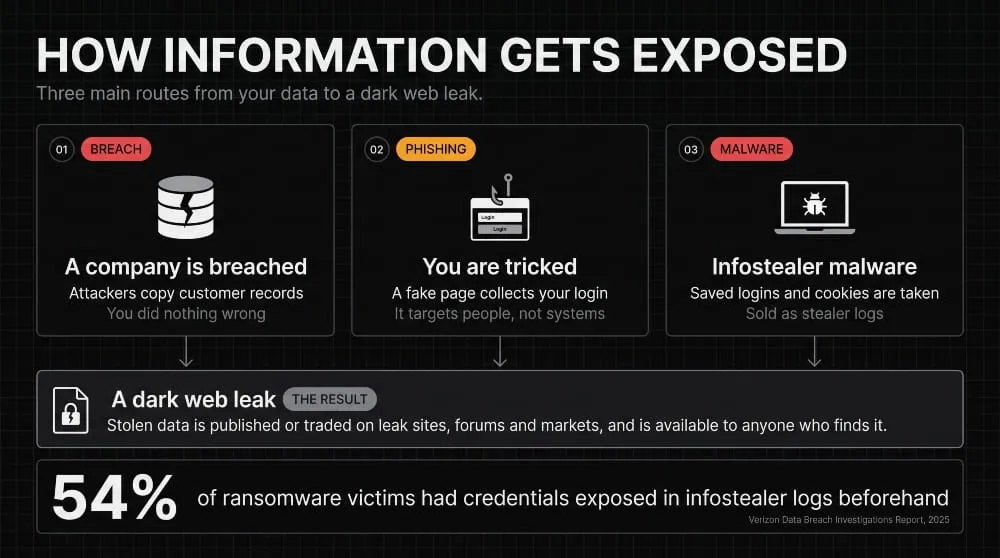
Information gets exposed in three main ways: a company that holds your data is breached, you are tricked into giving it away through phishing, or malware on your device steals it. Attackers then sell, trade, or publish the stolen data, and that publication is what people mean by a dark web leak.
Data Breaches
A data breach happens when attackers get into a company’s systems and copy what they find, such as customer records, email addresses, hashed passwords, and payment details. You don’t have to do anything wrong for this to affect you, because the organization storing your data is the weak point. Breached databases often circulate for years, and attackers combine data from several breaches to build a fuller profile of one person. A breach at a retailer you used once can still matter if you used the same password there as elsewhere.
Phishing
Phishing tricks you into handing over information yourself. A fake login page, a message pretending to be your bank, or a spoofed company email collects your username, password, or card number as you type it. The attacker then uses the details directly or sells them. Phishing works because it targets people, not systems, so it can expose accounts that are otherwise well protected.
Infostealer Malware
Infostealer malware quietly collects saved passwords, browser cookies, autofill data, and system details from an infected device, then sends them to the attacker. Attackers sell or share the results as stealer logs. This matters because the data comes straight from a real, actively used device, so the logins are often current. The link to later attacks is well documented: Verizon’s 2025 breach report found that 54% of ransomware victims had credentials exposed in infostealer logs beforehand. Cookies in these logs can also let an attacker hijack a session without needing your password.
What Is a Dark Web Leak?
A dark web leak is stolen data being published or traded in places criminals use, usually leak sites, forums, and markets. Some leaks are free, posted to build reputation or pressure a victim, while others are sold. A leak doesn’t mean your information is being used right now, but it means anyone who finds it can access it. The next section covers how to check whether yours is among it.
Dark Web Scanner and Check | How to See If You’re Exposed
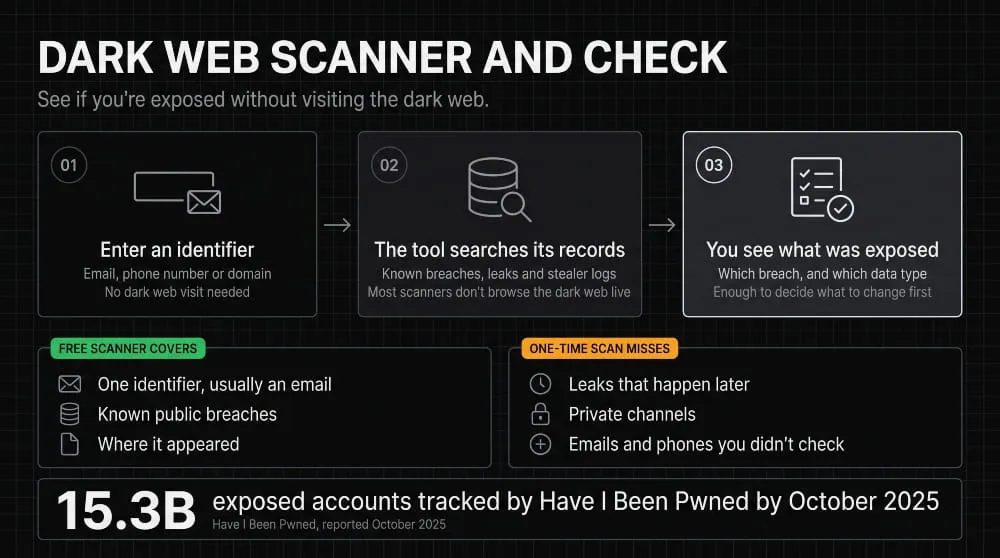
A dark web scanner, also called a dark web check, tells you whether an email address, phone number, or domain appears in known breaches, leaks, and stealer logs, and you don’t have to visit the dark web to use one. You enter the identifier, and the tool searches its records and shows what was exposed, usually the source and the type of data involved.
How a Scanner or Check Tool Works
Most consumer scanners don’t browse the dark web live. They search a database built from breaches, leak sites, and stealer logs collected over time and match your email address or other identifier against it. Those databases are large. Have I Been Pwned, the best-known public breach checker, passed 15.3 billion exposed accounts by October 2025. A good result tells you which breach or leak your information appeared in and what data came with it, such as a password, a phone number, or a physical address. That is enough to decide what to change first.
Free Dark Web Scanner: What Free Tools Cover
A free dark web scanner typically checks one identifier, usually an email address, against known public breaches and tells you where it turned up. That covers a lot, and for a personal check it is often all you need. Free tools usually don’t cover continuous alerts when new data appears, deep coverage of stealer logs, or help acting on the results. Treat a free scan as a starting point for discovery, not ongoing protection.
Limits of a One-Time Scan
A one-time scan shows what was known at that moment, and nothing after it. A clean result doesn’t mean you are safe. It means the tool didn’t find a match in its data, and the scan can miss data that leaks tomorrow, data that circulates only in private channels, and any email address or phone number you didn’t check. A scan also doesn’t tell you whether anyone has used the exposed data. The practical answer is to check regularly and change what’s affected right away, because unnoticed exposure is the risk that costs the most.
Check Your Exposure Now
For a personal address, use the email breach check. For a company, use the domain exposure check to see whether credentials tied to your domain have appeared in leaks. If you find a match, the sections below explain what the result means and how to respond.
Dark Web Reports
A dark web report is the result of a scan that shows which of your details, such as your email address, phone number, Social Security number, or passwords, were found in known leaks, where they turned up, and when. It tells you what was exposed, not whether anyone has used it, so it works best as a prompt to act.
What a Dark Web Report Shows
A typical dark web report lists each exposed item by type, the breach or leak it came from, the approximate date, and recommended next steps, such as changing a password or placing a fraud alert. Company-level reports add the affected domain, the employee accounts involved, and whether any entries came from stealer logs. A report reflects only the sources it covers, so two services can show different results for the same person. A free dark web report is useful for a first look, and the same limits apply as for any scan: it shows what the tool found, not everything that exists.
Google’s Dark Web Report (Retired)
Google’s Dark Web Report, which many people reached through Gmail or Chrome, no longer exists. Google stopped scanning for new dark web breaches on 15 January 2026, and retired the report entirely on 16 February 2026, saying it hadn’t given people helpful next steps. If you relied on it, the report’s history is gone, and you will need another way to check. Any website offering a Google dark web report now is not Google’s, so treat it with caution. A free scanner or an email breach check can cover the same basic question, and the section above explains how.
Dark Web Scans on a Credit Report
When a credit bureau or an identity-protection service shows dark web results next to your credit report, it is a monitoring feature added alongside the report, not an entry in the credit file that lenders use. For example, Experian describes its scan as searching over 600,000 pages going back to 2006 for a Social Security number, email address, or phone number, and it offers this with a free credit report and credit monitoring. That is a large search, but it has a ceiling. You can’t scan the entire dark web, so a result, or a clean result, reflects only the sources the service can reach. These scans are most useful for learning which identifiers were exposed, and what they show should lead to a credit freeze or fraud alert, not to the false comfort of an empty report.
What Dark Web Activity Detected Alerts Mean
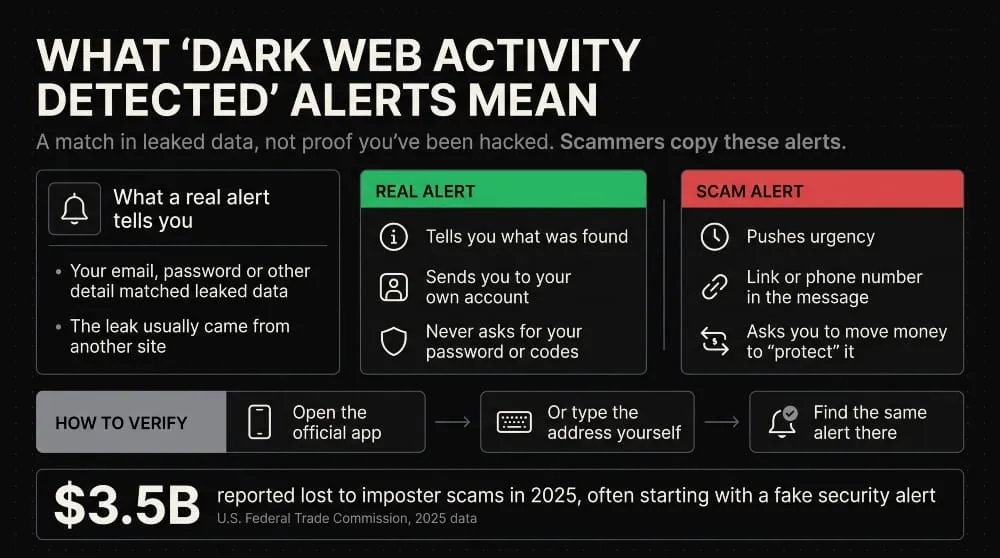
A dark web activity detected alert means a bank, antivirus, or credit service found your email address, password, or another identifier in leaked data. Real alerts are common and usually genuine, but scammers copy them, so the safe rule is never to act through the message itself: open the company’s official app, or type its address yourself, and look for the same alert there.
What the Alert Actually Tells You
An alert means a monitoring service matched something of yours against leaked data. It doesn’t mean you have been hacked, and it often doesn’t mean the company that sent the alert was breached, because the data usually comes from a leak at another site where you used the same email or password. The alert should say what it found, such as an email address, password, or phone number, and that detail tells you what to change. If it doesn’t name the data type, that is a reason to open the official app and check, not a reason to respond.
How to Tell a Real Alert From a Scam
A real alert informs you and sends you to your own account, while a scam alert tries to hurry you into acting. Warning signs include urgency, a request for your password, a one-time code, or your Social Security number; a phone number or link in the message; a vague greeting; and, above all, a request to move money to protect it. The problem is widespread. The FTC reported that people lost $3.5 billion to imposter scams in 2025, and that some of the costliest begin with a fake security alert, often from a bank. A genuine company will never ask you to transfer your money to keep it safe.
Why to Verify in the Official App, Not an Email Link
A link in an alert can lead to a convincing copy of the real site built to collect your login, and a phone number in the message can connect you to the scammer. The reliable check is to ignore both. Open the company’s official app or type its address into your browser yourself, then check your notifications or security section for an alert. If you can’t find it there, it is almost certainly not real. If you need to speak to someone, call the number printed on your card or on the company’s own website.
What to Do With a Real Alert
If the alert is genuine, treat it as a prompt to act, not a sign of damage. Change the password on the affected account and on any other account that shares it, turn on multi-factor authentication, and watch your accounts for activity you don’t recognize. If a Social Security number was involved, consider a fraud alert or credit freeze. The next section looks at what each type of leaked data costs you.
Leaked Passwords, Social Security Numbers and Identities
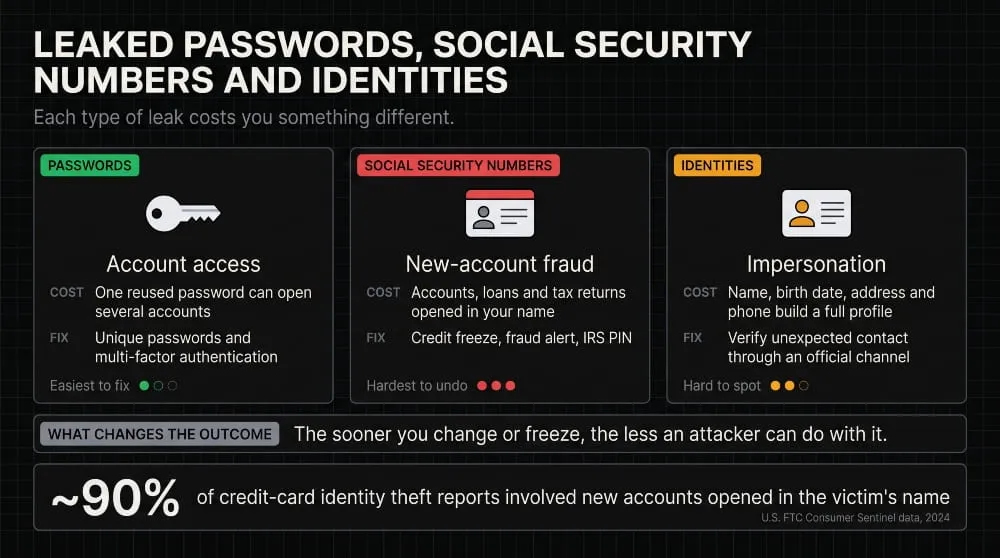
Leaked passwords, Social Security numbers, and identity details each cost you something different. A password costs you access to an account, a Social Security number exposes you to new-account fraud that can last for years, and identity details make you easier to impersonate and target. Passwords are the easiest to fix, and a Social Security number is the hardest.
Leaked Passwords
A leaked password lets someone sign in as you, and its real cost is how many other accounts share it. Attackers take the email-and-password pair from one leak and try it on banks, email, shopping, and work accounts, which is why one reused password can turn a minor breach into several takeovers. The fix is fast and within your control: change the password everywhere it was used, use a different one for every account through a password manager, and turn on multi-factor authentication. Dark web passwords are cheap for criminals to obtain, so protection has to come from you, not from keeping the password secret.
Leaked Social Security Numbers
A leaked Social Security number is the most damaging exposure because it can be used to open new accounts in your name, and it rarely changes. The scale of that harm shows in the data. Consumers filed about 1.1 million identity theft reports with the FTC in 2024, and roughly 90% of credit-card identity theft reports involved new accounts opened in the victim’s name. Other uses include fake tax returns and loan applications. If your number is exposed, practical steps in the United States include a free credit freeze, a fraud alert, an IRS Identity Protection PIN, and regular reviews of your credit reports. A freeze doesn’t remove the exposure, but it stops most new credit from being opened.
Leaked Identities
Leaked identity details, such as your name, date of birth, address, phone number, or copies of ID documents, cost you more quietly. They let attackers impersonate you convincingly, build a complete profile from several leaks, and send scams that mention real details about your life. These are hard to spot because nothing in your accounts changes, so the damage often shows up as a convincing phishing message or a fraudulent application. Treat unexpected contact that knows too much about you with suspicion, and verify it through an official channel before responding.
Which of these affect you depends on what was exposed. To check your own details, including your name, Social Security number, and password, see how to check if your information is on the dark web. The next section looks at whether you can take any of it back.
Can You Remove Information From the Dark Web?
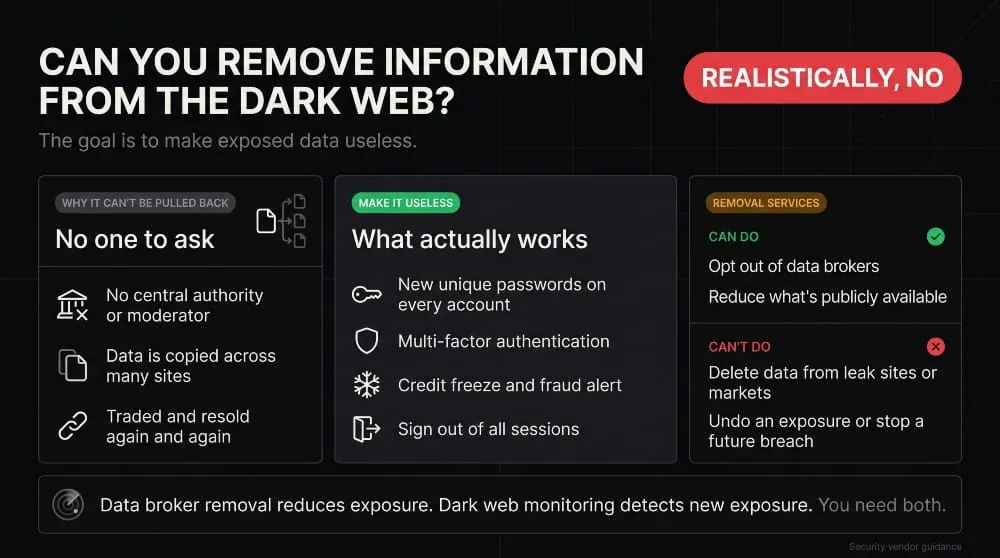
In practice, no. Once your data is posted on the dark web, it gets copied across independent sites, so you can’t pull it back. What you can do is make it useless: change the passwords, add multi-factor authentication, and freeze your credit so the exposed details can’t be used against you.
Why Dark Web Data Can’t Be Pulled Back
On a normal website, you can ask the owner to take something down. The dark web has no equivalent. No central authority or moderator controls the content, so removal isn’t possible, even for most law enforcement bodies, and data changes hands too often to contain. Sites also operate outside legal frameworks, so no one can negotiate with them, and stolen data is quickly copied and spread among many criminals. Deleting it from one place leaves it in several others. That is why removing yourself from the dark web is different from stopping its use.
How to Make Exposed Data Useless
The effective response is to make each type of exposed data worthless. Change the password on the affected account and on every account that shares it, then use a unique password for each site, ideally through a password manager. Turn on multi-factor authentication, preferably through an authenticator app or passkey, and sign out of all active sessions, because stolen cookies can keep an attacker logged in. If a Social Security number or other ID was exposed, place a credit freeze (free in the United States) and consider a fraud alert. Then watch your accounts and statements for activity you don’t recognize. None of this deletes the data, but it limits what a criminal can do with it. For businesses, the equivalent is rotating exposed credentials and revoking active sessions and tokens.
Removal Services: What They Can and Can’t Do
A dark web removal service usually doesn’t remove anything from the dark web. Data removal services work on the legal side of the internet, sending opt-out requests to data brokers and people-search sites. That matters because it reduces how much personal information is publicly available to build a profile of you and limits what a future breach can reveal. Brokers tend to repopulate their listings, so these services work through repeated requests. They can’t delete data from leak sites or marketplaces, undo an exposure that has already happened, or stop a later breach. In short, data broker removal reduces exposure, while dark web monitoring detects compromise, and you need the second to know when something new appears. For your own Google Search results, the Results about you tool can request removal of pages that show your contact details.
Dark Web Exposure for Businesses
Dark web exposure for a business means credentials, session cookies, or company data tied to your domains have appeared in leaks, stealer logs, or markets, usually without anyone at the company knowing. It matters because stolen logins are one of the most common ways attackers get in so that a single exposed employee account can become your company’s dark web risk exposure.
Domain-Level Exposure
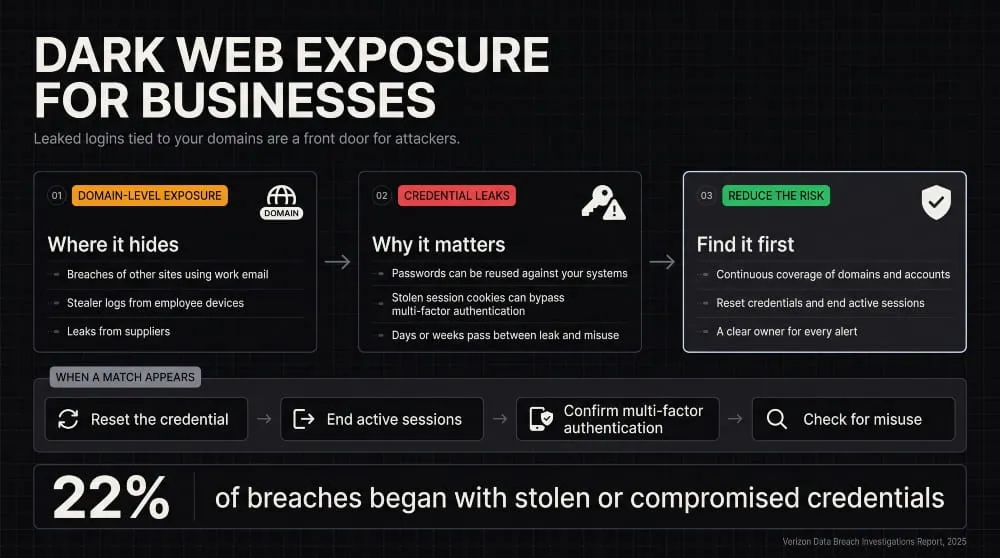
Domain-level exposure is the set of leaked logins that use your company’s email domain or point at your systems. It is wider than most teams expect. It includes credentials from breaches of other sites where employees signed up with work email addresses, logins captured by infostealer malware from employees’ laptops (including personal devices used for work), and data leaked by suppliers who hold your information. Because you don’t control those sources, you can’t see the exposure by looking at your own systems. A quick first look is the domain exposure check, which shows whether credentials tied to your domain have appeared in leaks.
Credential Leaks and Why They Matter
Credential leaks matter because attackers use them as the front door, not as a last resort. In Verizon’s 2025 breach report, compromised credentials were the initial access vector in 22 percent of breaches analyzed, making credential abuse the most common way attackers start a breach. Passwords aren’t the only risk. Session cookies and browser fingerprints can enable account takeover even with multi-factor authentication, so a leaked cookie can be as dangerous as a leaked password. The practical difficulty is timing: a credential can sit in a stealer log for days or weeks before anyone uses it, and the gap between exposure and misuse is the window in which a company can act.
How Businesses Reduce Dark Web Risk Exposure
Businesses reduce exposure by finding leaks quickly and acting before attackers use the credentials. That means continuous coverage of your domains, employee accounts, and stealer-log sources, not a one-time check, and a clear owner and process for what happens when a match appears: reset the credential, end active sessions, confirm multi-factor authentication is on, and check the account for signs of misuse. Dark web monitoring is the ongoing version of this, and continuous monitoring explains how it works. If you manage security for several clients, you have to run the same checks for each client’s domains, which is where automation saves the most time.
Frequently Asked Questions (FAQ)
Is there a free dark web scanner?
Yes. Free tools, such as email breach checks and domain exposure checks, compare an email address or company domain against known leaks and show where it appeared. They are a good first look, but they only show what is known at that moment and don’t send alerts when new data appears.
Is a dark web alert a scam?
It can be. Real alerts from your bank, antivirus, or credit service are common, but scammers copy them. The FTC reported that people lost $3.5 billion to imposter scams in 2025, and that some of the costliest begin with a fake security alert, often from a bank. Verify an alert in the company’s official app or by typing its address yourself, never through a link in the message, and treat any request to move money or share a password or code as a scam.
What is a dark web report?
A dark web report summarizes a scan, showing which of your details, such as your email address, phone number, password, or Social Security number, were found in known leaks, where they appeared, and when. It shows what was exposed, not whether anyone has used it. Google retired its own Dark Web Report on 16 February 2026, so any Google dark web report you find now is from another provider.
Can my information be removed?
Realistically, no. No central authority or moderator controls dark web content, so removal isn’t possible, even for most law enforcement bodies. The practical goal is to make exposed data useless by changing passwords, turning on multi-factor authentication, and freezing your credit. Removal services usually work on data brokers and people-search sites, not the dark web itself.
How do I check if my password is on the dark web?
Run your email address through a breach checker, such as an email breach check, to see which breaches included it, then change that password everywhere it was used. Avoid typing your real password into an unfamiliar site. Most password managers and browsers can flag compromised passwords. To check other details, see your information on the dark web.