
What Is Dark Web Protection?
Dark web protection is a set of habits, tools, and services that reduce damage when criminals steal and trade your personal or business data on the dark web. It can’t stop a breach at another company, but it can make stolen data far less useful to buyers.
Dark web protection defined
Dark web protection limits what criminals can do with your information after it leaks. You can’t switch off or block the dark web itself. It’s part of the internet, reachable only through special software, and stolen data from breaches, malware, and phishing campaigns gets sold or traded there.
Online protection against it therefore has two parts. The first is prevention: unique passwords, strong authentication, and locked-down credit files, so stolen data fails when someone tries to use it. The second is detection: quickly finding out when your data appears in a leak so you can respond before it is abused.
What it protects, and what it can’t do
Dark web protection covers the accounts, identities, and credentials that attackers monetize: logins, Social Security numbers, financial account details, and the session data that keeps you signed in. Done well, it shortens the time between exposure and response.
It can’t remove your data from criminal marketplaces, undo a breach, or guarantee that your information has never been exposed. Anyone promising to “erase” you from the dark web is overselling. Protection can make exposed data stale or useless, replace it quickly, and warn you early when something leaks.
Protection vs. monitoring vs. a one-time scan
Protection is the whole strategy, monitoring is one part of it, and a scan is a single snapshot. Protection includes everything you do to reduce risk, such as password hygiene, multi-factor authentication, and credit freezes. Dark web monitoring continuously watches for new exposure. A one-time scan checks for exposure at a single moment and says nothing about what leaks next week.
The difference matters because new breaches happen constantly. A clean scan today is good news, but it only becomes protection when something keeps checking, and you have a plan to act on what it finds.
Dark web surveillance explained.
Dark web surveillance is the automated collection and searching of breach dumps, criminal forums, marketplaces, and infostealer logs for specific data tied to you or your organization. A provider matches what it finds against the identifiers you register, such as an email address, phone number, or domain, and alerts you on a match.
Surveillance is a detection tool, not a defense. It tells you something has leaked; the steps in this guide determine whether that leak becomes a loss.
How Your Data Ends Up on the Dark Web
Most data reaches the dark web through three routes: breaches at companies that hold it, malware on devices that steal it, and phishing that tricks people into handing it over. You don’t need to do anything careless for your data to be exposed.
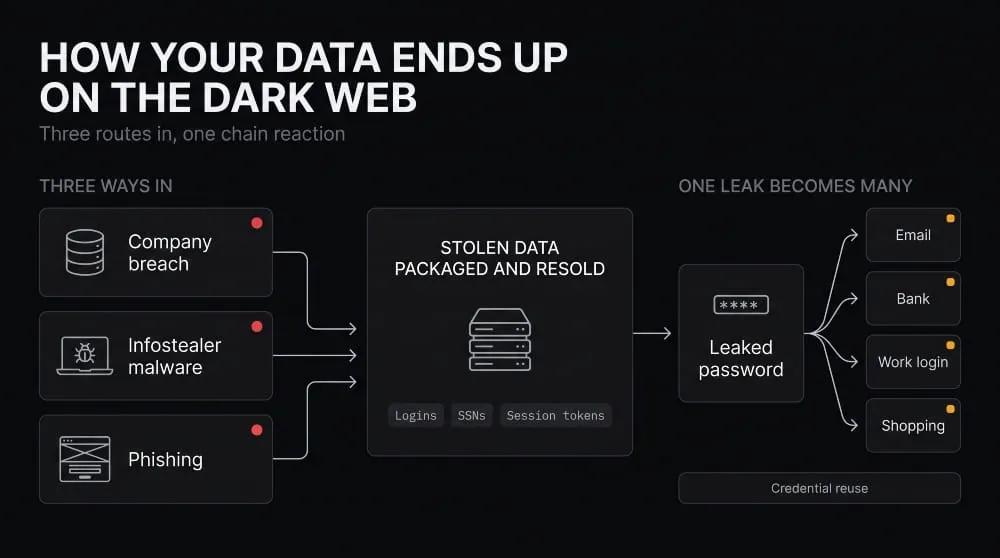
Breaches, infostealer malware, and phishing
A breach exposes whatever a company stored about you, and attackers often bundle and resell the data within days. Infostealer malware works differently: it runs quietly on an infected device, harvests saved passwords, browser data, and session cookies, and packages them into “logs” sold in bulk. Phishing skips the technical step entirely and persuades the victim to type credentials into a fake page.
The three feed each other. A phishing victim’s logins become a stealer log, and a breached company’s customer list becomes the target list for the next phishing campaign. This guide is about protecting your data, not about browsing safely; for that, see the guide on how to access the dark web.
Credential reuse and why one leak becomes many
Reusing a password turns one leak into access to every account that shares it. Attackers take a leaked email-and-password pair and automatically try it against banks, retailers, email providers, and work systems, a technique called credential stuffing.
That’s why a breach at a service you barely remember can compromise your primary email account months later. The original leak was small; the reuse made it large. Unique passwords break the chain because a leaked credential opens only one door.
What gets sold: logins, SSNs, financial data, session tokens
The most commonly traded data is login credentials, followed by identity data such as Social Security numbers, dates of birth, and addresses, and financial data such as card details and bank account information. Session tokens are a growing category. These cookies keep you logged in, and stealing one can let an attacker access an account without a password or one-time code.
Different data has different shelf lives. You can change a leaked password in minutes, but a Social Security number stays valid for life, which is why identity data deserves the most protection.
Identity Theft and Fraud Risks From Dark Web Exposure
Exposed data becomes harmful when someone uses it to take over existing accounts or open new ones in your name. Which risk you face depends on what leaked.
Dark web identity theft: how stolen data is used
Dark web identity theft starts when a buyer combines pieces of leaked data into a usable profile. A name, address, date of birth, and Social Security number can be enough to apply for credit, file a fraudulent tax return, or open accounts. At the same time, a leaked email and password pair is typically used to try to log in elsewhere.
Buyers rarely work with one source. They merge records from several breaches to fill gaps, so data you thought was harmless on its own can complete a profile when combined with another leaked item.
Dark web fraud: account takeover, new-account fraud, synthetic identity
Dark web fraud takes three main forms. Account takeover means logging into an existing account using stolen credentials or session tokens. New-account fraud means opening credit cards, loans, or utilities using stolen identity details. Synthetic identity fraud combines a real Social Security number, often from a child or someone not actively using credit, with invented names and details to create a person who doesn’t exist.
Synthetic identity fraud is the hardest to spot because the victim may never see a bill. The damage often surfaces years later, when a child applies for their first credit or student loan.
Warning signs your data is being abused
The clearest signs are things you didn’t do: password reset emails you didn’t request, login alerts from unfamiliar locations, unexpected two-factor codes, accounts or credit inquiries you don’t recognize, and mail about debts that aren’t yours. Rejected credit applications or unexpected changes to your credit report are also red flags.
Any one of these is worth checking, and two together mean you should act immediately using the steps in the section on what to do if your information is already exposed.
How to Protect Yourself From the Dark Web (Step by Step)
The most effective protection comes down to a few habits: unique passwords, strong multi-factor authentication, frozen credit, phishing awareness, a locked-down email account, and ongoing breach checks. Each step blocks a specific way stolen data gets used.
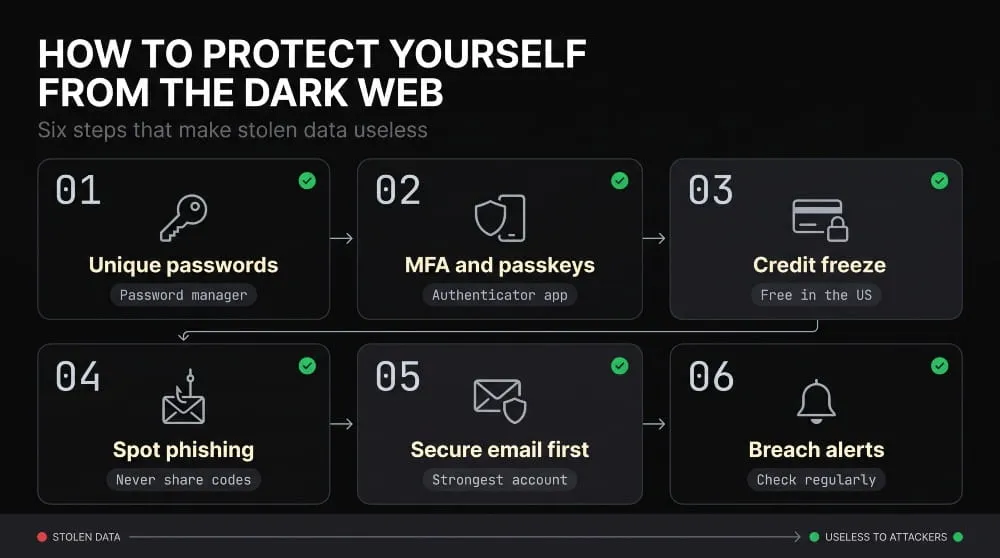
Unique passwords and a password manager
Use a different, long, randomly generated password for every account, and store them in a password manager so you don’t have to remember them. This single habit defeats credential stuffing, because a leaked password opens only the account it belongs to.
Start with the accounts that matter most, such as email, banking, and anything that stores payment details, then work through the rest over time.
Multi-factor authentication and passkeys
Turn on multi-factor authentication for every account that offers it, and prefer an authenticator app or hardware security key over text messages, which can be intercepted or redirected. Where available, passkeys are stronger still, because there is no password to steal or phish.
Multi-factor authentication isn’t a complete answer, since stolen session tokens can bypass it, but it blocks most attempts that rely only on a leaked password.
Credit freezes and fraud alerts.
In the United States, you can freeze your credit with each of the three major bureaus for free, which stops most new accounts from being opened in your name. A fraud alert is a lighter option that asks lenders to verify your identity before extending credit.
A freeze is the strongest defense against new-account fraud and synthetic identity misuse, and you can temporarily lift it when you apply for credit yourself. Consider freezing your children’s credit too.
Spotting phishing and limiting what you share
Be suspicious of urgent messages that ask you to log in, confirm details, or act quickly, whether they arrive by email, text, or phone. Go to the site directly instead of clicking a link, and never read one-time codes to anyone who contacts you.
Sharing less also shrinks what can leak. Avoid giving your Social Security number, date of birth, or phone number to services that don’t need them.
Securing email and high-value accounts first
Your primary email account is the key to everything else, because password resets for your other accounts go there. Give it your strongest password, a hardware key or authenticator app, and a recovery method you control. Then do the same for banking, payment, and cloud storage accounts.
Securing these first means that even if an attacker compromises a less important account, they can’t use it to reach the ones that matter.
Breach alerts and ongoing checks
Sign up for breach notifications so you learn about new exposure quickly. Many password managers, browsers, and banks include them, and free breach-lookup services can tell you whether your email address appears in known leaks. Review your credit reports periodically and check your financial statements for charges you don’t recognize.
Alerts only help if you act on them, so decide ahead of time what you will change first when one arrives.
What Dark Web Protection Services Include
A dark web protection service typically combines leaked-data surveillance with alerts and, in many cases, broader identity theft tools. What’s included varies widely between providers, so read the feature list rather than the marketing name.
Dark web surveillance and breach alerts
The core feature is surveillance: the service searches breach data and criminal sources for the identifiers you register and alerts you if one appears. Better services say what was exposed and where it came from, so you know whether to change a password or freeze your credit.
The limits are worth knowing. No service sees the whole dark web, since much of it is closed, and surveillance can only report exposure, not prevent it.
Identity protection extras (credit monitoring, restoration support, insurance)
Many services bundle credit monitoring, which alerts you to new inquiries and accounts, along with restoration support that helps you recover if your identity is stolen. Some include identity theft insurance that reimburses certain recovery expenses, subject to policy terms.
These extras set identity theft protection apart from dark web surveillance alone, and they matter most when something goes wrong. Check exactly what the insurance covers before counting on it.
Personal protection vs. household plans
Personal plans cover one adult’s identifiers, while household or family plans cover several people, often including children. Family coverage matters because children’s Social Security numbers are attractive for synthetic identity fraud and are rarely monitored.
If you’re comparing options, check how many people are covered, whether minors are included, and what information each person has to register.
Free vs. paid: what you get and what you give up
Free options, such as breach-lookup sites and alerts built into password managers, browsers, or banks, are useful for basic awareness and cost nothing. Paid services usually add broader surveillance, credit monitoring, restoration help, and insurance in exchange for a recurring fee and more personal data you hand over to register for monitoring.
Free alerts are a reasonable baseline, but they don’t help you recover once someone steals your identity. If you are comfortable managing recovery yourself, free tools plus a credit freeze cover a lot of ground.
Questions to ask before choosing a service
Ask what data sources it searches, how quickly it alerts you, and what you have to register to use it. Ask what happens after an alert, whether there is human restoration support or only a notification, and what the insurance does and doesn’t cover.
Also ask how the provider handles the sensitive data you give it, since a monitoring service that holds your Social Security number becomes a target itself.
If Your Information Is Already on the Dark Web
If your information has leaked, change the affected passwords, turn on stronger authentication, and freeze your credit first. Speed matters more than perfection, so begin with the accounts that would hurt most to lose.
First 24 hours: what to change and lock down
Change the exposed password immediately, and change it everywhere else you used it. Secure your email account next, then banking and payment accounts. Turn on multi-factor authentication, sign out of all active sessions to stop stolen tokens from working, and freeze your credit if identity data was exposed.
Check recent activity on the affected accounts and watch for new password-reset emails, which signal someone is trying to take over.
Longer-term steps
Over the following weeks, review your credit reports, set up ongoing breach alerts, and consider a fraud alert or an extended identity theft report if you have evidence of misuse. For a deeper walkthrough of how to confirm what has leaked, see the guide on whether your information is on the dark web.
If you become a victim of identity theft in the United States, the Federal Trade Commission’s IdentityTheft.gov builds a personalized recovery plan and helps you document the problem.
What you can and can’t get removed.
You generally can’t remove data from the dark web, because it sits in closed forums and marketplaces outside any takedown process and may already be copied elsewhere. Treat anyone offering guaranteed removal with skepticism.
What you can do is shrink the surface that feeds it. You can request removal from data broker and people-search sites, close accounts you no longer use, and make the leaked data worthless by changing credentials and freezing your credit.
Dark Web Protection for Businesses
Businesses face the same exposure as individuals, but on a larger scale, with the added risk that one employee’s leaked login can open company systems. Protection means finding exposed credentials tied to your domain before an attacker uses them.
Why employee credentials are the main exposure
Employee credentials are the most useful stolen asset for attackers targeting a business. The Verizon 2026 Data Breach Investigations Report found that stolen credentials appear in 39% of all breaches and remain the primary way attackers move laterally, escalate privileges, and monetize access after initial entry. Even when the initial entry point is something else, credentials often let an attacker go further.
Many leaked work credentials don’t come from your own systems at all. Employees reuse work emails and passwords on third-party sites, and infostealer malware on a personal device can capture a work login without breaching the company.
Domain-level protection vs. individual protection
Individual protection monitors a person’s identifiers, while domain-level protection monitors every address and credential tied to an organization’s domain. A business needs the second, because it can’t ask every employee, contractor, and vendor to register personally.
Domain-level coverage finds exposed credentials across the whole organization, including former employees whose accounts were never fully shut down. That coverage depends on matching, so it works best alongside a process for responding to what turns up.
Brand protection: impersonation, leaked customer data, fake domains
Brand protection extends beyond credentials to the ways attackers abuse a company’s name. This includes lookalike domains used in phishing, fake social accounts, and customer data that surfaces in leak forums.
Detecting these early lets a company act before customers are deceived, by reporting a fraudulent domain for takedown or notifying affected customers about a leak.
Managed approaches for MSSPs and MSPs protecting multiple clients
Managed security providers protect many clients at once, so they need monitoring that separates data by client, controls who can see what, and presents results under the provider’s own brand. Running this manually for dozens of domains doesn’t scale, which is why many providers use a platform built for the job.
Mispar is a wholesale platform that MSSPs resell under their own brand, with monitoring features built for multi-client, white-label delivery.
Compliance and cyber-insurance angle
Documented dark web monitoring supports compliance and cyber-insurance applications because both increasingly ask what controls an organization has to detect stolen credentials. Records showing what was found, when, and how you handled it serve as evidence in audits and client due diligence reviews.
Requirements vary by framework and insurer, so confirm exactly what your auditors and underwriters expect before relying on any one control.
Dark Web Protection Compared: Personal, Identity Theft, and Business
The right protection depends on whose data you are protecting and what you need to do after an exposure is found.
| Type | Coverage | Who It’s For | What It Doesn’t Cover |
|---|---|---|---|
| Personal dark web protection | Passwords, MFA, credit freeze, breach alerts for your own email and identifiers | Individuals comfortable managing their own recovery | Credit monitoring, restoration help, and insurance unless added separately |
| Identity theft protection services | Dark web surveillance plus credit monitoring, restoration support, and often insurance | Individuals and families who want recovery help after an incident | Business domains, employee credentials, and brand abuse |
| Business dark web protection | Domain-level credential monitoring, brand and impersonation detection, response workflows | Organizations and MSSPs protecting clients | Personal identity theft recovery for individual employees |
Frequently Asked Questions (FAQ)
How do I protect myself from the dark web?
Use a unique password for every account, turn on multi-factor authentication, freeze your credit, and sign up for breach alerts. These steps don’t stop data leaks, but they make leaked data much harder to use. Secure your email account first, since it controls password resets for everything else.
Can you protect yourself from the dark web?
You can’t stop companies you don’t control from stealing your data, but you can limit the damage. Unique passwords, strong authentication, and a credit freeze make stolen data much less useful, and alerts help you respond quickly. Protection reduces harm; it doesn’t prevent exposure entirely.
Does dark web protection stop identity theft?
No service stops identity theft entirely, but good protection makes it harder and helps you recover faster. A credit freeze blocks most new-account fraud, while surveillance and credit monitoring tell you quickly when something goes wrong. Restoration support, where included, helps with cleanup afterward.
Is free dark web protection enough?
For many people, free protection is a solid baseline. Free breach lookups, password-manager alerts, and a free credit freeze cover the main risks. Paid services add credit monitoring, restoration help, and insurance, which matter most if you want hands-on support after an incident.
What’s the difference between dark web protection and dark web monitoring?
Protection is the full set of steps that reduce risk, while monitoring is the ongoing watch for new exposure, one part of it. Monitoring tells you something has leaked, and protection includes what you do to reduce the harm and how you respond. See our guide to dark web monitoring for the detection side.
How do businesses protect themselves from dark web threats?
Businesses protect themselves by monitoring their domain for leaked employee credentials, enforcing multi-factor authentication, and having a response process for what monitoring finds. They also watch for brand impersonation and keep records for audits and insurers. Organizations that serve many clients often use a multi-client monitoring platform so protection scales.