
Compromised credentials are logins, tokens, keys, or other authentication secrets that an unauthorized person has obtained or can access, so they can no longer be trusted to prove who is signing in. Once a credential is compromised, the safe response is to treat it as burned: confirm whether it has been used, cut off access, and replace it. This guide explains how credentials get compromised, how to spot them, and exactly what to do next.
What Are Compromised Credentials?
Compromised credentials definition
Compromised credentials are authentication details, such as a username and password, an access token, or an API key, that someone other than the legitimate owner has gained access to or may have copied. The credential still works, which is what makes it dangerous. The system cannot tell the difference between the real user and anyone holding the same secret.
A credential does not have to be proven stolen to count. If it appeared in a breach, was typed into a phishing page, or was left in a public place, treat it as compromised until shown otherwise.
Credential compromise meaning: state vs event
The term credential compromise is used in two ways. As a state, it describes a credential that is no longer secret. As an event, it describes the moment or process that caused it, such as a successful phishing attack or a database breach.
The distinction matters in practice. The event tells you what to investigate and fix, such as how the secret escaped. The state tells you what to do right now: assume the secret is known and replace it.
Compromised vs stolen vs leaked vs exposed credentials
These terms overlap, but each points to a different situation, and the right response differs slightly.
| Term | What It Means | Typical Cause |
|---|---|---|
| Compromised | Anyone unauthorized has or may have the credential | Any of the below |
| Stolen | Taken deliberately by an attacker | Phishing, malware, credential dumping |
| Leaked | Published or traded after a breach | Third-party database breach |
| Exposed | Left accessible by mistake | Public repository, open storage |
Compromised is the umbrella term. Stolen, leaked, and exposed describe how it happened. For the attacker-side methods, see our guide to credential theft. For credentials that have surfaced in breach data, see our page on leaked credentials.
What counts as a credential
A credential is anything that proves identity or grants access. That includes passwords and passphrases, session tokens and cookies, API keys, SSH keys, service account secrets, OAuth tokens, and single sign-on assertions.
Machine credentials deserve as much attention as human ones. Service accounts and API keys are often long-lived, broadly permitted, and rarely rotated so that a compromise can go unnoticed for a long time.
How Credentials Become Compromised
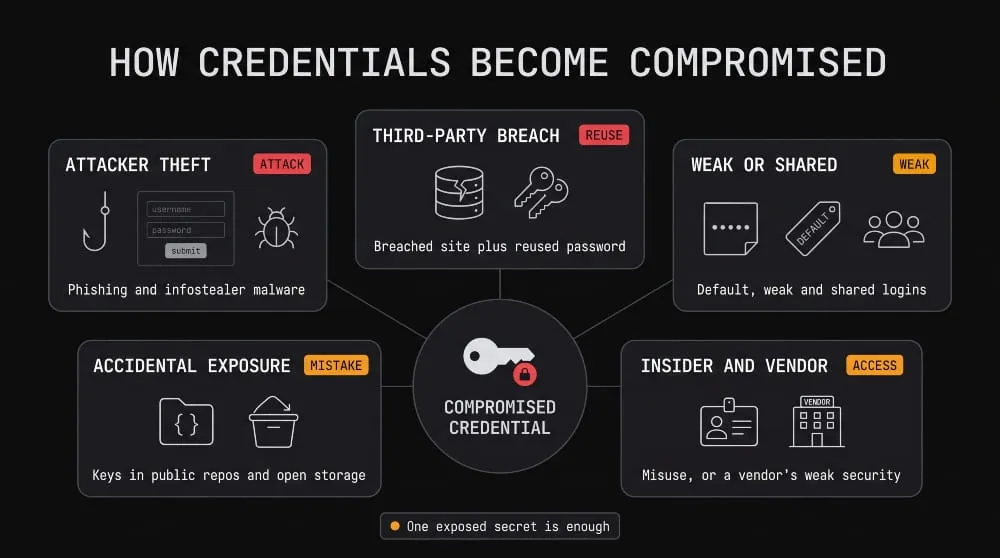
Theft by attackers
The most direct route is theft. Attackers capture credentials through phishing pages that imitate real sign-in screens, infostealer malware that copies saved passwords and session cookies from a device, or tools that extract credentials from memory on an already compromised machine. These methods are covered in detail in our guide to credential theft.
Third-party breaches and password reuse
A credential can be compromised without any attack on your own systems. When a third-party service is breached, criminals can obtain the usernames and passwords stored there. If the same password protects a work account, that account is now at risk too.
Attackers exploit this by trying leaked pairs against many sites, a technique explained in our guide to credential stuffing. Password reuse turns an outside breach into an internal incident.
Weak, default and shared credentials
Some credentials are compromised in effect before anyone steals them. Default passwords on devices and applications are publicly documented, weak passwords are easy to guess, and shared logins mean many people know the secret and no one person can be traced. Each of these shrinks the effort an attacker needs.
Exposure through misconfiguration
Credentials are frequently exposed by accident. Common examples include API keys committed to public code repositories, secrets stored in configuration files that get published, cloud storage buckets left open to the internet, and credentials pasted into tickets, chat channels, or documents with broad sharing. Automated scanners find these within minutes, so treat an exposed secret as compromised the moment it is published.
Insider and vendor access
People with legitimate access can also compromise credentials, whether through carelessness, such as writing down or sharing a login, or through malicious intent. Vendors and contractors add another path, since their credentials in your systems are only as safe as their own security. Offboarding gaps, where access is not removed when someone leaves, leave valid credentials in circulation.
Why Compromised Credentials Are So Dangerous
Valid logins look like normal activity.
Compromised credentials are dangerous because a successful login with a valid credential triggers none of the alarms built for malware or exploits. The system sees an authorized user. Security tools that watch for malicious files or known vulnerabilities have little to flag, which is why identity-focused monitoring is needed to catch credential-based intrusions.
Account takeover, privilege escalation, lateral movement
Once inside, an attacker with a valid credential can take over the account, read or send email, and access whatever the user can. From there, they look for higher-privilege accounts, such as administrators, and use them to move to other systems. A single low-privilege credential can become a path to the most sensitive systems if permissions are broad.
Link to ransomware and fraud
Compromised credentials are a common first step toward ransomware and fraud. Verizon’s 2026 Data Breach Investigations Report found that half of the ransomware victims in its data had a credential or infostealer event in the 95 days before the attack. Ransomware operators increasingly buy working logins from initial access brokers rather than breaking in themselves.
The same access enables business email compromise, payment fraud, and data theft, since the attacker acts with the victim’s own permissions.
How long compromised credentials stay usable
A compromised credential stays usable until someone changes it or revokes it. Passwords often remain valid for months or years, and API keys and service account secrets can last even longer. Session tokens usually expire sooner, but they can be valid long enough to cause damage. This is why speed matters: the shorter the gap between compromise and response, the less an attacker can do.
Signs of Compromised Credentials
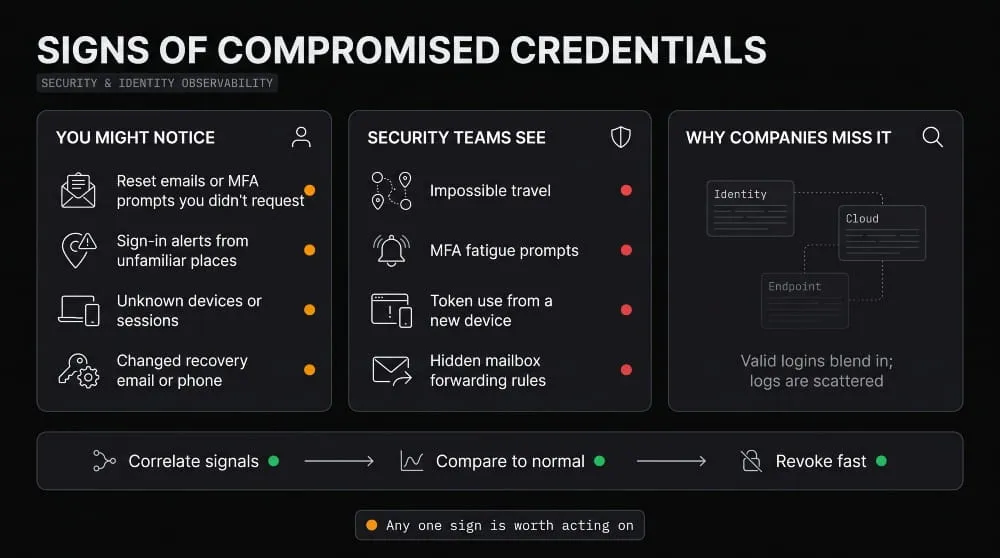
Signs for individuals
Individuals may notice password reset emails or MFA prompts they didn’t request, sign-in alerts from unfamiliar locations or devices, unknown devices or sessions in account settings, changes to recovery email or phone details, and messages or purchases they didn’t make. Treat any of these as a possible compromise, and secure the account right away.
Signs for security teams
Security teams should watch for impossible travel, where one account signs in from distant locations within a short time; repeated MFA prompts a user did not trigger, which is often called MFA fatigue; and token use from a device the user has never used. Other signals include new inbox forwarding or mailbox rules that hide or redirect messages, sign-ins at unusual hours or to applications the user never touches, and bursts of failed logins followed by a success.
Credential compromise attacks and why companies miss them
Companies often miss credential compromise attacks because the activity blends in. Logs are scattered across identity providers, cloud services, and endpoints, and no single source shows the full picture. Malware-tuned alerts don’t fire, and legitimate users generate enough noise to hide a quiet intruder. Detection improves when you correlate identity signals across systems and compare them against each user’s normal behavior.
How to Detect Compromised Credentials
Log and identity-signal analysis
The core method for detecting compromised credentials is analyzing authentication logs and identity signals for behavior that departs from normal. Review sign-in location, device, time, and application, along with privilege changes and new MFA registrations. Baselines for each account make anomalies stand out, and combining identity logs with endpoint and network data helps confirm whether a suspicious login is real.
Breach-database and external exposure checks
Some compromises show up outside your network before they appear in your logs. Checking whether your domains and employee email addresses appear in known breach data and stealer logs can reveal exposed credentials before an attacker uses them. Our guide to dark web monitoring explains where this data comes from and how matching works.
Detecting abuse vs detecting exposure
Detection falls into two different jobs. Detecting abuse means spotting a compromised credential being used through anomalous logins and behavior. Detecting exposure means finding that a credential has been leaked or stolen, whether or not anyone has used it yet.
Both are needed. Exposure detection gives early warning and lets you reset credentials before misuse. Abuse detection catches the cases where exposure went unseen.
Honeytokens and decoy credentials
Honeytokens are fake credentials, keys, or documents placed where an attacker would look, such as a file share, a code repository, or a password store. No legitimate user has a reason to touch them, so any use is a high-confidence sign that someone is searching for credentials. They are cheap to deploy and produce few false alarms.
Common detection gaps
Typical gaps include no visibility into service accounts and API keys, logs not retained long enough to investigate, unmonitored MFA events, and no process for checking external exposure. Many teams also detect a suspicious login but have no automated way to revoke the session, which leaves a window for abuse.
Compromised Credentials Monitoring
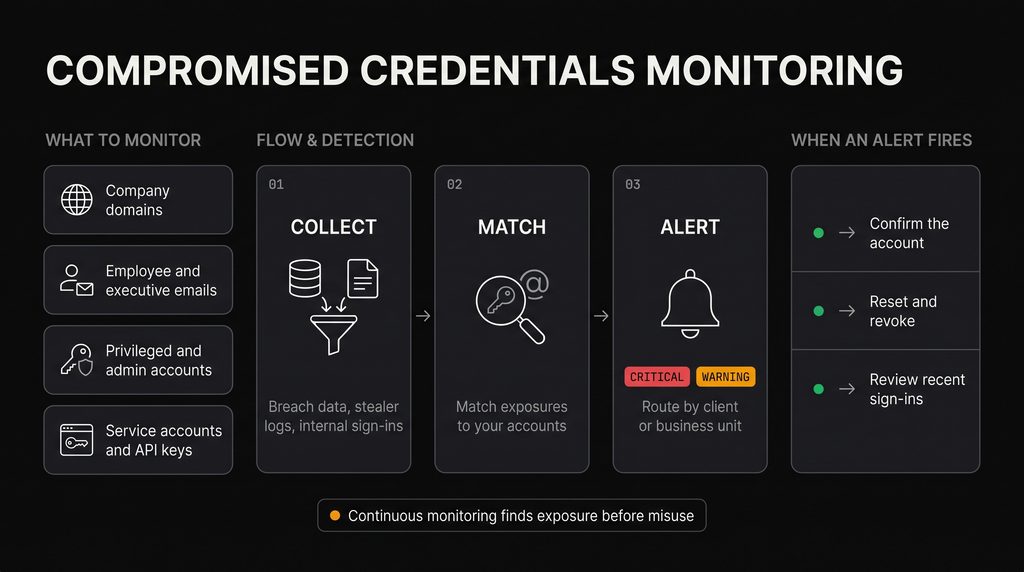
What continuous monitoring covers
Compromised credentials monitoring is the ongoing process of watching for signs that credentials have been exposed or are being misused, rather than checking once after an incident. It combines external sources, such as breach datasets and stealer logs, with internal identity signals, so that a new exposure or suspicious sign-in triggers an alert instead of waiting to be discovered.
What to monitor
Start with the assets attackers target most. That means your company domains, employees’ and executives’ email addresses, privileged and administrator accounts, and service accounts and API keys with broad access. Include third-party and contractor accounts that connect to your systems, since they are a common weak point.
Alerts: what to do when one fires
When an alert says a credential has been exposed, confirm which account it belongs to, check whether it is still valid, and reset it. Then review recent sign-ins for that account to see whether it was used. Handle alerts on privileged accounts first, and move any sign of active misuse straight to the containment steps below.
Monitoring for MSSPs and larger teams
Teams managing many organizations or accounts need monitoring that works across all of them, with alerts routed by client or business unit. Mispar’s monitoring feature is built for that multi-client case.
What to Do If Credentials Are Compromised
Immediate containment steps
When credentials are compromised, contain first, then investigate. Disable or restrict the affected account, end active sessions, and isolate any device suspected of malware. Preserve logs before they rotate out, since you need them to understand what happened.
Reset credentials and revoke sessions and tokens.
A password reset alone is not enough. Reset the password, revoke all active sessions and refresh tokens, remove any MFA methods you don’t recognize, and rotate API keys or service secrets the account could access. Stolen tokens can remain valid after a password change, so you must revoke them.
Scope analysis: what the credential could reach
Determine what the credential had access to and whether it was used. Review sign-ins, mailbox rules, file access, privilege changes, and new accounts or keys created during the exposure window. This tells you whether you are dealing with a contained exposure or a broader breach, and which other credentials may also need replacing.
Password reset guidance after a breach
NIST’s digital identity guidance supports changing a password when evidence shows it has been compromised, and checking new passwords against lists of known-breached values so people don’t choose one that is already circulating. It also moves away from forcing routine periodic changes without cause. The practical rule is to reset on evidence of compromise, not on a calendar, and to block known-compromised passwords at the time they are set.
Notification and documentation
Record what you found, when, what was affected, and what you did. Depending on your industry and the data involved, you may need to notify customers, partners, regulators, or insurers within set timeframes, so involve legal and compliance early. Good documentation also supports audits and improves your response next time.
How to Prevent Credential Compromise
Phishing-resistant MFA
Phishing-resistant authentication, such as passkeys and FIDO2 security keys, is the strongest single defense. These methods tie logins to the genuine site, so a fake page cannot capture anything usable. Prioritize them for administrators, finance staff, and anyone with access to sensitive systems.
Unique passwords and a password manager
Unique passwords for every account stop one breach from spreading. A company-approved password manager makes that practical by generating and storing strong passwords, and many can flag ones that appear in breach data.
Least privilege and rotation
Limit what any single credential can reach. Give users and services only the access they need, remove unused accounts promptly, and rotate API keys and service account secrets so a compromised one expires quickly. Keep secrets out of code repositories and shared documents.
Conditional access and session controls
Conditional access policies check device health, location, and risk before granting access, and shorter session lifetimes limit how long a stolen token is useful. Binding sessions to devices makes stolen tokens harder to reuse elsewhere.
Employee training
Training works best when it is short, frequent, and based on current lures, including AI-written messages and phone-based social engineering. Make reporting a suspicious message easy and reward it, so problems surface early instead of staying hidden.
Frequently Asked Questions (FAQ)
What are compromised credentials?
Compromised credentials are logins, tokens, keys, or other authentication secrets that an unauthorized person has obtained or may be able to use, so they can no longer be trusted to verify identity.
What is credential compromise?
Credential compromise occurs when a credential is no longer secret. It can result from phishing, malware, a third-party breach, accidental exposure, or insider misuse.
How do I know if my credentials are compromised?
Signs include unexpected password resets or MFA prompts, sign-in alerts from unfamiliar locations, unknown devices or sessions, changed recovery details, and messages you didn’t send. You can also check whether your email address appears in known breach data.
What is the difference between compromised and leaked credentials?
Compromised is the broader term for any credential an unauthorized party has or may have. Leaked credentials are one cause, where the credential was published or traded after a breach. A credential can be compromised without ever being leaked, for example through a phishing attack.
How do you detect compromised credentials in an enterprise?
Enterprises detect them by analyzing identity and authentication logs for unusual behavior, monitoring external sources for exposed credentials, tracking MFA and token activity, and deploying honeytokens. Combining these gives coverage of both exposure and active misuse.
What should I do first if credentials are compromised?
Contain first: disable or restrict the account, end active sessions, and isolate affected devices. Then reset the password, revoke tokens, rotate any secrets the account could reach, and review activity to see whether the credential was used.