
Yes, MFA can be bypassed. In most real attacks, the control isn’t broken so much as routed around: attackers steal a session after a user completes MFA, trick someone into approving a login, or exploit a weak recovery path. Stopping it takes phishing-resistant sign-in, protection for the session that follows, and exposed credential monitoring that flags stolen credentials before anyone uses them.
What Is MFA Bypass?
MFA bypass is any technique that gets an attacker into an account protected by multi-factor authentication without defeating the second factor itself. MFA can be bypassed, and it happens routinely, usually by stealing a session, manipulating a user into approving a login, or exploiting a gap in recovery or configuration.
It helps to separate bypass from the idea that MFA is broken. MFA still blocks the large majority of password-only attacks, and a stolen password alone is rarely enough to get in. Attackers have adapted by targeting what happens around the check instead of the check itself. Microsoft’s Entra documentation cites its 2024 Digital Defense Report, which recorded a 146% rise in adversary-in-the-middle phishing attacks over one year, and notes that token theft becomes the logical next vector as organizations adopt stronger sign-in methods.
That is why attackers go after the session instead of the password. Once a user authenticates, the service hands their browser or app a token that proves the login happened. A stolen token carries that proof, so the attacker never faces an MFA prompt.
| Technique | What It Abuses | What Stops It |
|---|---|---|
| Adversary-in-the-middle (AiTM) phishing | A reverse proxy relays the real login and captures the session cookie | Phishing-resistant MFA (FIDO2, passkeys), device-bound sessions |
| Phishing kits and phishing-as-a-service | Ready-made AiTM tooling that lowers the skill needed | Phishing-resistant MFA, email filtering, user reporting |
| QR code phishing | Lures moved to personal phones outside corporate email controls | Phishing-resistant MFA, managed-device requirements |
| Infostealer malware | Session cookies and credentials harvested from the endpoint | Endpoint protection, compliant-device conditional access, short sessions |
| MFA fatigue and push bombing | Repeated approval prompts until a user taps accept | Number matching, phishing-resistant MFA |
| SIM swapping and help-desk social engineering | SMS codes and weak identity checks on resets | Non-SMS factors, strict help-desk verification |
| AI deepfakes and voice impersonation | Convincing impersonation of executives or employees | Out-of-band verification, phishing-resistant MFA |
| MITM and XSS | Intercepted traffic or injected script reading tokens | TLS, HttpOnly and Secure cookies, content security policy |
How Attackers Bypass MFA: The Main Techniques
Most MFA bypass attacks fall into a handful of patterns. The table below maps each to the weakness it exploits and the control that addresses it.
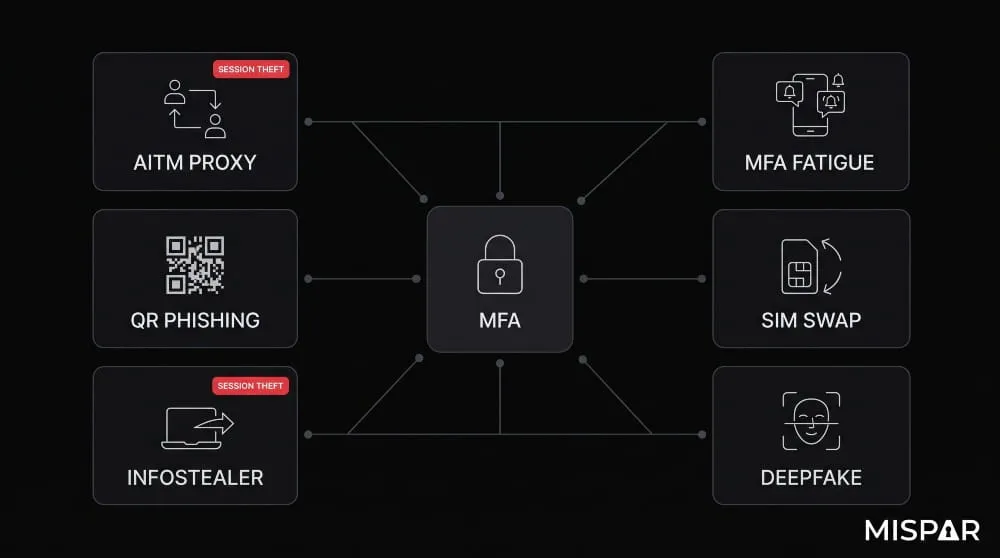
Adversary-in-the-middle (AiTM) reverse proxy phishing.
In an AiTM attack, the victim lands on a page that looks like their real login. Behind it, a reverse proxy passes everything to the genuine service in real time, so the password and MFA code are both valid. When the login succeeds, the proxy keeps the resulting session cookie. CISA describes phishing kits with reverse proxies that steal login credentials, MFA codes, and session cookies to get around MFA protection.
Phishing kits and phishing-as-a-service
The tooling behind AiTM attacks is widely available. Evilginx-based frameworks, EvilProxy and Phantom are examples of named kits, some open source and some rented as services, and they come and go. They share one design: relay the login, capture the session. Because they package the technique, attackers no longer need to build their own proxy infrastructure.
QR code phishing
QR code phishing, often called quishing, places the lure in a QR code inside an email or attachment. Scanning it moves the victim to a phone, which usually sits outside the company’s link scanning and endpoint controls. The destination is typically the same AiTM page described above, so the QR code is a delivery trick rather than a separate bypass.
Infostealer and malware-based bypass
Infostealer malware runs on a victim’s device and collects browser-stored credentials and session cookies. An attacker who imports a stolen cookie into their own browser inherits an already-authenticated session, so MFA is never triggered. This is an MFA bypass without any phishing page at all, and it works even against users who never entered anything on a fake site.
MFA fatigue and push bombing
In push bombing, an attacker who already has a password repeatedly triggers approval prompts, hoping the user taps accept to make them stop. CISA recommends number matching as an interim measure for organizations using push-based MFA, though it ranks below phishing-resistant methods because it still relies on user judgment.
SIM swapping and help-desk social engineering
SMS codes can be diverted when an attacker persuades a carrier to move a number to a new SIM. A related route skips the factor entirely: the attacker convinces a help desk to reset or re-enroll MFA for the account. In both cases, the weak point is the recovery process, not the authenticator.
AI deepfakes and voice impersonation
Generative AI makes impersonation cheaper. A cloned voice or convincing video can pressure a help desk or an employee into approving a reset or sharing a code. The defense is as procedural as it is technical: verify requests through a separate, known channel before changing anything about an account’s authentication.
Software-based bypass attacks (MITM and XSS)
Some attacks target the application. A man-in-the-middle position on an insecure connection can capture tokens in transit, and cross-site scripting can run injected code that reads tokens stored where scripts can reach them. These are weaknesses in how a service handles sessions, so they are fixed in the application’s configuration and code.
Token and Session Cookie Theft: The Bypass That Starts After Login
Token theft is the bypass that begins after the user has already passed MFA. The attacker steals the token that proves the login and replays it, so the service sees a legitimate, already-authenticated session.
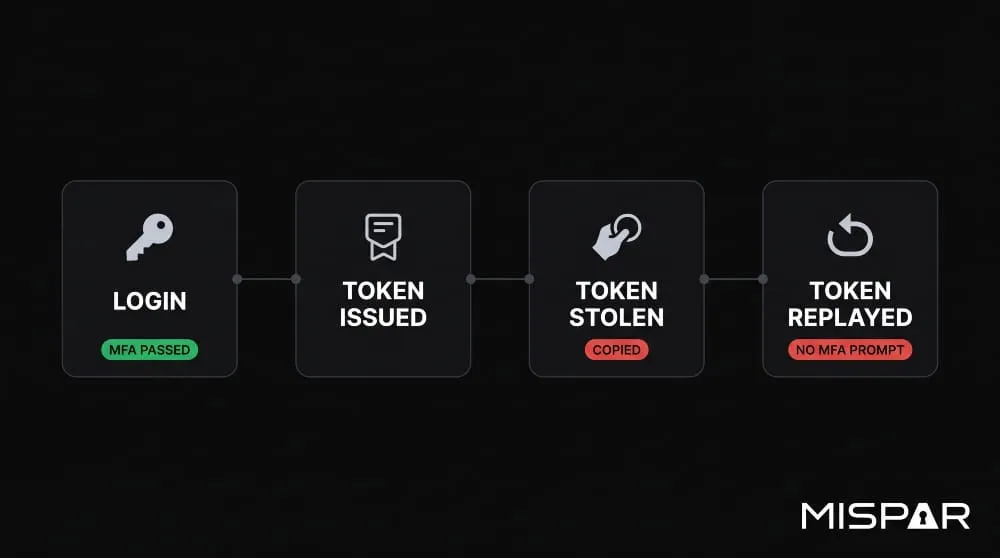
What is token theft?
A token is a digital object a service issues after authentication to grant access without asking for credentials again. Token theft is when someone else captures that object. Microsoft’s guidance states that once a token is stolen, an adversary can impersonate the user and access or exfiltrate data, including in cases that bypass MFA.
Session token vs access token vs refresh token vs OAuth token
A session token, usually a cookie, tells a web app that this browser is logged in. An access token grants access to a specific resource for a short window; in Microsoft Entra, it typically lasts 60 to 90 minutes. A refresh token lets an app request new access tokens without another login and can last up to 90 days on a rolling basis. OAuth is the framework that issues access and refresh tokens to applications, so an OAuth token is an access or refresh token granted to an app, often after a user or admin consents. Refresh tokens are the most valuable to steal because they quietly renew access.
How does token theft happen?
There are four common routes. AiTM phishing captures the cookie during a proxied login. Infostealer malware lifts cookies and tokens from the endpoint. XSS lets injected script read tokens that the application exposes. A man-in-the-middle position captures them in transit. The first two account for most of what defenders see in practice.
Why MFA doesn’t protect a stolen session
MFA is checked at sign-in. A token is bearer proof that the check already happened, so presenting it does not trigger another one. In identity provider logs, the replay often looks like a normal sign-in where MFA was satisfied earlier, which is also why it is easy to miss.
What attackers do with a stolen token
The usual first moves are reading mail, creating inbox rules to hide replies, and running business email compromise against contacts. Attackers also register new devices or MFA methods to persist after the token expires, pull files from cloud storage, and pivot into other apps connected through single sign-on.
MFA Bypass in Microsoft 365, Azure and Okta
Can someone bypass Microsoft MFA?
Yes, but it is rarely Microsoft’s MFA being cracked. Attackers usually steal a session through AiTM phishing or infostealers, or they use accounts and protocols that conditional access never required MFA for. Microsoft’s own guidance treats token theft as the likely next step once phishing-resistant MFA is in place, which tells you where attackers go when the front door is hardened.
Microsoft 365 and Office 365 token theft
In Microsoft 365, a stolen session cookie or refresh token gives access to mail, files, and Teams without a fresh MFA prompt. Microsoft’s January 2026 write-up of a multi-stage AiTM and business email compromise campaign abusing SharePoint is one example of how these attacks chain a lure, a stolen session, and follow-on fraud.
Outlook and Teams account takeover through stolen tokens.
A stolen token for Outlook or Teams lets an attacker read conversations, send messages as the user, and create mailbox rules, all of which look like normal activity from a valid account. Colleagues trust messages that arrive from a real internal account, which makes these takeovers effective for payment fraud and further phishing.
Conditional access gaps and legacy authentication
Conditional access only protects what its policies cover. Exclusion groups left over from migrations, apps that do not participate in newer controls, and legacy protocols that cannot perform MFA all create paths where MFA is never enforced. Blocking legacy authentication closes one of the oldest and most reliable gaps.
Admin MFA exceptions as an attack surface
Features meant for convenience, such as temporary bypass options, trusted locations, and per-user exclusions, become an attack surface when they linger. An exception created for a break-glass account or a project and never reviewed is a standing hole. Treat every exclusion as something with an owner and an expiry date.
Okta MFA bypass risks
Okta deployments face the same classes of attack: session theft after AiTM or infostealers, push fatigue, and help-desk-driven resets. The mitigations are the same: phishing-resistant authenticators, tight session policies, and strict identity verification for recovery.
MFA Bypass in the Wild
Akira ransomware and SonicWall VPN MFA bypass
Starting in July 2025, researchers at Arctic Wolf observed Akira ransomware operators logging into SonicWall SSL VPNs, including accounts that had one-time-password MFA enabled. The exact bypass method was not confirmed publicly at the time. Still, investigators suspected stolen OTP seeds, possibly tied to exploitation of CVE-2024-40766, and advised resetting all credentials and OTP secrets on affected devices. One incident analysis described the path from VPN login to encryption taking under four hours. The lesson is that MFA can fail at the edge when the secrets behind it are exposed, with no phishing involved.
AiTM phishing campaigns in 2025 and 2026
AiTM campaigns have stayed active through 2025 and 2026, and Microsoft has documented multi-stage operations that pair proxied logins with email compromise. The pattern is consistent: a convincing lure, a relayed login and a stolen session, followed quickly by fraud or data theft.
Lessons from real incidents
Three themes recur. Attackers target secrets and sessions rather than users’ second factors. Speed matters, because the time between access and impact can be hours. And detection at the identity layer, such as unusual logins from hosting providers or tokens used from new locations, catches what MFA alone does not.
What CISA, Microsoft and OWASP Say About MFA Bypass
CISA’s fact sheet on Implementing Phishing-Resistant MFA calls FIDO/WebAuthn the only widely available phishing-resistant option, treats number matching as an interim step for push-based MFA, and lists SMS and one-time codes as vulnerable to phishing and SIM swap.
Microsoft’s guidance on tokens in Microsoft Entra ID recommends a layered defense: phishing-resistant credentials, hardened devices, device-based and risk-based conditional access, device-bound tokens and network-based enforcement. It also notes that access tokens can only be revoked when an app supports Continuous Access Evaluation.
OWASP’s Session Management Cheat Sheet covers the application side: protecting session cookies with secure attributes, issuing a fresh session identifier after login, enforcing timeouts and invalidating sessions on the server at logout.
How to Detect MFA Bypass and Token Theft
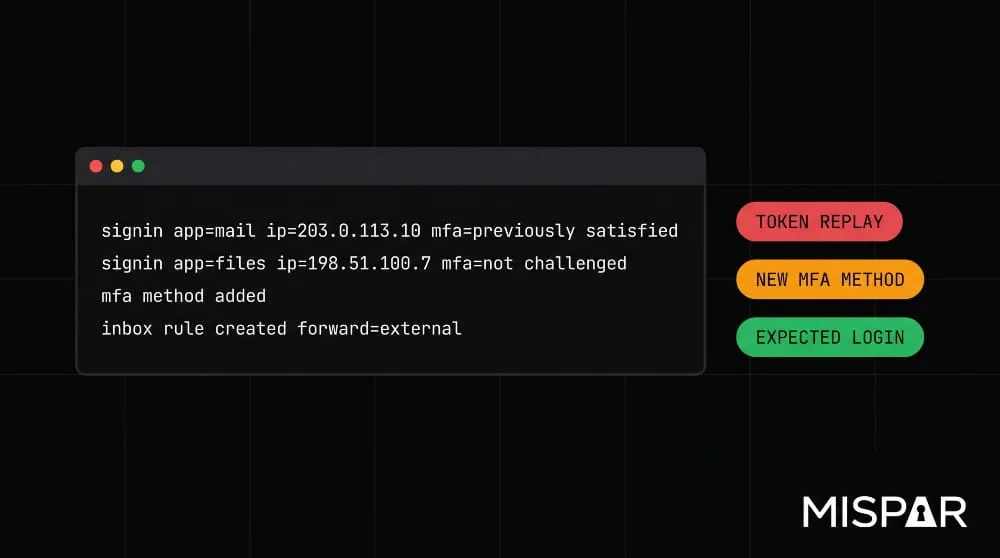
Sign-in log signals
Look for sign-ins to a new app or from a new IP or device that carry no fresh MFA challenge, impossible travel between sessions, and logins from hosting or VPS infrastructure instead of ordinary consumer or corporate networks. Identity protection tools also raise anomalous-token detections when a token’s characteristics or location look unusual, though some of these fire after the fact.
Detecting session token theft
A replayed token usually shows up as the same session suddenly appearing from a different location or client. Compare the user agent, IP, and device details of a session against its earlier activity, and treat a sudden change without re-authentication as suspicious.
Suspicious mailbox rules and MFA method changes.
After a takeover, attackers often create inbox rules that hide or forward mail, register a new MFA method, add a device, or grant consent to an OAuth app. Alert on each of these events, especially when they follow an unusual sign-in.
Credential and session exposure outside your network
Stolen credentials and session data often surface in infostealer logs and leak sources before they are used. Monitoring for exposed credentials gives an early signal that works even when the theft happened on an unmanaged device you cannot see.
How to Prevent MFA Bypass
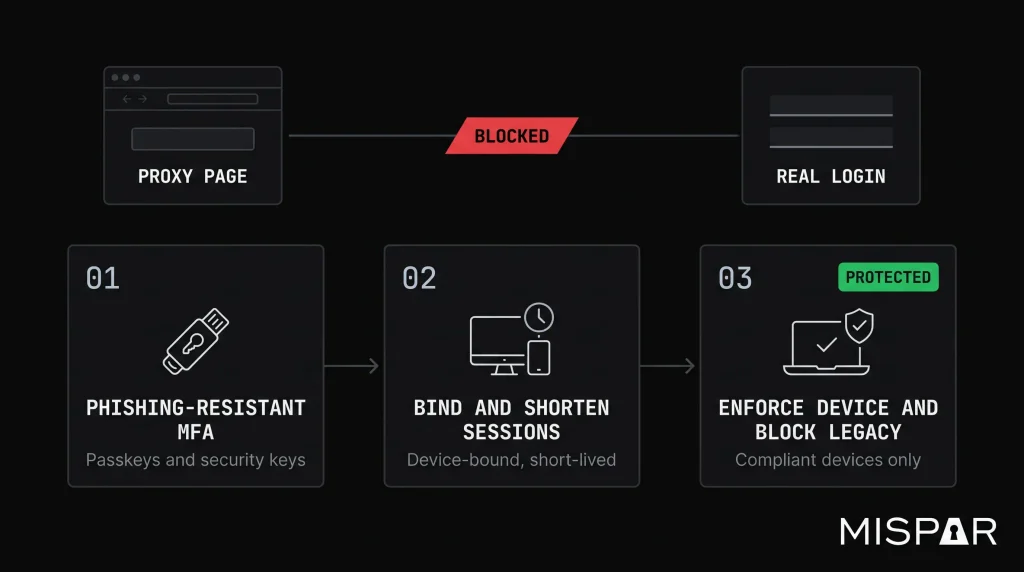
Phishing-resistant MFA (FIDO2, passkeys)
FIDO2 security keys and passkeys bind a login to the real site’s domain, so a proxy page cannot relay a usable response. This defeats AiTM, QR code phishing, and push fatigue at the source. Prioritize administrators and high-value users first, then expand.
Token protection and device-bound sessions
Token protection ties a session token to the device that received it, so a copied token fails when replayed elsewhere. Microsoft’s documentation notes that token protection covers native applications, not browser sessions, so confirm current coverage before relying on it as your only control.
Short token lifetimes and continuous access evaluation
Shorter sessions shrink the window a stolen token is useful. Continuous Access Evaluation lets a service revoke access in near real time when risk changes, which matters because ordinary access tokens otherwise live until they expire.
Conditional access with compliant devices
Requiring a compliant, managed device for sensitive apps means a token stolen from an unmanaged machine, or replayed from the attacker’s own browser, is less likely to be accepted. Pair it with risk-based policies that react to unusual sign-ins.
Blocking legacy authentication
Block protocols that cannot perform MFA outright. Audit what still uses them, migrate those workflows, and enforce the block so password-only access is not available as a side door.
Infostealer defenses
Keep endpoint protection current, limit use of work accounts on unmanaged or personal devices, discourage storing credentials in browsers on shared machines, and clear and rotate sessions when an endpoint is found infected. Reducing infostealer infections directly reduces stolen cookies.
How companies stop phishing attacks that bypass MFA
Companies layer controls. Email filtering and safe-link scanning reduce lure delivery, phishing-resistant MFA removes the proxy’s payoff, conditional access limits where tokens work, and a simple reporting path lets users flag suspicious messages quickly. No single layer is enough, which is why they are combined.
Token Theft Response Playbook
Revoking sessions and refresh tokens
Revoke the user’s sign-in sessions and refresh tokens first. Remember that access tokens may remain valid until they expire unless the app supports continuous access evaluation, so plan for a short residual window.
Credential reset and MFA re-registration
Reset the password, then review and remove any MFA methods you did not expect. Re-register the user’s authenticators from a trusted device, since an attacker may have added their own.
Identity provider response
Review sign-in and audit logs for the full session history, check for new devices, OAuth consents, inbox rules and forwarding, and confirm whether other accounts shared the same exposure. If the compromise involved edge-device secrets such as VPN OTP seeds, rotate those secrets too.
Post-incident review and hardening.
Determine how the token was stolen and close that route, whether through phishing-resistant MFA, a conditional access gap, or an infected endpoint. Then tighten session lifetimes and exclusions based on what the incident exposed.
How MSSPs Detect Stolen Sessions and Credentials
MSSPs see MFA bypass from two angles: the identity layer, where replayed tokens and odd sign-ins appear, and the exposure layer, where stolen data surfaces before it is used. The second is often earlier. Infostealer malware collects credentials and session data from endpoints, and that material can appear in leak sources before an attack. Tracking credential theft, infostealer malware, and leaked credentials alongside dark web monitoring gives an early warning. The monitoring features turn those exposures into alerts a service team can act on. Exposure monitoring does not see a token being replayed, so it complements identity-layer detection instead of replacing it. Mispar is a wholesale platform MSSPs resell under their own brand to deliver this kind of monitoring to clients.
Frequently Asked Questions (FAQ)
Can MFA be bypassed?
Yes. Attackers bypass MFA by stealing session tokens, relaying logins through phishing proxies, pressuring users into approving prompts, or abusing recovery and configuration gaps. The factor itself is rarely defeated directly.
Can someone bypass Microsoft MFA?
Yes, most often through token theft after AiTM phishing or an infostealer infection, or through accounts and protocols that conditional access does not cover. Phishing-resistant MFA, compliant-device requirements, and blocking legacy authentication reduce the risk.
How do hackers bypass MFA?
Common methods include AiTM phishing that captures the session, infostealer malware that steals cookies, MFA fatigue prompts, SIM swapping, help-desk social engineering, and AI-assisted impersonation.
Can infostealer malware bypass MFA?
Yes. Infostealers can collect session cookies and tokens from a device. An attacker who replays that session is already authenticated, so no MFA prompt appears.
What is token theft?
Token theft is the capture of the digital token a service issues after login, such as a session cookie, access token, or refresh token, so an attacker can replay it and impersonate the user without passing MFA again.
How do you detect session token theft?
Watch for sign-ins to new apps or from new IPs, devices, or hosting providers without a fresh MFA challenge; impossible travel; new inbox rules; new MFA methods; and anomalous token alerts from your identity provider.
How do you prevent token theft?
Use phishing-resistant MFA, require compliant devices through conditional access, enable device-bound tokens and continuous access evaluation where supported, keep sessions short, block legacy authentication, and reduce infostealer infections on endpoints.