
Credential monitoring is the ongoing search for a company’s usernames and passwords in stolen, leaked, and traded data, with an alert when one turns up. For MSSPs, it works as a recurring service: one pipeline watches every client domain and tells the client which logins to lock down before an attacker tries them. This guide covers what it monitors, where the data comes from, how detection works, what to look for in a solution, and how an MSSP can deliver credential monitoring across a client base.
What Is Credential Monitoring?
Credential monitoring definition
Credential monitoring is the continuous detection of an organization’s exposed logins in data that criminals have stolen, leaked, or put up for sale. When a monitored email address or domain appears alongside a password, the team receives an alert so the account can be secured while the exposure is still only a risk. It watches the outside world, which is exactly where an internal log or firewall has no visibility.
Credential exposure vs credential leakage
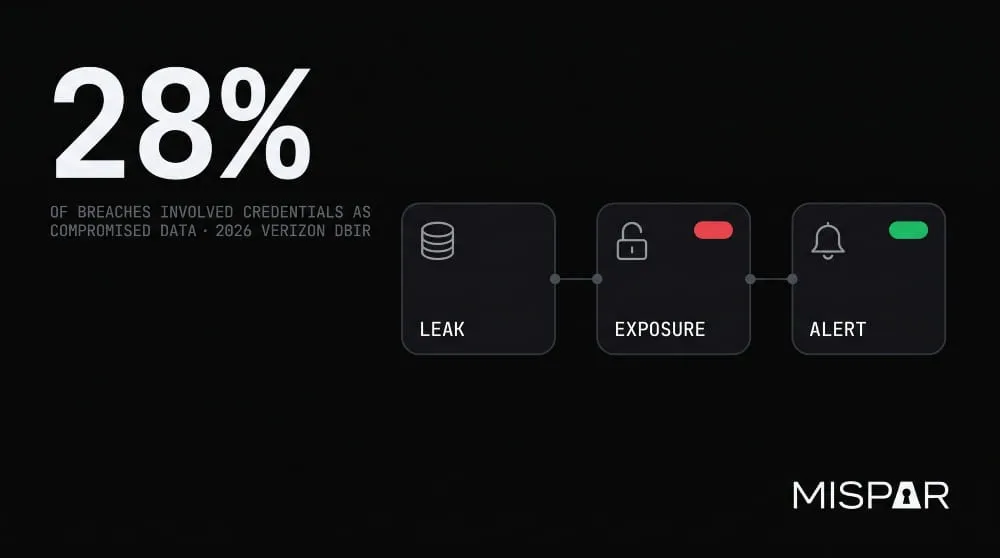
Credential leakage is the event: a login leaves the organization through a breach at a third-party service, an infostealer infection, a misconfigured database, or a paste. Credential exposure is the condition that follows, meaning a working login is now available to someone outside the organization. Leakage happens once, but exposure lasts until the password is changed and any live sessions are revoked. Credential monitoring measures exposure, which is why a leak from years ago can still matter if the password was never changed.
Why exposed logins matter before a breach
An attacker with a valid login doesn’t need an exploit, and nothing in the network looks unusual until the account is used. Verizon’s 2026 Data Breach Investigations Report found credentials among the data compromised in 28% of breaches, so exposed logins are both a target and a way in. The same report shows vulnerability exploitation overtaking credential abuse as the most common initial access vector, but stolen logins remain central to how attackers move through a network once inside. Monitoring shortens the gap between when a login leaks and when someone acts on it.
Credential Monitoring vs Dark Web Monitoring vs Identity Threat Detection
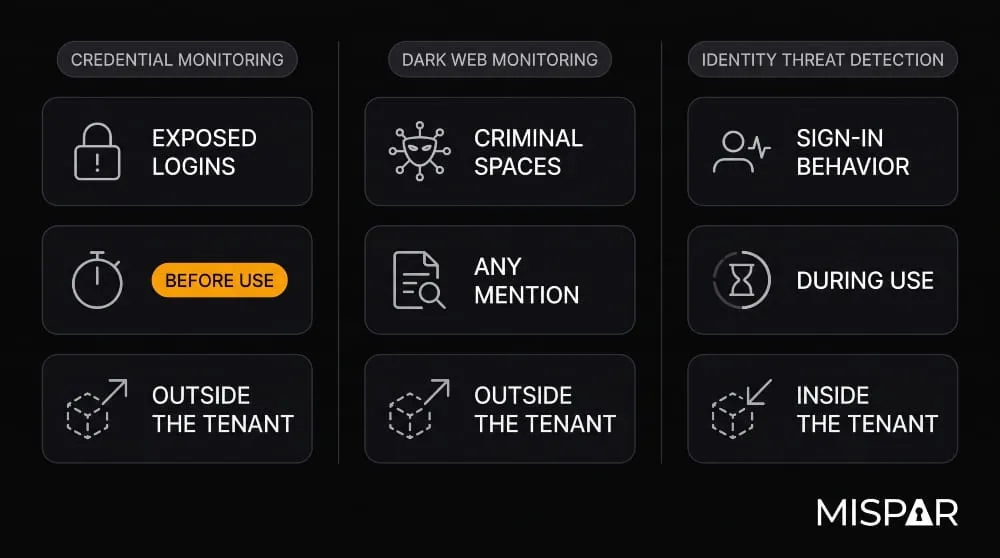
Credential monitoring looks for exposed logins outside the environment, dark web monitoring looks for any mention of the organization in criminal spaces, and identity threat detection watches how identities behave inside the environment. The three overlap, but each answers a different question.
Where each one fits and what each one does not cover
Credential monitoring is the narrowest and the most actionable, because a match points to one account and one fix. Dark web monitoring is broader and suits risks beyond logins, such as data for sale or an executive being discussed. Identity threat detection catches abuse that has already started, and it cannot warn about a password that has leaked but hasn’t yet been used. Most MSSPs run credential monitoring as the early-warning layer and use identity telemetry to confirm whether an exposed account has been touched.
What Gets Monitored: Employee, Executive, Vendor and Machine Credentials
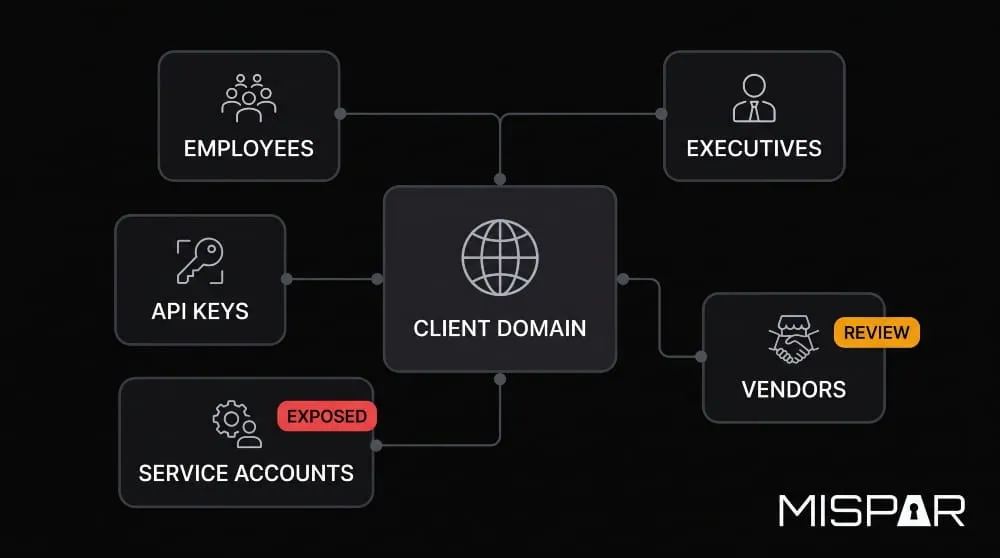
A credential monitoring program covers every type of login that grants access to a client’s systems, which means more than the staff email list. Coverage works best when it is scoped by identity type, because each type carries a different level of risk and calls for a different response.
Employee credential monitoring
The baseline is every corporate email address on a client’s domains, matched against leaked passwords. Employee accounts are the largest group and the most exposed to password reuse, since people often use a work address to sign up for outside services that later get breached. Monitoring also catches work addresses that appear in stealer logs, which usually signals an infected personal or corporate device.
Executive and VIP accounts
Executives, finance staff, and administrators warrant tighter handling because one compromised account can authorize payments or reset others. Monitoring for this group should include the corporate address and, where the client agrees, personal addresses that are known to be used for business. Alerts for these accounts need a faster response path than the general queue.
Vendor and third-party logins
Suppliers and contractors often hold logins to client portals, shared drives, and ticketing systems. A leaked vendor login gives an attacker access without touching the client’s own staff, so the vendor domains that connect to critical systems belong on the watchlist. The practical limit is permission: the client needs to be able to act on the finding, even when the account belongs to another company.
Service accounts and machine credentials
Service accounts, API keys and tokens leak differently from human logins. They tend to surface in code repositories, configuration files, and stealer logs from developer machines, and they rarely rotate on a schedule. Many tools only match email and password pairs, so confirm whether a solution covers keys and tokens before promising machine credential coverage to a client.
Sources: Stealer Logs, Paste Sites, Telegram and Breach Dumps
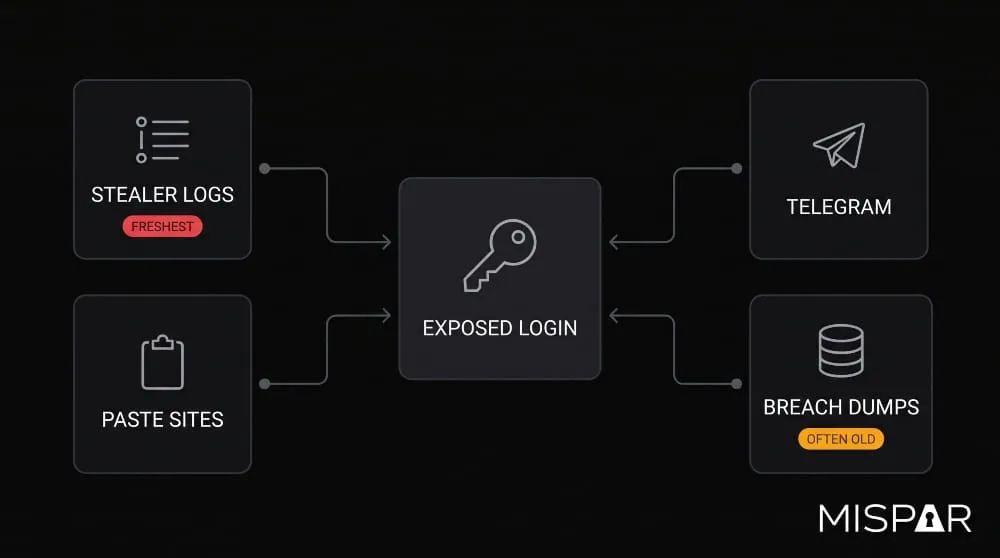
Credential monitoring draws on four main kinds of sources: stealer logs, breach dumps, paste sites, and criminal chat channels. They differ in freshness and reliability, and a good program treats a match from each of them differently.
How infostealer malware steals credentials
Infostealer malware runs on an infected device and collects saved browser passwords, autofill data, cookies, and session tokens, then packages them into a log that is sold or shared. Each entry usually records the website the login belongs to, so the credential comes paired with the service it unlocks. Because the data is taken from a live device, stealer logs are typically fresher and more dangerous than old breach data, and stolen session cookies can let an attacker skip the login step altogether.
Dark web credential monitoring
Parts of this supply chain sit on criminal forums, marketplaces and closed channels, which is where dark web credential monitoring comes in. Telegram channels and paste sites sit alongside them as places where stolen logins are posted, traded or given away. For a wider view of how hidden-source coverage works beyond logins, see dark web monitoring.
Breach dumps and combolists
Breach dumps are the data taken from a compromised service, and combolists are collections of email and password pairs assembled from many dumps and logs. They are older and often recycled, so a match is not proof that a password still works. Their value is in showing reuse: if a client’s address appears with a password that resembles the current one, an attacker running automated login attempts has a clear starting point.
How Credential Monitoring Works: Collect, Match, Score, Alert
Credential monitoring works in four stages: collect exposed data, match it to the client’s identities, score each match for severity, and alert the right person. Quality at each stage determines whether the service produces useful warnings or just noise.
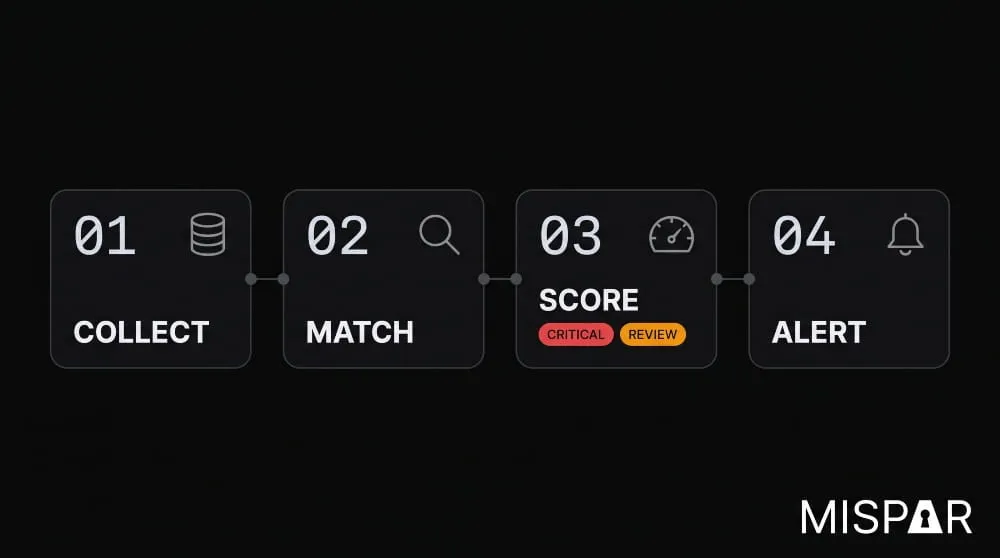
Collection and ingestion
The platform gathers data from stealer log feeds, breach repositories, paste sites, and criminal channels, then normalizes it into a searchable form. Coverage and speed matter more than raw volume, because a fast pipeline that misses stealer logs is less useful than a smaller one that catches fresh infections.
Domain and email matching
Each client registers its domains, and the platform checks the collected data for addresses on them. Good matching handles subdomains, aliases, and format differences, and removes duplicates so one leaked credential doesn’t generate ten alerts. This stage also controls false positives, for instance by ignoring addresses that no longer exist in the client’s directory.
Severity scoring
Not every match carries the same risk, so each one is scored. The main inputs are whether the password was exposed in plaintext or only as a hash, how recently the data surfaced, whether the account is privileged, and whether the entry is tied to a service the client actually uses. A fresh plaintext password for an administrator from a stealer log belongs at the top of the queue, while a hashed password from an old breach for a disabled mailbox does not.
Credential exposure detection and alerts
The final stage delivers the finding to a person or a ticket with enough context to act. Detection is only useful if the alert reaches someone with the authority to reset the account, so routing by client, severity, and account type is part of the design, not an afterthought.
Employee Credential Monitoring
Employee credential monitoring checks a client’s staff logins against exposed data and flags accounts that need action. It is the entry point for most clients because the scope is clear and the fix is simple.
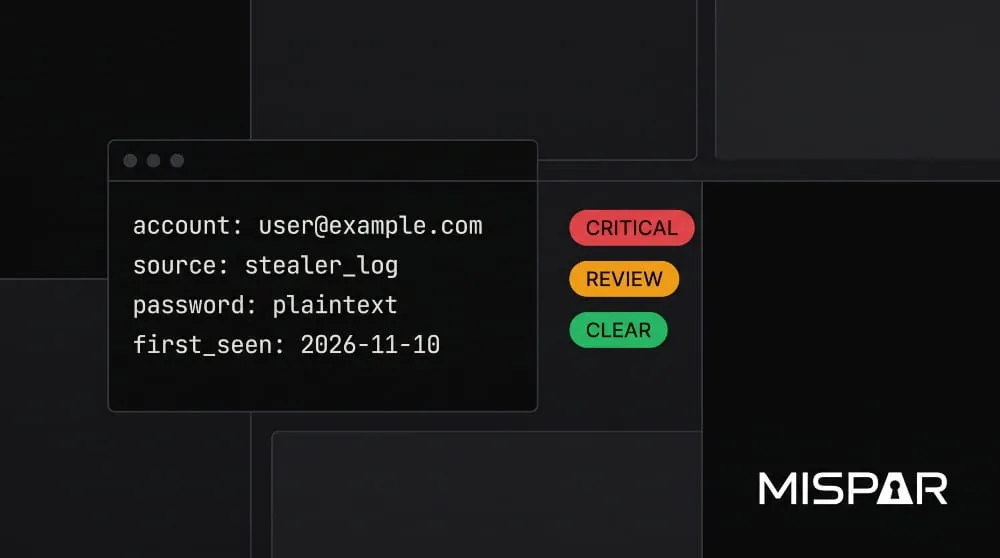
How to detect exposed employee credentials
Start by registering all of the client’s domains, including legacy and acquired ones. Run an initial sweep to establish the existing exposure, then keep the check continuous so new leaks surface within days instead of at the next quarterly review. Cross-check every match against the client’s directory so the team deals only with accounts that are still active, and note which ones are privileged.
What each alert should contain
A useful alert names the affected account, the source type, the date it was first seen, and whether the password was visible in plaintext. It should include the service or site the login was tied to, the client it belongs to, and a recommended next step. An alert that only says an email address was found forces an analyst to rebuild that context before anyone can act.
What to Look For in a Credential Monitoring Solution
The right credential monitoring solution covers the sources that matter, delivers findings quickly, produces few false positives, and fits an MSSP’s delivery model. Judge it on those four points before looking at features.
Coverage, freshness and false-positive rate
Ask where the data comes from, how quickly new stealer logs and dumps are added, and how the platform decides that a match is real. A provider should be able to explain how it separates plaintext from hashed passwords and how it handles duplicates. Run a trial against a known domain and compare the findings with what you already know about it.
Tools that monitor credentials stolen by malware
Stolen-by-malware credentials are the highest-risk category, so confirm that stealer log coverage is a core capability and not an add-on. Find out whether the platform links a leaked login to the infected device or at least to the infection date, since that tells the team whether the problem is a password or a compromised machine.
Integrations, reporting and white-label support
An MSSP needs alerts to flow into the ticketing and security tools it already uses (integrations), and it needs client-ready reports without manual assembly. White-label support lets the service run under the MSSP’s own brand, which matters when credential monitoring is sold as part of a wider managed offering.
Credential monitoring pricing models
Credential monitoring is usually priced in one of a few ways: per domain, per monitored identity, per client tier, or as a platform fee with wholesale rates for resellers. Per-identity pricing scales with client size, while per-domain pricing is simpler to quote. For MSSPs, the more useful question is how the model affects margin when the service is resold, and whether the provider charges separately for stealer log coverage, reporting, or white-label features.
Credential Monitoring for MSSPs
MSSPs deliver credential monitoring as a recurring service that combines continuous detection, triage, and regular reporting to the client. The strongest offers go beyond forwarding alerts and take responsibility for what happens after one fires.
Packaging it as a recurring service across clients
A simple structure is a monthly or continuous monitoring tier with defined response times by severity. Clients pay for the assurance that exposed logins are found and handled, and a report showing what was found and fixed makes the value visible between incidents. Keeping the service definition consistent across clients keeps delivery costs predictable.
Multi-tenant monitoring and reporting
Running dozens of clients means the platform has to separate each client’s data, alerts, and reports while giving the MSSP one view across all of them. Multi-tenant monitoring lets an analyst work a single queue ordered by severity instead of logging in to each client separately, and it makes per-client reporting routine.
Selling it with a prospecting scan
An exposure scan of a prospect’s domain turns an abstract risk into a concrete finding. Prospecting with proof that real employee logins are already circulating is a more persuasive opening than a general warning, and it leads naturally into a monitoring engagement. It works best when the findings are presented as a starting point, with the monitoring service as the way to keep them under control.
Where MSPs fit
Credential monitoring for MSPs follows the same model: an MSP can add it to its password and MFA services and bill it per client. The difference between an MSP and an MSSP is usually in response. An MSSP is expected to triage exposures, judge severity, and advise on follow-up, while an MSP often passes the alert to the client’s IT staff. Either can resell the service if the platform supports multiple clients and branded reporting.
What to Do When an Alert Fires
When a credential alert fires, the first job is to make the exposed login useless, and the second is to find out whether it has already been used. Speed matters more than a perfect investigation at this stage.
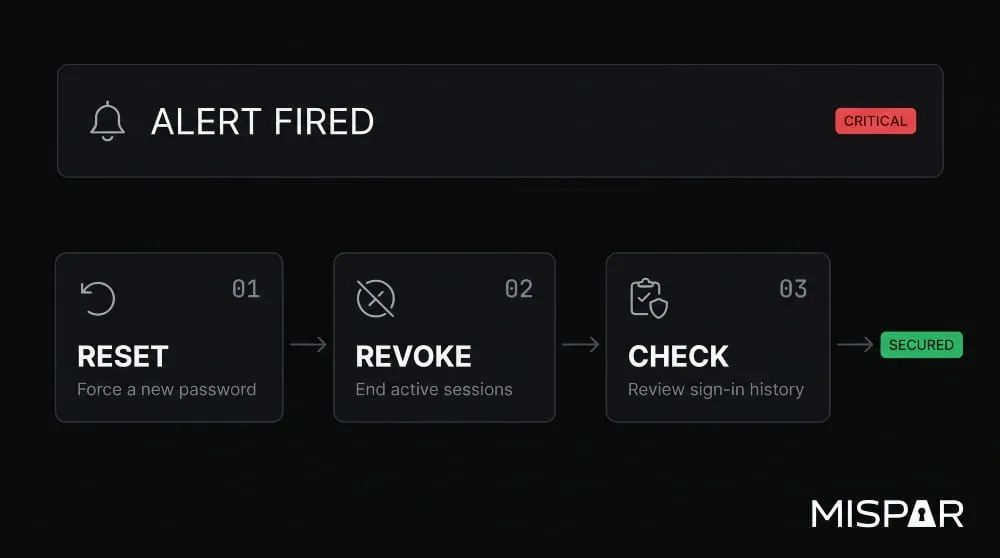
Reset, revoke sessions, and enforce MFA.
Force a password reset for the affected account and revoke all active sessions and tokens, because a stolen session can remain valid after the password changes. Confirm that multi-factor authentication is enforced on the account and on any service the credential was tied to. If the alert came from a stealer log, treat the device as suspect and have it checked before using the new password on it.
Check for reuse and signs of account takeover.
Review the account’s sign-in history around and after the date of exposure, watching for unfamiliar locations, new devices, forwarding rules, or unexpected consent grants. Then check whether the same password was used on other accounts the client controls. A reused password turns one exposure into several, so the reset should cover every place it appears.
Client communication
Tell the client what was found, what was done, and what they need to do next, in plain terms and without blame for the user. Link the incident to the wider pattern where it helps: leaked credentials explains how exposed logins end up in circulation, and credential management covers the policies and tools that reduce reuse in the first place. Closing the loop in writing also gives the client an audit trail.
Frequently Asked Questions (FAQ)
Is credential monitoring the same as dark web monitoring?
No. Credential monitoring looks specifically for exposed logins in stolen and leaked data. In contrast, dark web monitoring watches criminal spaces for any mention of the organization, including data for sale or discussion of a target. Credential monitoring draws on some dark web sources, but it also covers stealer logs, breach dumps, and paste sites, and its output is an account to fix.
How often should credentials be checked?
Continuously, or as close to it as the platform allows. Stolen logins are traded quickly, and a monthly or quarterly check leaves a long window in which an exposed password can be used. A one-time scan is useful for a baseline or a prospect, but it is not a substitute for ongoing monitoring.
What does credential monitoring cost?
It depends on the pricing model. Common structures include per domain, per monitored identity, per client tier, or a platform fee with wholesale rates for resellers; costs rise with the number of identities and the depth of source coverage. When comparing providers, look at what is included, such as stealer log coverage, reporting, and white-label support, before comparing headline rates.
Can it detect credentials stolen by malware?
Yes, if the solution ingests stealer logs. These logs record credentials taken directly from infected devices, making them among the most valuable sources a monitoring platform can cover. Confirm that coverage during evaluation, because not every provider includes it.
Does it replace a password manager or MFA?
No. A password manager helps people choose and store strong, unique passwords, and MFA adds a second barrier if a password is stolen. Credential monitoring does neither. It tells you when a login has already been exposed, which makes it a complement to both controls and a check on whether they are working.
Credential monitoring turns leaked logins from a hidden risk into a task with an owner, which is why it fits an MSSP’s recurring service model. Mispar gives MSSPs the monitoring, multi-tenant reporting, and white-label delivery to run it across every client.