
AI agent credentials are the API keys, tokens, service accounts, and other secrets an AI agent uses to log in to tools and data on someone’s behalf. They are risky because the agent acts on its own, often with broad access, and can be tricked into leaking what it holds. The safest approach is to give each agent its own short-lived, narrowly scoped credentials, keep secrets out of the model’s reach, and monitor how they are used.
What Are AI Agent Credentials?
AI agent credentials definition.
AI agent credentials are the authentication secrets that let an AI agent connect to external systems such as email, code repositories, databases, cloud platforms, and SaaS tools. They are machine credentials: the agent presents them instead of a person typing a password, and the systems it reaches treat the agent as an authorized user or service.
The moment an agent can send an email, query a database, or open a pull request, it holds credentials, and anyone who steals or misuses them gets the same access.
Types of credentials agents use
Agents typically rely on API keys for AI model providers and third-party services, OAuth access and refresh tokens that grant delegated access to a user’s accounts, and service account secrets for cloud and internal systems. They also use SSH keys and personal access tokens for code and infrastructure, and the credentials embedded in the configuration of the tool servers they connect to, such as Model Context Protocol (MCP) servers.
How agent credentials differ from human credentials
Habits and friction protect human credentials: people notice odd prompts, and MFA interrupts logins. Agent credentials have neither. They are usually long-lived, often shared across tasks, rarely rotated, and exercised at machine speed. An agent also reads untrusted content as part of its job, something a human login never does, so that the agent’s own behavior, not just theft, can expose the credential.
Why AI Agent Credentials Are Risky
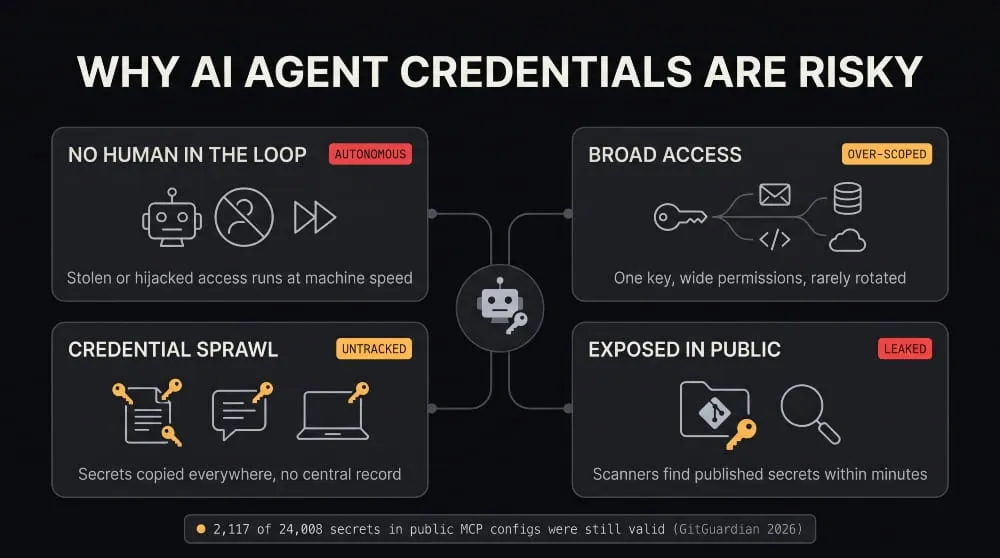
Agents act without a human in the loop.
An agent that can take actions with its credentials can cause damage as quickly as it can be fooled. A stolen human password still needs a human attacker to use it. An attacker can use a stolen agent token, or manipulate the agent into performing actions.
Broad access and credential sprawl
To be useful, agents often get broad permissions, and the same key may be reused across several agents, scripts, and environments. This creates AI agent credential sprawl: secrets copied into config files, environment variables, chat tools, and developer laptops, with no central record of where they live or what they can do.
Real-world exposure data
The scale is already measurable. GitGuardian’s State of Secrets Sprawl 2026 report found 24,008 unique secrets in MCP-related configuration files on public GitHub in 2025, and 2,117 of them were verified as still valid. The report notes that MCP server documentation often suggests putting credentials directly in configuration files, which helps explain why these secrets get published.
Why agents turn laptops into part of the perimeter
Because agents need local access to editors, terminals, and files, developers often store their credentials on their machines. An infected laptop therefore exposes the agent’s keys, along with everything else saved on it, linking this risk to ordinary infostealer malware.
How AI Agent Credentials Get Exposed
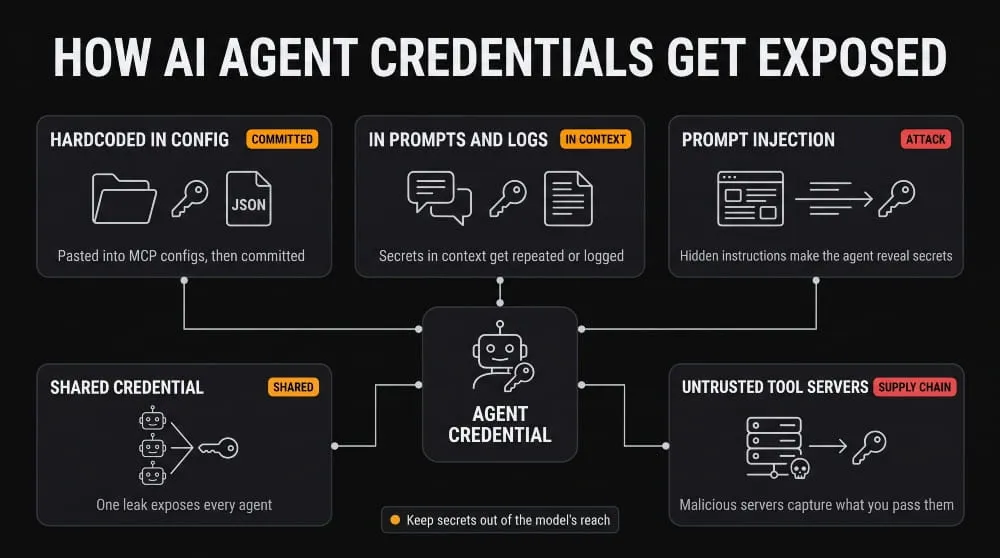
Credentials and secrets in AI coding workflows
AI coding assistants read project files, run terminal commands and open pull requests, which puts them close to every secret in a developer’s workspace. An .env file in the project folder, a token in shell history or a key in a test fixture can all end up in the assistant’s context, in its logs or in a commit it writes. Reduce the risk by keeping secrets out of the workspace the agent can read, excluding secret files from its access, giving it scoped development tokens instead of production keys, and running secret scanning before every commit.
Hardcoded in configuration files
The most common leak is the simplest. Someone pastes a key into an MCP configuration file, startup script, or notebook, then commits it to a repository, shares it in a ticket, or syncs it to cloud storage. Automated scanners find public secrets quickly, so treat a key committed once as exposed.
Pasted into prompts, context, and logs
Secrets that enter the model’s context can leak later. A key in a prompt, a tool response, or an agent’s memory can reappear in outputs, get logged, or show up in transcripts that many people can read. Keeping secrets out of the model’s context removes this path entirely.
Prompt injection that makes the agent reveal secrets
Prompt injection hides malicious instructions in content the agent processes, such as a web page, an email, a document, or a tool description. If the agent can see a secret or reach a credentialed tool, those instructions can tell it to send the secret somewhere or use the access for the attacker. We cover the wider attack family in our guide to credential theft.
One credential shared by many agents
When several agents share one credential, a single compromise exposes all of them, and logs cannot show which agent did what. Shared credentials also make it hard to revoke one misbehaving agent’s access without breaking the rest.
Malicious or untrusted tool servers
Agents connect to tool servers that run code and receive whatever credentials they pass. A malicious or poorly secured server can capture those secrets, and a compromised package used to build or run one can do the same.
What Are the Credential Risks of MCP?
Secrets stored in MCP configuration
MCP servers are often configured with a key or token in a local JSON file or a command-line flag. These files are easy to commit by accident, easy for any process on the machine to read, and rarely protected as a real secrets store.
Over-broad scopes and long-lived tokens
An MCP server that grants full access to an account with a never-expiring token gives the agent more power than any single task needs. If that token leaks or the agent is manipulated, the blast radius is the whole account.
Token passthrough and confused-deputy problems
MCP’s security guidance warns against passing a user’s token straight through to other services without validating it, because this breaks accountability and lets a server act with permissions it should not have. The safer pattern is for each server to accept only tokens meant for it and to use separate credentials when it calls downstream services.
Untrusted servers and supply-chain risk
Every MCP server an agent connects to is code with access to some set of secrets. Installing servers from unvetted sources, or letting them auto-update, adds the same supply-chain risk seen in malicious packages, with the added problem that the server may sit right next to an agent’s live credentials.
How to Secure AI Agent Credentials
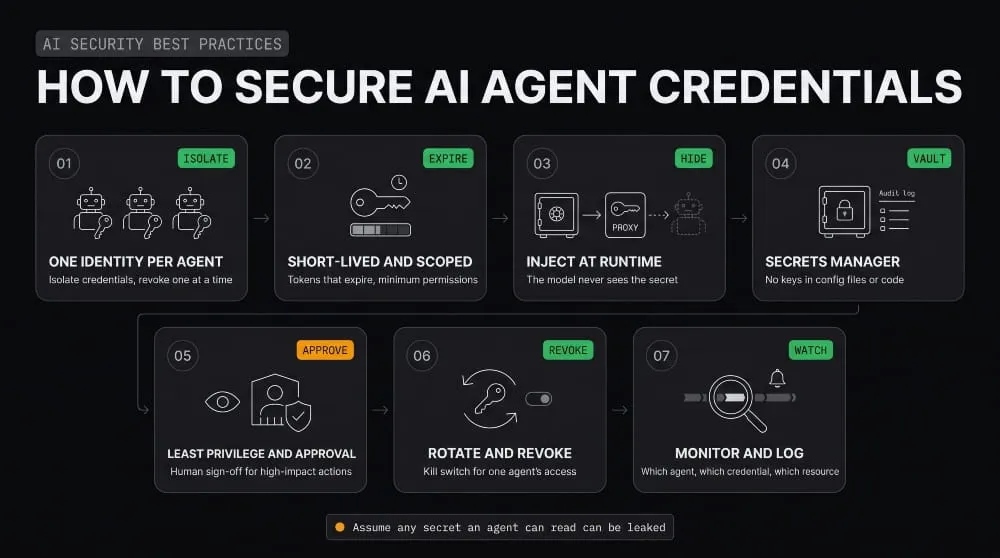
Give each agent its own identity.
The first rule is isolation. Create a separate identity and credential for each agent, and, where possible, each task, instead of sharing one key. Isolating credentials per AI agent limits the damage of any compromise to one agent, makes logs meaningful, and lets you revoke one without affecting the others.
Prefer short-lived, scoped credentials over static keys.
AI agents without static credentials are the goal. Use short-lived tokens issued on demand, such as OAuth access tokens with narrow scopes or cloud workload identity that mints temporary credentials, so a stolen token expires quickly. Where a static key is unavoidable, scope it to the minimum permissions and rotate it on a schedule.
Inject secrets at runtime, outside the model’s reach.
The safest pattern for MCP credential injection is to keep the secret out of the model’s context altogether. A gateway, proxy, or secrets broker holds the credential and attaches it to the request when a tool is called, so the model only ever sees the result. The agent can use the access without ever reading, repeating, or leaking the secret.
How to prevent prompt injection from stealing credentials
The most reliable way to stop prompt injection from stealing credentials is to make sure the agent never holds a secret it could repeat. Inject credentials at call time through a proxy or broker so they stay outside the model’s context. Then limit what a manipulated agent can do: scope tokens to the minimum access, restrict where the agent can send data, treat content from web pages, emails and tool descriptions as untrusted, and require human approval for credentialed actions that are sensitive or irreversible. Log every credentialed call so an unexpected request stands out.
Store secrets in a secrets manager
Move credentials out of configuration files and code and into a secrets manager with access controls and audit logs. Turn on secret scanning for repositories and developer machines so a key pasted in the wrong place is caught early.
Centralized credential governance for agentic systems
Centralized credential governance means managing every agent credential from one place, instead of leaving each team to handle its own keys. It starts with a single inventory of agent identities and the secrets they hold, with a named owner for each. Policy is then set centrally: which systems an agent may reach, how long its credentials last, which actions need human approval, and who can revoke them. Routing every request through a vault or credential broker gives one point for enforcement and one audit trail, so a security team can answer which agent used which credential without checking each tool separately.
Apply least privilege and require approval for sensitive actions.
Grant read-only access wherever the task allows it, and restrict each agent to the specific systems it needs. For high-impact actions such as deleting data, sending money, or changing permissions, require a human approval step so a manipulated agent cannot act alone.
Rotate, revoke, and keep a kill switch.
Rotate agent credentials regularly and revoke them as soon as an agent is retired or a project ends. Keep a fast way to restrict a single agent’s access so you can contain suspected misuse in minutes.
Monitor and log agent activity.
Log which agent used which credential, on what resource, and when. Alert on unusual patterns such as access to systems the agent has never touched, bursts of activity, or use from unexpected locations. Without this record, a compromised agent credential looks like normal automation.
MCP Credential Security: Risky Patterns vs Safer Patterns
The table below summarizes the most common MCP credential mistakes and the safer alternative for each.
| Risky Pattern | Why It Fails | Safer Pattern |
|---|---|---|
| API key pasted into an MCP config file | Easy to commit, copy, or read | Pull the secret from a secrets manager at runtime |
| One shared token for all agents | One leak exposes everything; no attribution | One identity per agent |
| Long-lived, full-access token | Large blast radius, no expiry | Short-lived, narrowly scoped tokens |
| Secret placed in the prompt or context | Can be repeated, logged, or exfiltrated | Inject at call time through a proxy |
| Unvetted MCP servers | Code that touches live secrets | Review, pin versions, and limit permissions |
What to Do When an AI Agent Credential Is Compromised
Contain the agent first.
Disable or isolate the affected agent and revoke its credentials immediately. This is the credential containment step for AI agents: the goal is to stop any further use before working out what happened.
Revoke, rotate, and review
Rotate every secret the agent could reach, including keys it may have copied into logs or memory. Review the agent’s activity logs for the exposure window to see what it accessed or changed, and check whether other agents shared the same credential.
Fix the cause
Find how the secret escaped, whether through a config file, a prompt injection, a shared credential, or an infected device, and close that path. Our guide to compromised credentials covers full containment and scope analysis.
Monitoring for Exposed AI Agent Credentials
Prevention reduces the chance of a leak, but some secrets will still escape, whether in a public repository, a stealer log from a developer’s laptop, or a data dump. Watching for your organization’s exposed credentials outside your network shortens the time between exposure and response. Our guide to leaked credentials explains how to find exposure and what to do about it, and our overview of dark web monitoring shows how continuous coverage works. For providers who run this as a service across many clients, Mispar’s monitoring feature is built for that case.
Frequently Asked Questions (FAQ)
What are AI agent credentials?
AI agent credentials are the API keys, tokens, service account secrets, and other authentication data that let an AI agent access tools, data, and systems on someone’s behalf.
How do you secure AI agent credentials?
Give each agent its own identity, use short-lived and narrowly scoped tokens, keep secrets out of the model’s context by injecting them at runtime, store them in a secrets manager, require approval for sensitive actions, and monitor and rotate them.
What are the credential risks of MCP?
The main risks are secrets stored in MCP configuration files, over-broad scopes and long-lived tokens, token passthrough between services, and untrusted servers that can capture credentials passed to them.
Should AI agents use static API keys?
Avoid them where you can. Short-lived, scoped tokens or workload identity limit the harm of a leak. If a static key is unavoidable, restrict its permissions, store it in a secrets manager, and rotate it regularly.
How do you isolate credentials per AI agent?
Create a separate identity and credential for each agent or task, scope each to only what it needs, and log activity per identity. If one is compromised, you can revoke it without disrupting the others.
Can prompt injection steal an agent’s credentials?
Yes, if the agent can see a secret or call a credentialed tool. Keeping secrets out of the model’s context, limiting what the agent can reach, and restricting what it can send outside the organization all reduce this risk.