
Credential harvesting is the large-scale collection of usernames, passwords, and session data, usually through fake login pages, phishing messages, or malware. Attackers gather logins in bulk, then use or sell them to break into email, cloud, and business systems. This guide explains how credential harvesting works, how it differs from credential phishing, which techniques are common, and the controls that stop it.
What Is Credential Harvesting?
Credential harvesting is an attack in which criminals collect valid logins from many people at once, instead of breaking into one account at a time. It covers any method that captures credentials at scale: fake sign-in pages, phishing emails, credential-stealing malware, and rogue networks.
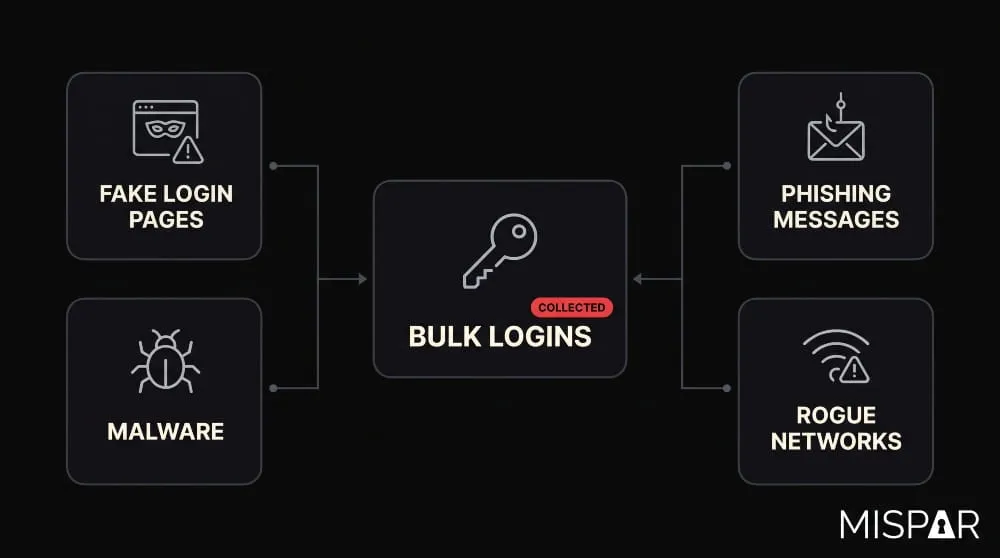
Credential harvesting definition and meaning
Credential harvesting means tricking or compelling people and systems into handing over login details, then collecting those details in a central place for later use. The word harvesting describes the scale: attackers gather credentials the way a farmer gathers a crop, in bulk and with little regard for any single victim. The harvested logins are then used for account takeover, sold to other criminals, or fed into further attacks.
Credential harvesting in cyber security (who gets targeted and why)
In cybersecurity, credential harvesting is a leading way attackers gain access because a valid login looks like normal activity and rarely triggers alarms. Anyone with an account can be targeted, but attackers favor staff in finance, IT, and HR; executives; and users of widely used email and single sign-on platforms. Managed service providers and their clients are attractive too, since one harvested administrator login can open the door to many downstream environments.
What a credential harvester is
A credential harvester is anything that collects stolen logins: a cloned sign-in page, a phishing kit, a piece of malware, or a rogue access point. Some harvesters work in real time, capturing a password as it is typed. Others quietly gather saved passwords from an infected device and send them to the attacker. The term also refers to the person or group running the campaign.
Harvesting in the MITRE ATT&CK framework
MITRE ATT&CK has no single technique named credential harvesting. The behavior is spread across the Credential Access tactic (TA0006) and related techniques, including Phishing (T1566) for delivery, Phishing for Information (T1598) for collecting logins from targets, Adversary-in-the-Middle (T1557) and Steal Web Session Cookie (T1539) for intercepting sessions, and Input Capture (T1056) for capturing typed credentials. Mapping detections to these techniques helps a security team see which parts of the harvesting chain they can and cannot see.
How Credential Harvesting Works
Credential harvesting works in four steps: the attacker lures a target, captures the login, collects it centrally, and then reuses it. Each step can be carried out with simple, cheap tools, which is why the attack is so widespread.
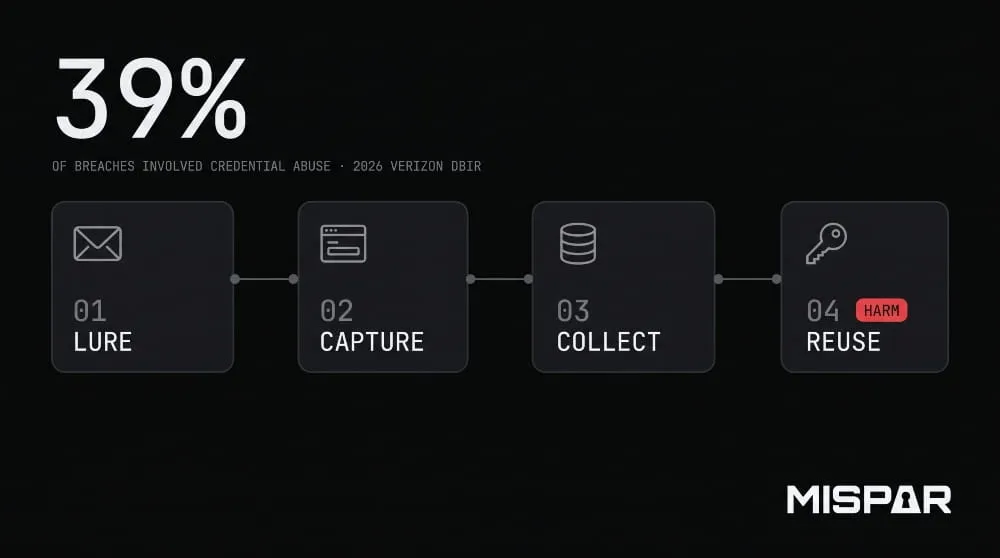
Lure, capture, collect, reuse (the attack lifecycle)
The lure is the message, link, advert, or network that draws the victim in. Capture happens when the victim types a password into a fake page, or when malware reads it from the device. Collection is the transfer of that data to the attacker, often into a panel or a chat channel that sorts the results. Reuse is the final step, where the attacker signs in, resells the login, or tests it against other services.
Credential harvesting emails
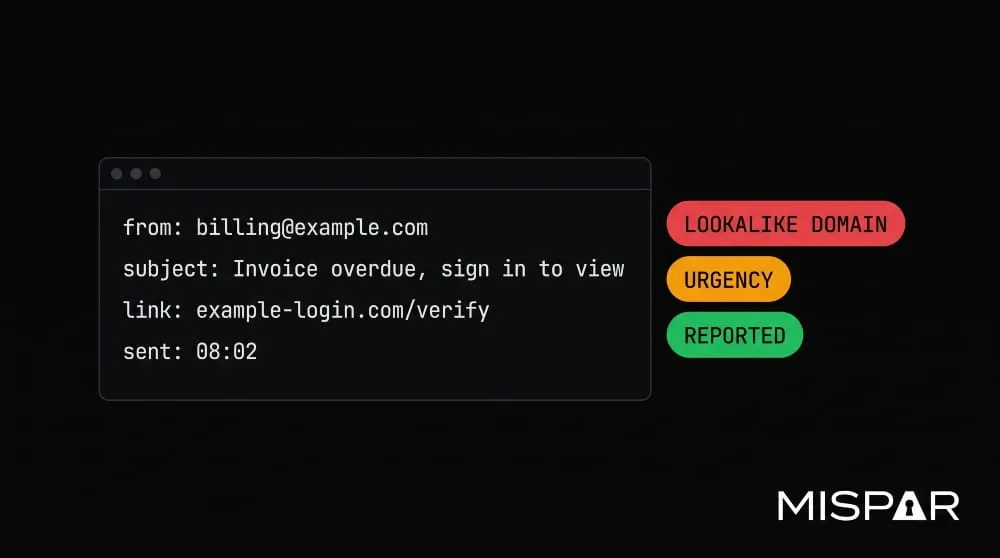
Email remains the most common delivery route. A credential-harvesting email usually imitates a trusted service. It pushes the reader toward a sign-in page, with a reason to act quickly, such as a shared document, an unpaid invoice, a mailbox quota warning, or a password expiry notice. The message itself often contains no malware, which is why it can pass filters that look only for malicious attachments.
Credential harvesting malware
Some harvesting skips the victim’s typing and takes the credentials straight from the device. Infostealer malware collects saved browser passwords, autofill data, and session cookies, then packages them for the attacker. It reaches devices through malicious downloads, cracked software, and fake installers, and it can capture every account a person has saved, not just the one a phishing page asked for.
Why one harvested login leads to others
A single stolen login rarely stays useful for one service. People reuse passwords, so attackers test harvested credentials against other sites, and a compromised email account lets them reset passwords elsewhere. Verizon’s 2026 Data Breach Investigations Report found credential abuse in 39% of breaches, showing how often a harvested login becomes the thread attackers pull on later in an intrusion.
Common Techniques: Cloned Login Pages, Proxy Phishing, Rogue Wi-Fi, QR and Ad Lures
The most common credential-harvesting techniques are cloned login pages, proxy phishing, rogue Wi-Fi, QR code lures, and malicious ads. They differ in delivery but share one aim: getting a victim to authenticate somewhere the attacker controls.
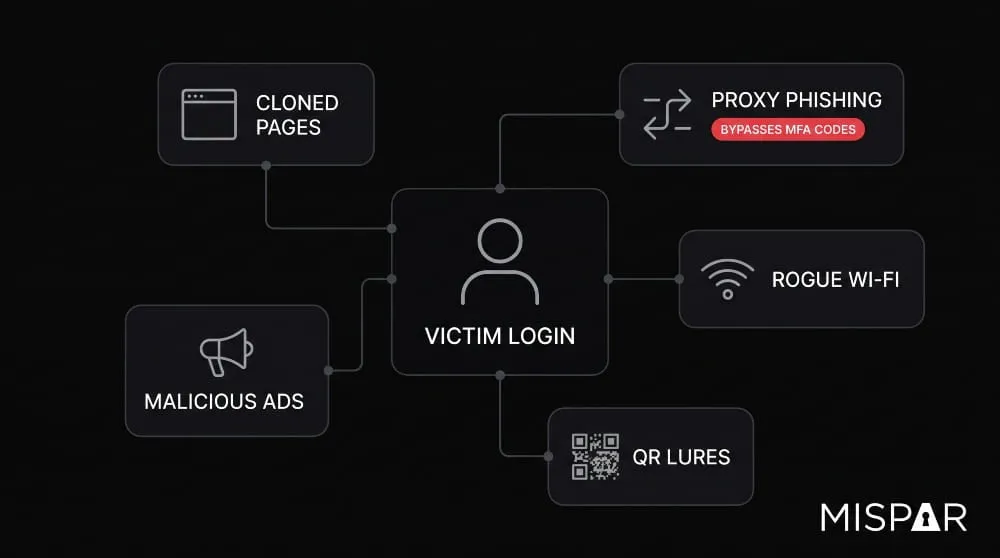
Cloned login pages
A cloned login page copies the look of a real sign-in screen, often for a widely used email or cloud service, and sits on a lookalike domain. When the victim enters a username and password, the page records them and usually redirects to the genuine site so nothing seems wrong. Pages like these are quick to build from ready-made phishing kits and are often taken down within days, which is why attackers keep moving to new domains.
Proxy phishing and session capture
Proxy phishing places the attacker’s server between the victim and the real sign-in page. The victim sees the genuine login and completes it, including any multi-factor prompt, while the attacker captures the resulting session. Because the session is already authenticated, standard one-time codes and push approvals do not stop it. This is the main reason security teams are moving toward phishing-resistant authentication.
Rogue Wi-Fi and fake hotspots
A rogue Wi-Fi network imitates a legitimate hotspot, such as one in a café, hotel, or airport. Users who connect may be shown a fake captive portal that asks them to sign in with a work or email account, which hands the credentials to the attacker. The risk is highest for travelers and remote workers, and the defense is to avoid signing in through unfamiliar portals and to use a trusted connection instead.
QR code lures
QR code lures place a code in an email, a PDF, or a physical location that leads to a fake sign-in page. The attack works because the destination is hidden until the code is scanned, and because scanning often happens on a personal phone that sits outside the company’s email and web filters. Treat an unexpected QR code asking you to log in the same way as an unexpected link.
Malicious ads and fake sign-in prompts
Attackers buy or poison search ads so a fake login page ranks above the real one for a popular service, then use pop-ups and in-page prompts claiming a session has expired. A person who searches for a login and clicks the first result can land on a harvesting page without any email involved. Bookmarking the official sign-in address removes much of that risk.
AI-written lures
AI tools let attackers write fluent, personalized messages in any language and at scale, removing the spelling errors that once gave phishing away. Lures can now reference a target’s role, colleagues, or recent activity with little effort. Warning signs therefore have to shift from bad grammar to context: an unexpected request, an unusual sender, urgency, and a sign-in link that does not match the real domain.
Credential Harvesting vs Credential Phishing
Credential phishing is one method of credential harvesting, so every phishing attack that steals a login is harvesting, but not all harvesting involves phishing. Harvesting is the broader goal, and phishing is one way of reaching it.
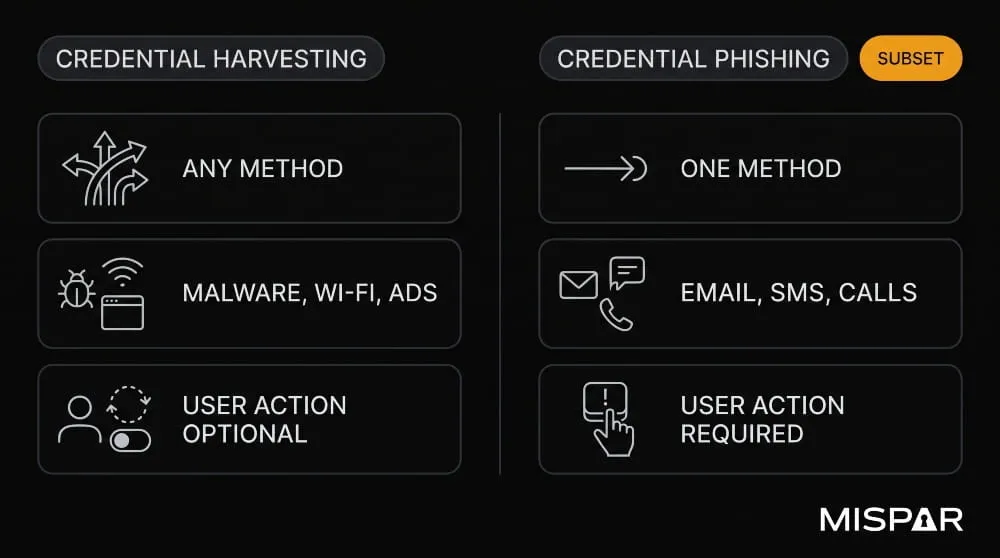
Where the two overlap
The two overlap whenever a phishing message sends a victim to a fake page that records the login. Most harvesting campaigns that security teams meet in practice are phishing campaigns, so the terms are often used as if they mean the same thing. The practical difference is that harvesting describes what the attacker wants, and phishing describes how they ask for it.
| Comparison Dimension | Credential Harvesting | Credential Phishing |
|---|---|---|
| What it is | Bulk collection of logins by any method | Tricking a person into entering a login on a fake page or form |
| Scope | Broad, includes malware, rogue networks and leaks | Narrower, a social engineering technique |
| Typical delivery | Phishing, malware, fake hotspots, ads, QR codes | Email, text message, chat, voice call |
| Needs user action | Not always | Yes, the victim must act |
| Typical defense | Phishing-resistant MFA, endpoint protection, monitoring | Email filtering, training, DNS filtering, MFA |
When harvesting happens without phishing
Harvesting can happen with no deception at all. An infostealer on a device collects saved passwords without any user action, a compromised website can skim logins as they are typed, and a poisoned search ad can send people to a fake page with no message involved. Defenses built only around email will miss these routes.
Credential Phishing: Lures, Warning Signs, Prevention
Credential phishing is a social engineering attack that persuades a person to enter their login on a fake page or form, and it is the most common route into credential harvesting. Stopping it takes a mix of technical controls and user awareness.
What is credential phishing?
Credential phishing uses a believable message, usually imitating a known brand or a colleague, to direct someone to a counterfeit sign-in page. The message can arrive by email, SMS, chat, or phone call, sending the target to a link. The attacker needs no malware and no technical flaw, only a user who believes the request is real.
Common lures
The most common lures are an overdue invoice, a shared document that needs sign-in to view, a notice that multi-factor authentication must be reset, and a voicemail or call-back notification. Each one creates a reason to log in right now. Attackers choose lures that match everyday work, which is why they succeed even against careful people.
Warning signs for users
Watch for unexpected requests to sign in, urgency or threats, a sender address that is slightly off, and a link whose domain does not match the service it claims to be. A login page reached through a message rather than a bookmark deserves a second look at the address bar. When in doubt, go to the service directly instead of using the link, and report the message.
Credential phishing prevention and protection
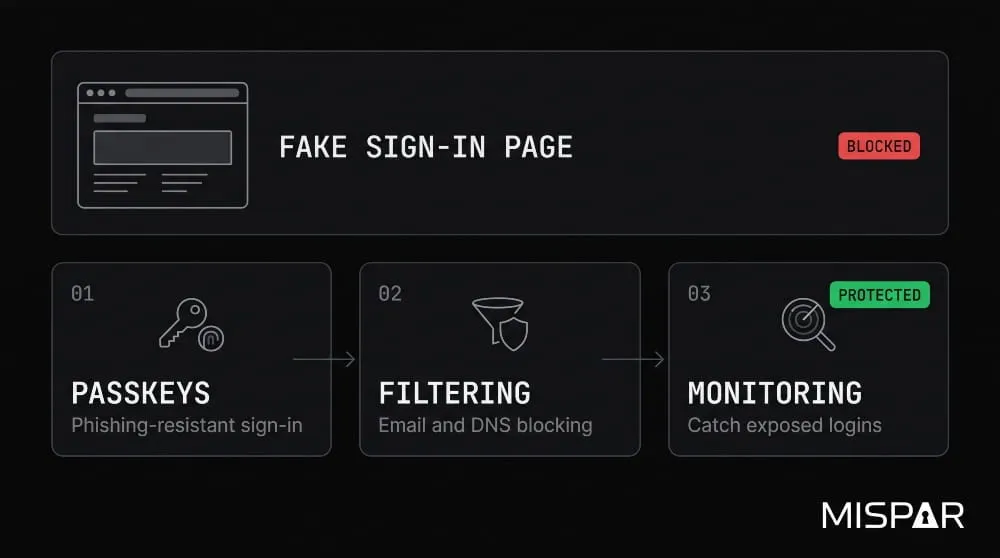
Effective credential phishing prevention combines layers: email filtering to stop lures from reaching the inbox and phishing-resistant authentication. Hence, a captured password is not enough; DNS filtering to block known harvesting domains is also needed. Reporting channels matter too, because a message reported in minutes can be removed from every inbox before others click. No single control is sufficient, so the aim is to make each step of the attack harder.
Phishing-resistant authentication
Passkeys and hardware security keys are tied to the real website address, so they will not complete a sign-in on a lookalike domain. That defeats both cloned pages and proxy phishing, which one-time codes and push approvals do not. For privileged accounts and anyone who handles money or sensitive data, moving to passkeys or security keys is the greatest single change available.
DNS filtering and pre-click controls
DNS filtering blocks connections to newly registered and known malicious domains before a page loads. Pre-click controls such as link rewriting and URL scanning add another check when a link is opened, not only when the message arrives. Together they stop many victims from ever seeing the fake page.
Harvesting vs Stuffing vs Theft
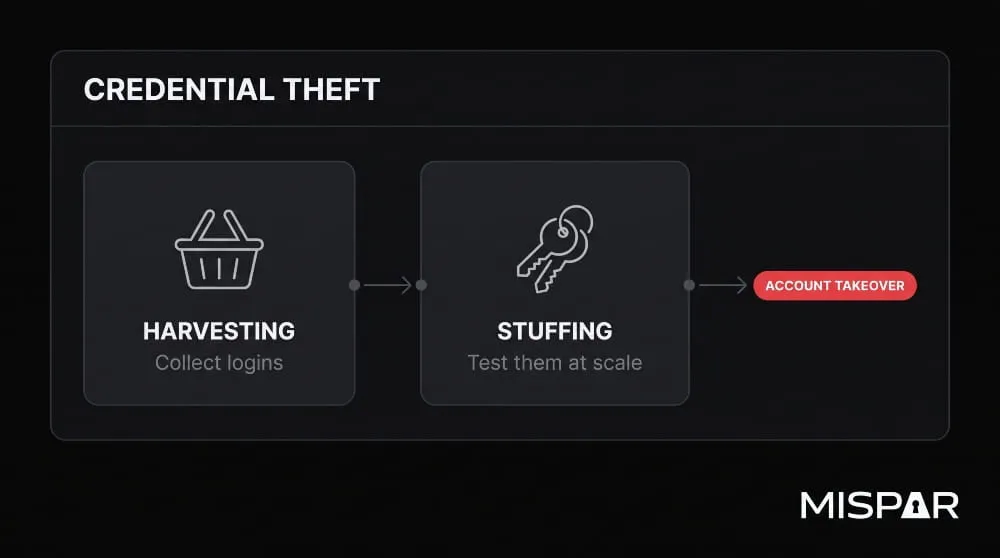
Credential harvesting, credential stuffing, and credential theft describe different stages of the same problem. Harvesting is how logins are collected, stuffing is how they are tried at scale against other services, and theft is the broader term for any way an attacker obtains them.
How each term differs
Credential harvesting is the collection step: gathering logins through fake pages, phishing, or malware. Credential stuffing is what often follows, where attackers run harvested or leaked pairs against many sites, hoping that people reused a password, a close relative of password spraying. Credential theft is the umbrella that includes harvesting alongside other routes such as database breaches, keylogging, and insider misuse. Seen together, harvesting feeds stuffing, and both sit inside theft.
Where Harvested Credentials End Up
Harvested credentials usually end up in stealer logs, paste sites, criminal marketplaces and chat channels, where they are sold, shared or tested. How long they circulate depends on how valuable they are and whether the owner changes the password first.
Logs, paste sites and combolists
Infostealer logs group harvested data by device, and attackers often condense many sources into a combolist, a file of email and password pairs built for automated attacks. Samples and fragments also surface on pastebin-style sites, where they are shared for attention or reputation. Once a login is in one of these places, it can be copied indefinitely.
Resale and reuse
Harvested logins are sold in bulk, often priced by account type, and bought by other groups that specialize in fraud, ransomware access, or business email compromise. The result is that one phishing click can become several separate incidents months later. This is how leaked credentials and compromised credentials build up in circulation long after the original harvest.
How to Prevent Credential Harvesting
Preventing credential harvesting means making stolen logins less useful, harder to capture, and quicker to spot. No single measure works alone, so combine technical controls with good habits and monitoring.
How to prevent credential harvesting from fake websites
Prevent fake-site harvesting by removing the habit of signing in through links. Use bookmarks or a company portal to reach important services, check the full domain before typing a password, and use a password manager that fills credentials only on the exact registered site. A password manager that refuses to autofill on a lookalike domain is an effective warning in itself.
MFA, passkeys and conditional access
Multi-factor authentication blocks simple password theft, but code-based and push methods can still be bypassed by proxy phishing. Passkeys and security keys close that gap, and conditional access adds rules based on device health, location, and risk, so a stolen login used from an unfamiliar place is challenged or blocked. Prioritize administrators and finance users first.
Email and DNS filtering
Filter inbound mail for impersonation, lookalike domains, and risky links, and block newly registered and known malicious domains at the DNS layer. Add sender authentication through SPF, DKIM, and DMARC so attackers cannot easily spoof your own domain. These controls reduce how many lures arrive and how many fake pages load.
User training that changes behavior
Training works when it is short, frequent, and tied to what people actually see, such as realistic simulations followed by immediate feedback. The most useful habit to build is reporting: a user who reports a suspicious message quickly gives the security team a chance to remove it from every inbox. Avoid training that blames people, since it discourages reporting.
Password hygiene
Unique passwords limit the damage of any single harvest, because a stolen login cannot be replayed on other services. A company-approved password manager, strong generated passwords and a clear process for retiring shared and stale accounts make that realistic. For the policies and tooling that support this, see credential management.
Monitoring for exposure after the fact
Prevention will not stop every harvest, so it needs to be paired with detection of logins that have already escaped. Monitoring watches for client credentials appearing in stealer logs, breach dumps, and criminal channels, and dark web monitoring extends that view into the places where harvested data is traded. An alert at this stage lets a team reset the account before the attacker uses it.
What to Do After a Harvest
After a harvest, the priority is to make the stolen login useless, then find out whether it was used. Act on the account first and investigate second, since delay is what gives attackers their opening.
Reset, revoke sessions, re-enroll MFA.
Force a password reset, revoke all active sessions and tokens, and re-enroll multi-factor authentication, preferably with a phishing-resistant method. Revoking sessions matters because a captured session can stay valid after a password change. If malware is suspected, isolate and clean the device before using the new password on it.
Check sign-in logs and mailbox rules.
Review sign-in history for unfamiliar locations, devices, and times, and check the mailbox for forwarding rules, hidden inbox rules, and new app consents. Attackers who reach an email account often set up rules to hide replies or forward messages, and those changes persist after a password reset if nobody removes them. Check whether the same password was used on other services.
Notify and report
Tell the affected user and the security owner promptly, and inform the client when the account belongs to a managed customer. Report the phishing page or domain to the hosting provider and to the impersonated brand so it can be taken down. Record what you found and what you did, since that record supports any compliance or insurance follow-up.
FAQ
What is credential harvesting in simple terms?
Credential harvesting is when attackers collect many people’s usernames and passwords, usually through fake login pages, phishing messages, or malware. Attackers then use the stolen logins to break into accounts or sell them to other criminals.
Is credential harvesting the same as phishing?
No. Credential harvesting is the goal of collecting logins in volume, and phishing is one method of doing it. Harvesting can also happen through malware, fake Wi-Fi networks, and malicious ads, with no phishing message involved.
How can I tell a harvesting page from a real login?
Check the full web address first, since harvesting pages sit on lookalike domains. Be cautious of a login page reached through an unexpected message, and treat a sign-in prompt that appears from a QR code or an ad the same way. Going to the service directly from a bookmark is the safest check.
Can MFA stop credential harvesting?
MFA helps, but not completely. It stops attackers with only a stolen password, but proxy phishing can capture an authenticated session and bypass one-time codes and push approvals. Passkeys and security keys resist this because they will not sign in on a lookalike domain.
What is a credential harvester?
A credential harvester is the tool or setup that captures stolen logins, such as a cloned sign-in page, a phishing kit, credential-stealing malware, or a rogue access point. The term is sometimes used to refer to the attacker running the campaign.
How do MSSPs help clients detect harvested logins?
MSSPs detect harvested logins by monitoring client credentials in stealer logs, breach dumps, and criminal channels; reviewing sign-in activity for signs of misuse; and guiding clients through resets when an exposure appears. They also help roll out phishing-resistant authentication and keep reporting consistent across clients.
Credential harvesting cannot be fully prevented, so the practical goal is to make stolen logins hard to use and quick to find. Mispar gives MSSPs the monitoring and multi-client reporting to catch exposed credentials early and resell that protection under their own brand.