
Credential management is the practice of issuing, storing, rotating, monitoring, and revoking the logins, keys, and tokens that people and systems use to access resources. Done well, it ensures every credential has a known owner, only the access it needs, and expires or is replaced before it becomes a liability. This guide explains the credential lifecycle, the types of credentials to manage, best practices, and where credential management stops.
What Is Credential Management?
Credential management definition
Credential management is the set of policies, processes, and tools an organization uses to control the full life of its authentication secrets, from creation to retirement. It covers who can get a credential, where it is stored, how often it changes, who can see it, and how it is removed when no longer needed.
The goal is simple: reduce the chance that a credential is lost, shared, guessed, or stolen, and limit the damage if one is.
Credentials vs passwords vs secrets vs identities
These terms are related but not identical. A credential proves identity or grants access and includes passwords, tokens, keys, certificates, and biometrics. A password is one kind of credential. A secret usually refers to credentials used by applications and infrastructure, such as API keys and database passwords. An identity is the account or entity a credential belongs to, whether a person, service, or device.
Managing credentials means managing all of these, not just the passwords employees type.
What credential management is not
The phrase is used in other contexts that this guide does not cover. Operating system tools such as Windows Credential Manager store saved logins on a single device; they’re a feature, not a program for managing an organization’s credentials. Professional credentialing, such as verifying a clinician’s licenses or certifications, is a separate field entirely.
Why Credential Management Matters
Credentials as the front door to most breaches
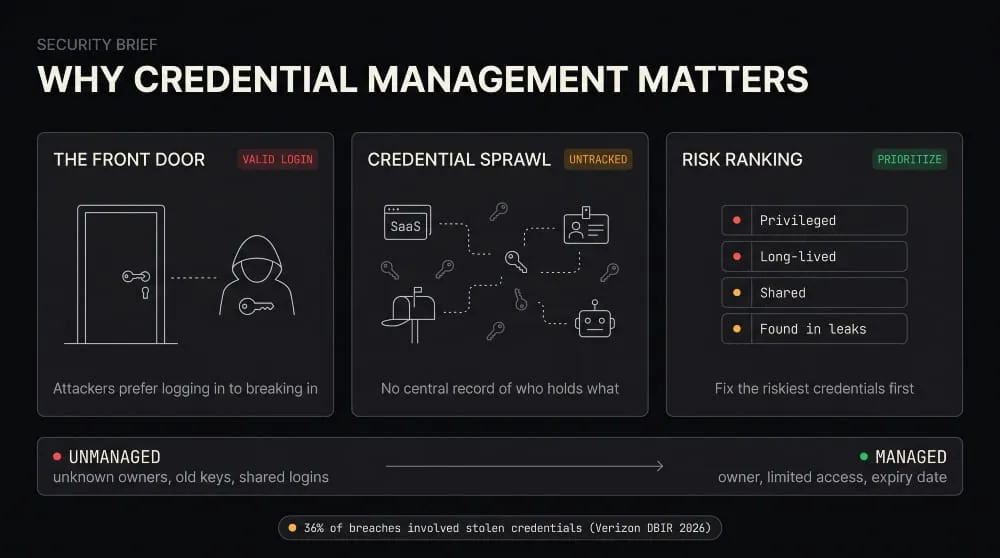
Credentials matter because attackers prefer logging in to breaking in, and a valid login bypasses most security controls. Our guide to credential theft covers how attackers steal them, and our guide to compromised credentials covers what happens next. Credential management is the discipline that reduces the supply of credentials worth stealing.
Credential sprawl across SaaS, shared accounts, and contractors.
Organizations accumulate credentials faster than they track them. Every SaaS tool, shared mailbox, contractor account, and automation adds more, and many have no clear owner. Credential sprawl means nobody can confidently say how many credentials exist, who holds them, or which ones are still needed, making it impossible to secure what you don’t know.
The cost of not cleaning up shows in the data. GitGuardian’s State of Secrets Sprawl 2026 report found that 64% of credentials confirmed valid in 2022 were still not revoked in 2026, showing how long forgotten credentials can remain usable.
Credential risk management
Credential risk management treats each credential as a risk to measure and reduce. That means knowing how privileged it is, how long it has existed, how it is stored, whether it is shared, and whether it appears in known leaks. Fix high-privilege, long-lived, shared, or exposed credentials first.
The Credential Lifecycle: Issue, Store, Rotate, Revoke, Retire
Credential lifecycle management
Credential lifecycle management means handling a credential deliberately at every stage. It issues credentials to a verified owner with the minimum access needed, stores them securely, rotates them on a defined schedule or after any suspected exposure, revokes them immediately when access should end, and retires them so they cannot be reused. Gaps at any stage, especially revocation, are where most long-term exposure comes from.
Automated credential management
Manual handling does not scale. Automated credential management uses tools to create, rotate, and revoke credentials without relying on people to remember. Automation reduces human error, shortens the time a stolen credential stays useful, and creates consistent audit records.Credential rotation is most effective when it is automatic and does not break the systems that use the secret. The usual pattern is to issue the new credential, let both versions work for a short overlap, move every consumer to the new one, then retire the old one. Trigger rotation on a schedule for privileged and machine credentials, after any suspected exposure, and when someone with access leaves. Rotating without an inventory of who uses each secret is how outages happen, so build the inventory first.
Credential rotation and expiry policies
Rotation replaces a credential with a new one so that an old, possibly exposed value stops working. Privileged access management credential rotation applies this to the most powerful accounts first, often rotating after every use. Expiry policies set a hard end date so credentials do not live forever by default. Rotate immediately when there is evidence of compromise, and prefer short-lived credentials where the system supports them.
Credential management process, step by step
A workable process starts with an inventory of every credential, human and machine, and an assigned owner for each. Next, classify them by privilege and sensitivity, move secrets into approved storage, and apply MFA and least privilege. Then set rotation and expiry rules, automate where possible, log all access, and regularly review the inventory, removing what is no longer needed.
Types of Credentials You Need to Manage
Employee and remote employee credentials
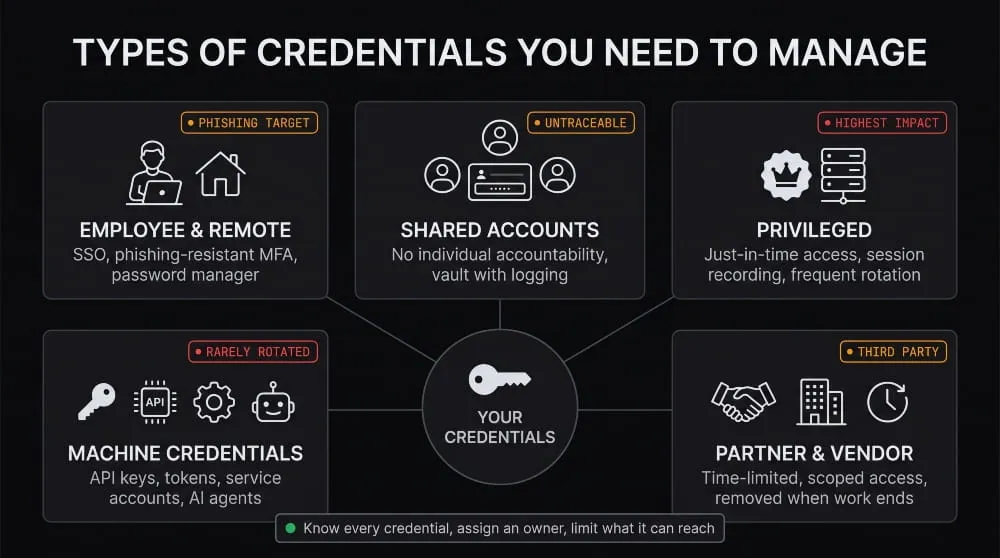
Employee credential management covers the logins staff use daily, including those of remote and hybrid workers who connect from unmanaged networks and personal devices. These credentials benefit most from single sign-on, phishing-resistant MFA, and a company-approved password manager because people are the most common phishing target.
Shared accounts and credentials
Shared credentials are accounts used by several people, such as a social media login or a generic admin account. They are risky because you can’t trace activity to an individual, and revoking them affects everyone. Where sharing is unavoidable, use a vault that records who accessed the credential and when, and rotate it when team membership changes.
Privileged credentials
Privileged credentials, such as administrator, root, and domain accounts, can change systems and access sensitive data, so a compromise has the largest impact. They need the tightest controls: separate admin accounts, just-in-time access, session recording, and frequent rotation.
Machine credentials: API keys, tokens, service accounts
Machine credentials are the secrets applications, scripts, and services use to communicate with each other. They often outnumber human credentials, are rarely rotated, and are frequently embedded in code or configuration. They are covered in more depth in the secrets section below.
Partner and vendor credentials
Contractors and vendors often need access to your systems, and their credentials are only as safe as their own security. Managing partner credential risk means granting time-limited, scoped access, requiring MFA, reviewing access regularly, and removing it the moment the engagement ends.
Credential Management Best Practices
Enforce MFA and least privilege.
Require multi-factor authentication everywhere it is supported, using phishing-resistant methods like passkeys and security keys for administrators and sensitive systems. Pair it with least privilege, so each credential can reach only what its owner needs. A strong password on an over-privileged account is still a high-value target.
How teams manage credentials during offboarding
Offboarding is where credential management most often fails. When an employee leaves, deactivate their accounts the same day, revoke active sessions and tokens, remove them from shared accounts and vault groups, and rotate any shared credentials they knew. Review what machine credentials or API keys they created and reassign or replace them. A checklist tied to the HR departure event keeps this consistent.
Eliminating shared credentials
Replace shared logins with individual accounts wherever possible, and when you must use a shared credential, store it in a vault with checkout, logging, and automatic rotation after use. The safest way to manage your work credentials is to avoid sharing them at all.
Short-lived credentials and automated rotation
Credentials that expire on their own reduce the damage from any theft. Favor short-lived tokens and automated rotation over long-lived static secrets, and set a default expiry so a forgotten credential eventually stops working.
Audit logging and review cadence
Log every credential access and change, and regularly review the logs and credential inventory. Recertify privileged and shared access periodically, asking each owner to confirm it is still needed. Logs also provide evidence to investigate quickly if something goes wrong.
Secrets Management and Hardcoded Credentials (OWASP Guidance)
Environment variables: what they solve and what they don’t
Hardcoded credentials are catalogued as CWE-798, Use of Hard-coded Credentials, in the Common Weakness Enumeration list.
How to fix hardcoded credentials
Fixing hardcoded credentials starts with treating every exposed secret as compromised and rotating it, because removing it from the code does not remove it from version history, forks or backups. Next, find the rest with secret scanning across repositories and developer machines, then move each secret into a secrets manager and have the application fetch it at runtime. Finish by adding pre-commit and pipeline scanning so new hardcoded secrets are blocked before they reach the repository.
Why hardcoded credentials in source code are dangerous
Hardcoded credentials are secrets written directly into source code or configuration, and they are dangerous because anyone who can read the code can use them. They spread through version control history, copies, and backups, and you can’t change them without redeploying the application. OWASP’s secrets management guidance advises against hardcoding credentials and recommends centralizing secrets instead.
Environment variables: what they solve and what they don’t
Moving a secret into an environment variable keeps it out of the source code, which helps. It does not make the secret safe by itself. Environment variables can show up in process listings, logs, crash dumps, and child processes, and they offer no rotation, access control, or audit trail. They are a stepping stone toward a secrets manager, not a destination.
Rotating exposed credentials
If a secret was ever committed to a repository, shared in a ticket, or otherwise exposed, treat it as compromised and rotate it, even if the exposure was brief. Deleting the file or commit doesn’t help, since copies and history may already exist. Rotation should be fast and routine so responding to an exposure isn’t a major project.
Credential vaulting: how a credential vault works and why short-lived tokens help
A credential vault is a central, encrypted store for passwords, keys and tokens, with access controls, checkout and an audit log of every use. Credential vaulting means keeping secrets in that store instead of in code, spreadsheets or chat messages, so people and applications request a credential when they need it. A good vault records who accessed what and when, and can rotate the secret automatically after each use. A secrets vault stores credentials centrally with access controls and audit logs, and applications retrieve them at runtime instead of holding them. A stronger pattern is dynamic, short-lived credentials, where the vault issues a temporary secret for each use and it expires automatically. This follows the same principle as human credential management: the less time a secret is valid, the less a leak is worth.
Credential Management for AI Agents and Non-Human Identities
Best practices for AI agent credential management
AI agents act on their own and often hold broad access, so their credentials need extra care. Give each agent its own identity, use short-lived and narrowly scoped tokens, keep secrets out of the model’s context, and require approval for sensitive actions. Our dedicated guide to AI agent credentials covers this in detail.
Credential management in AI workspaces
AI workspaces and desktop agents that run in isolated sessions still need credentials to connect to tools and data. Isolating sessions helps, but only if each session has separate, scoped credentials. Sharing one key across sessions removes the benefit of the isolation.
MCP and bot credentials at scale
MCP servers and bots quickly multiply machine credentials. At scale, managing them requires a central inventory, per-agent identities, secrets pulled from a vault at runtime instead of written into configuration files, and automated rotation. Without these, credential sprawl grows with every new integration.
Machine identity and credential management
Machine identity management applies the same lifecycle discipline to the non-human side: know every service account, certificate, and key; assign owners; limit privileges; rotate on schedule; and retire what is unused. Because machine credentials usually outnumber human ones, this is often where the largest gaps are.
Credential Management vs IAM, PAM, Password Managers and Secrets Management
Credential management vs identity and access management (IAM)
Identity and access management decides who a person or system is and what they can access. Credential management controls the secrets used to prove that identity. IAM is the policy layer, and credential management is how the proofs are issued, protected, and retired. The two work together, and platform tools such as Microsoft Entra ID cover parts of both.
Identity, credential and access management (ICAM/FICAM)
Identity, Credential, and Access Management, often written ICAM, combines identity governance, credential handling, and access control into one approach. The US federal version is known as FICAM. It is useful as a model for how the three disciplines fit together in larger organizations.
Privileged credential management and PAM
Privileged access management, or PAM, focuses on the powerful accounts that can change systems. Privileged credential management is the part of PAM that vaults, rotates, and records credential use. It is a specialized subset of broader credential management.
Where password managers fit
Password managers store and generate passwords for people, which makes them a valuable part of credential management for human users. They do not cover machine secrets, rotation across systems, or access governance, so they are one component rather than a full program.
Comparison table
| Discipline | Main Question It Answers | Typical Scope |
|---|---|---|
| Credential management | How are secrets issued, stored, rotated, and revoked? | All human and machine credentials |
| IAM | Who is this, and what can they access? | Identities, roles, and permissions |
| PAM | How are powerful accounts controlled and recorded? | Administrator and privileged accounts |
| Secrets management | How do applications get secrets safely? | API keys, tokens, and certificates |
| Password manager | Where do people keep their passwords? | Human users’ logins |
Credential Management Systems, Software and Platforms: What to Look For
Types of credential management systems
Credential management systems fall into several categories: enterprise password and vault tools for people, privileged access management platforms for administrators, secrets managers for applications, and identity platforms that handle credentials as part of broader identity services. Many organizations use more than one, since no single tool covers every type of credential.
Credential brokers
A credential broker sits between an application, user or AI agent and the systems it needs to reach, and issues a short-lived credential on request instead of handing out a stored secret. The requester proves who it is, the broker checks policy and returns a temporary credential, and nothing long-lived has to be stored with the application. Brokers are especially useful for machine credentials and for AI agents, which is covered in our guide to AI agent credentials.
Open source vs commercial
Open source options offer flexibility and no license cost but require more effort to deploy, maintain, and secure, and they may lack vendor support. Commercial products usually provide integrations, support, compliance reporting, and managed operations for a fee. The right choice depends on your team’s capacity and how sensitive what you are protecting is.
Enterprise and multi-team requirements
Larger organizations should look for role-based access control, support for multiple teams or tenants with separation between them, integration with identity providers and ticketing systems, scalable automation, and reliable audit logs. Support for both human and machine credentials matters if you run many applications and agents.
Evaluation checklist
When evaluating a system, ask whether it covers every credential type you have, supports automated rotation and revocation, enforces least privilege and MFA, records who accessed what and when, integrates with your existing identity and security tools, and protects its own secrets with strong encryption and access controls. Test it with your real workflows before committing.
Cost and ROI considerations
Count the full cost, including licensing, deployment, integration, and the time to maintain the system. Weigh it against reduced time spent on password resets and manual rotation, fewer audit findings, and the lower likelihood and impact of a credential-related breach. Cost savings are real but depend heavily on how much of the process you automate.
What Credential Management Can’t Tell You: When Credentials Have Already Leaked
A vault protects what employees store, not what has already been exposed.
Even a well-run program has a blind spot. A vault controls the credentials it knows about, but it cannot tell you that malware captured an employee’s password last week, it appeared in a third-party breach, or it was posted in a leak. Those exposures happen outside your systems, so internal controls can’t see them.
Detecting leaked and infostealer-exposed credentials
Credentials stolen by infostealer malware or published in breach data can still be valid unless someone rotates them. Finding them depends on watching external sources for your domains and accounts. Our guide to leaked credentials explains how exposure is detected, what to do when it is found, and how attackers often use exposed logins in credential stuffing attacks.
How dark web credential monitoring completes the picture
Credential management reduces what can be stolen and limits what a stolen credential can do. Monitoring tells you when something has been exposed anyway, so you can rotate it before attackers use it. The two work as a pair: management controls the credentials you hold, and monitoring watches for the ones that have escaped. Our guide to dark web monitoring explains how continuous coverage works, and Mispar’s monitoring feature is built for providers who deliver it across many clients.
Frequently Asked Questions (FAQ)
What is credential management?
Credential management is the practice of issuing, storing, rotating, monitoring, and revoking the logins, keys, and tokens that people and systems use to access resources, so that each credential has an owner, limited access, and a defined lifespan.
What is the difference between credential management and password management?
Password management focuses on the passwords people use and usually involves a password manager. Credential management is broader: it also covers tokens, API keys, certificates, service accounts, and the full lifecycle and governance of every credential, human and machine.
How often should credentials be rotated?
There is no single schedule. Rotate immediately after any suspected compromise, rotate privileged and machine credentials on a defined cycle or after each use, and prefer short-lived credentials that expire automatically. For ordinary user passwords, current guidance favors changing them on evidence of compromise rather than on a fixed calendar.
How should credentials be handled when an employee leaves?
Deactivate their accounts the same day, revoke sessions and tokens, remove them from shared accounts and vault access, and rotate any shared credentials or secrets they could access. Reassign or replace any machine credentials they owned, and use a checklist tied to the departure event.
How do you manage credentials for AI agents?
Give each agent its own identity, use short-lived and narrowly scoped credentials, keep secrets out of the model’s context by injecting them at runtime, store them in a vault, and log and monitor agent activity.
Do I need a credential management system?
If you have more credentials than you can track by hand, share accounts, run applications that use secrets, or need audit evidence, then yes. A small team may start with a password manager and a secrets vault, and add more as the number of credentials and systems grows.