
What Is a Ransomware Attack?
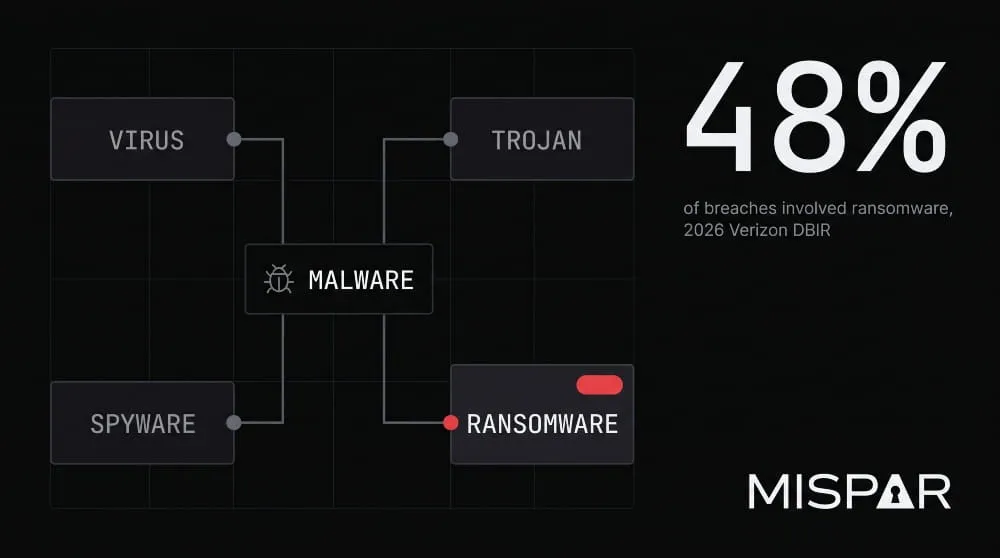
A ransomware attack is a cyberattack in which criminals use malicious software to lock or encrypt an organization’s files and systems, then demand payment for restoring access. Most attacks today also steal data first, so the demand covers both unlocking the files and keeping the stolen information private. The scale is large: the Verizon 2026 Data Breach Investigations Report found ransomware in 48% of all breaches it analyzed, up from 44% the year before.
Ransomware vs malware vs other cyberattacks
Ransomware is a category of malware, which means every ransomware attack involves malware, but most malware is not ransomware. A virus corrupts files, spyware watches the victim, and a banking trojan steals credentials. Ransomware differs in its business model: the attacker holds something the victim needs and demands money to return it. Phishing, credential theft, and vulnerability exploitation are methods attackers use to get in, and ransomware is often the payload they deliver once they have access.
Is ransomware a social engineering attack or a denial-of-service attack?
Ransomware is neither, though it overlaps with both. Social engineering is a way of tricking people, and phishing emails are a common way to deliver ransomware, but the ransomware itself is software. A denial-of-service attack floods a service with traffic to knock it offline, and ransomware denies access by encrypting data inside the victim’s own environment. The outcome looks similar (systems stop working), but the mechanism and defenses differ.
Why attackers use ransomware
Attackers use ransomware because it converts access into cash faster and more reliably than most other crimes. A stolen database has to be sold, but a ransom note puts direct pressure on the victim, and the downtime itself creates urgency. The pressure usually works through three levers: operational shutdown, the threat of publishing stolen data, and the risk of regulatory or customer fallout. Verizon reports that 69% of organizations refused to pay in 2025, up from 65% the year before, yet the model persists because even a small share of payers makes it profitable.
How a Ransomware Attack Works (Step by Step)
A ransomware attack follows a repeatable chain: the attacker gets in, expands access, steals data, encrypts systems, and then demands payment. Each stage gives defenders a chance to interrupt it, which is why understanding the sequence matters more than memorizing any single malware family.
The ransomware attack lifecycle and attack chain
The usual sequence has six stages:
- Initial access through a phishing email, a stolen password, or an unpatched system.
- Establishing a foothold and turning off security tools.
- Privilege escalation, often toward the identity system that controls the whole network.
- Lateral movement to find valuable servers and backups.
- Data theft.
- Encryption, followed by the ransom note.
Modern attackers move quickly through the middle stages. Sophos found the median time to reach Active Directory was 3.4 hours from the start of an intrusion.
Initial access: phishing, stolen credentials, exposed services, unpatched vulnerabilities
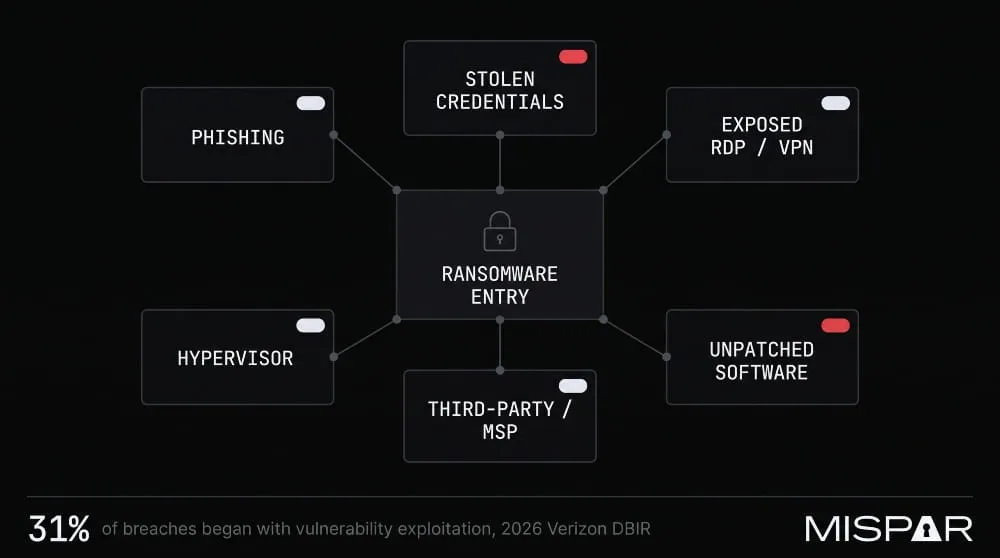
Initial access comes from four main routes: phishing, stolen or guessed credentials, exposed remote services, and unpatched software. In Verizon’s 2026 data, vulnerability exploitation led breaches at 31%, overtaking credential abuse at 13%. Sophos counts identity differently, grouping stolen credentials, brute force, and phishing, and found 79% of ransomware attacks it studied started with an identity-based approach. The two datasets measure different things, but both point to the same priorities: patch exposed systems fast and protect every login.
Zero-day vulnerabilities and ransomware
Yes, a ransomware attack can start with a zero-day vulnerability, meaning a flaw the vendor has not yet patched. The 2021 Kaseya VSA attack is the best-known case, and the 2023 MOVEit Transfer campaign showed the same pattern at scale. Zero-days are rarer than known-but-unpatched flaws, so most organizations are more likely to be hit by a vulnerability that already has a fix. That makes patch speed on internet-facing systems the more practical defense.
Lateral movement, data theft and encryption
After gaining access, attackers map the network, harvest more credentials, and head for the systems that matter: domain controllers, file servers, hypervisors, and backups. They copy sensitive data out before encrypting anything, because stolen data gives them leverage even if the victim can restore from backup. Encryption comes last and is designed to be as disruptive as possible, often hitting many machines at once. Frequently, the same compromised accounts that enabled the intrusion also enable account takeover across email and cloud services.
Double extortion and leak sites
Double extortion means the attackers both encrypt the victim’s data and threaten to publish what they stole. Victims are named on dedicated leak sites on the dark web, with samples posted to prove the theft is real. This changes the calculation for the victim, because restoring from backup no longer ends the problem. Some groups skip encryption entirely and run pure data-extortion campaigns, so the absence of locked files does not mean an intrusion was harmless.
How long a ransomware attack lasts
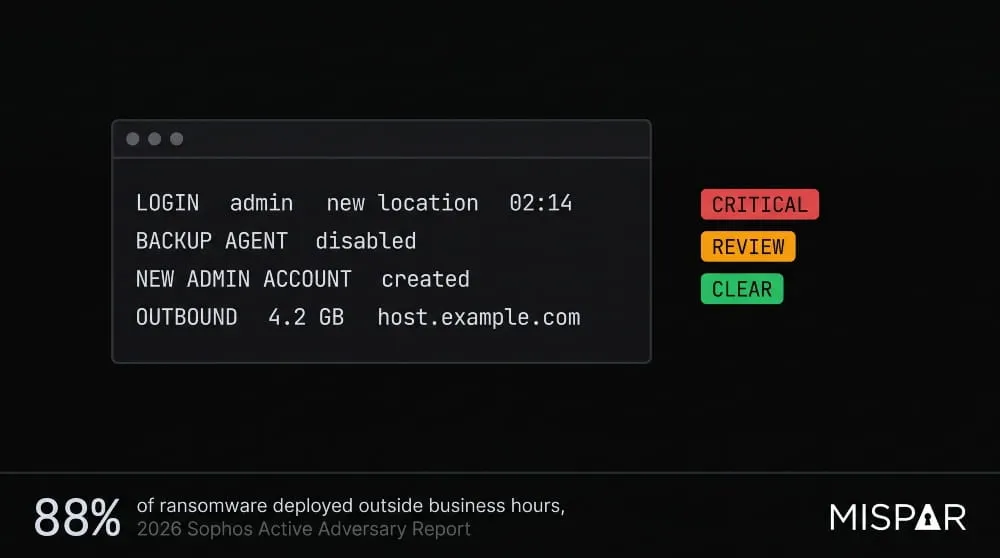
Encryption itself can take minutes to hours, but the intrusion usually starts earlier, and recovery lasts far longer. Sophos’s 2026 report put median dwell time at three days, and found 88% of ransomware cases deployed encryption outside business hours. Attackers time the final step for nights and weekends, when response is slowest. The visible attack ends quickly, but the cleanup can take weeks, as the recovery section below explains.
AI-generated ransomware code
Criminals are using AI tools to write, modify, and debug malware, which lowers the skill needed to build a working ransomware strain. Security researchers have also shown proof-of-concept ransomware that generates its own code at runtime. The practical effect is not a new type of attack but more attackers, faster iteration, and more convincing phishing lures. Verizon’s 2026 report explicitly flags AI-augmented vulnerability research and weaponization as a growing concern.
Ransomware Attack Vectors
A ransomware attack vector is the route an attacker uses to deliver ransomware or gain the access needed to deploy it. The main vectors are phishing, stolen credentials, exposed remote access, third-party compromise, and attacks on specific infrastructure like hypervisors and cloud storage.
Phishing and email-based delivery
Phishing delivers ransomware through malicious attachments, links to credential-harvesting pages, or fake login prompts that capture a password. Often the email does not deploy ransomware directly: it gives an attacker a foothold or a password, and the ransomware follows days later. Phishing that targets passwords feeds directly into the same pipeline that fuels credential stuffing and password spraying against other services.
Credential theft and infostealer logs as an access source
Stolen credentials are one of the most common entry points, and many come from infostealer malware. Infostealer malware quietly harvests saved passwords, browser cookies, and session tokens from infected devices, and criminals sell or share the stolen logs on markets. A ransomware group can buy a valid VPN or email login for a target company without writing a single exploit. Credential theft of this kind is hard to spot because the login looks legitimate, and stolen session tokens can even sidestep MFA through session hijacking.
Remote access and RDP, supply-chain and MSP compromise
Exposed Remote Desktop Protocol, VPNs and firewall admin interfaces give attackers a direct way in when they lack strong authentication. Sophos found firewalls were the starting point in 21% of attacks it examined, and VPNs in 8%. Supply-chain and MSP compromise multiplies the effect: breaching one provider can expose all of its customers at once. Verizon reports that third-party involvement in breaches reached 48% in its 2026 data.
ESXi, cloud and IoT targets
Attackers increasingly go after infrastructure rather than individual PCs. Encrypting a VMware ESXi hypervisor takes down every virtual machine it hosts in one operation. In cloud environments, they delete snapshots, wipe storage buckets, or abuse stolen admin credentials to turn off recovery options. Internet-connected devices and operational technology are rarer targets but can be disruptive because they are often poorly monitored and hard to patch.
Famous Ransomware Attacks and What They Teach
The most famous ransomware attacks show how the threat grew from a niche trick into an industry, and each one exposed a specific weakness that still matters today. Reading them in order shows the entry points repeating.
Timeline of notable ransomware attacks
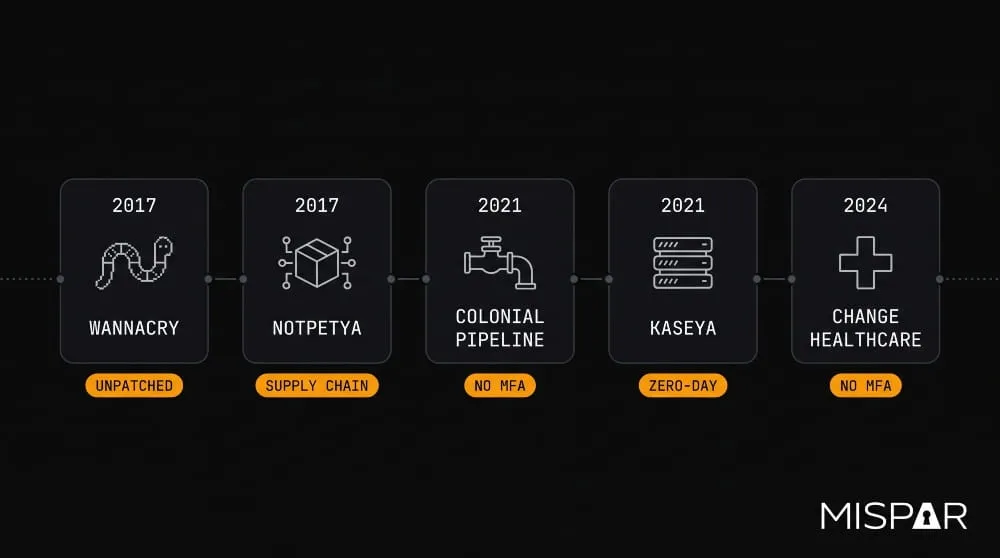
The first known ransomware, the AIDS Trojan of 1989, was distributed on floppy disks at a health conference and demanded payment by mail. CryptoLocker arrived in 2013 and popularized strong encryption paired with cryptocurrency payment. WannaCry and NotPetya followed in 2017 and showed that self-spreading malware could cross borders in hours. Colonial Pipeline (2021) showed that ransomware could disrupt physical supply chains, Kaseya (2021) showed the power of the MSP supply-chain route, and Change Healthcare (2024) showed the scale of damage when a critical healthcare intermediary goes down.
WannaCry 2017 case study
WannaCry was a worm that spread in May 2017 using EternalBlue, an exploit for an unpatched flaw in Windows file sharing. It hit hundreds of thousands of computers across about 150 countries and severely disrupted the UK’s National Health Service. The lesson is that a patch existed before the attack, so unpatched systems were the real vulnerability. A researcher also stopped the spread by registering a domain that acted as a kill switch, which showed how quickly defenders can respond when they understand the malware.
Colonial Pipeline summary and affected assets
In May 2021, the DarkSide ransomware group attacked Colonial Pipeline, the operator of a major fuel pipeline serving the US East Coast. The company shut down pipeline operations as a precaution after its billing and business systems were hit, which caused fuel shortages and panic buying. Investigators linked the intrusion to a compromised password for a legacy VPN account that lacked multi-factor authentication. The lesson is that one stolen credential on one forgotten account can halt critical infrastructure.
Kaseya VSA and the MSP supply-chain lesson
In July 2021, the REvil group exploited a zero-day flaw in Kaseya’s VSA remote management software and pushed ransomware to the customers of managed service providers that used it. A relatively small number of MSPs passed the infection to well over a thousand downstream businesses. The lesson is that tools with broad administrative reach are high-value targets, and anyone who manages other organizations’ systems becomes a multiplier for attackers.
The biggest and most notorious ransomware attacks compared.
| Attack | Year | Entry Point | Main Lesson |
|---|---|---|---|
| WannaCry | 2017 | EternalBlue exploit on unpatched Windows systems | Patch known flaws before worms find them |
| NotPetya | 2017 | Poisoned update to Ukrainian accounting software | Software supply chains can spread destructive malware |
| Colonial Pipeline | 2021 | Compromised VPN password, no MFA | Secure every remote-access account |
| Kaseya VSA | 2021 | Zero-day in remote management software | Provider compromise reaches every customer |
| Change Healthcare | 2024 | Stolen credentials on a remote access portal without MFA | Enforce MFA on all external access |
Types of Ransomware and Common Variants
Ransomware comes in two classic types, crypto and locker, and in many named families that rise and fall as criminal groups rebrand, split, and get disrupted. The family name matters less than how the group operates.
Crypto ransomware vs locker ransomware
Crypto ransomware encrypts files and demands payment for the decryption key, and it is by far the dominant type. Locker ransomware locks the user out of the device or screen without necessarily encrypting the underlying files, and it is now uncommon. Modern attacks usually combine encryption with data theft, so the older crypto-versus-locker split understates what attackers actually do.
Notable ransomware families
A handful of families have shaped the threat landscape. Ryuk targeted large organizations, especially hospitals, in 2018 and 2019. Maze pioneered double extortion in 2019. Conti ran a highly organized operation until internal leaks and a high-profile attack on Costa Rica led to its breakup. DarkSide struck Colonial Pipeline, and LockBit was among the most prolific groups for years, surviving a major law enforcement disruption in 2024. Akira was the most active brand in Sophos’s 2026 dataset, appearing in 22% of incidents among 51 ransomware brands observed.
Ransomware-as-a-service and affiliate models
Ransomware-as-a-service, or RaaS, splits the work between developers and affiliates. Developers build and maintain the malware, negotiation portal, and leak site, while affiliates break into victims and deploy it, with the proceeds split between them. This explains why takedowns rarely end the problem: affiliates move to a new brand, and the same intrusion techniques keep appearing under new names.
How Much Does a Ransomware Attack Cost? Statistics and Trends
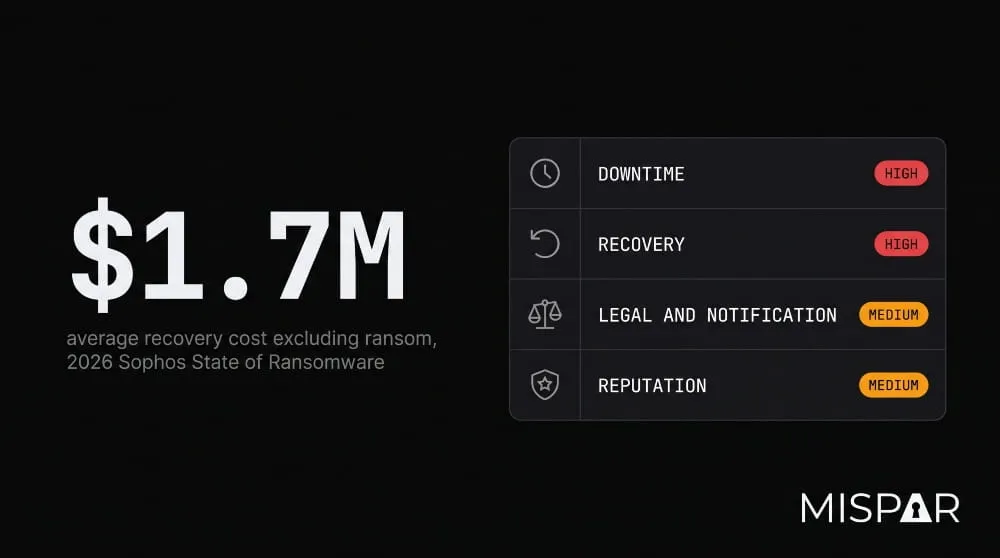
The average ransomware attack now costs about $1.7 million to recover from, excluding any ransom. That figure comes from Sophos’s 2026 State of Ransomware survey and is up 11% year over year. The ransom itself is often the smaller part of the bill.
How often attacks occur and whether they’re increasing
Ransomware’s share of breaches keeps rising. Verizon’s 2026 report shows ransomware in 48% of breaches, up from 44%. One independent breakdown of the report noted that there has never been a DBIR edition where ransomware’s share went down. Payments are falling at the same time, with Verizon putting the median ransom at around $140,000, so attackers are pushing for more attacks rather than larger single payouts.
Direct vs indirect costs: downtime, recovery, reputation
Direct costs include ransom payments, forensic investigators, legal counsel, restoring systems, and notifying affected people. Indirect costs are often larger: lost revenue during downtime, staff time diverted from normal work, higher cyber insurance premiums, customer churn, and regulatory scrutiny. Sophos found 56% of attacks resulted in encrypted data, up from 50% the previous year, meaning more victims face operational costs, not just the threat.
Who Gets Targeted: Industries and Business Sizes
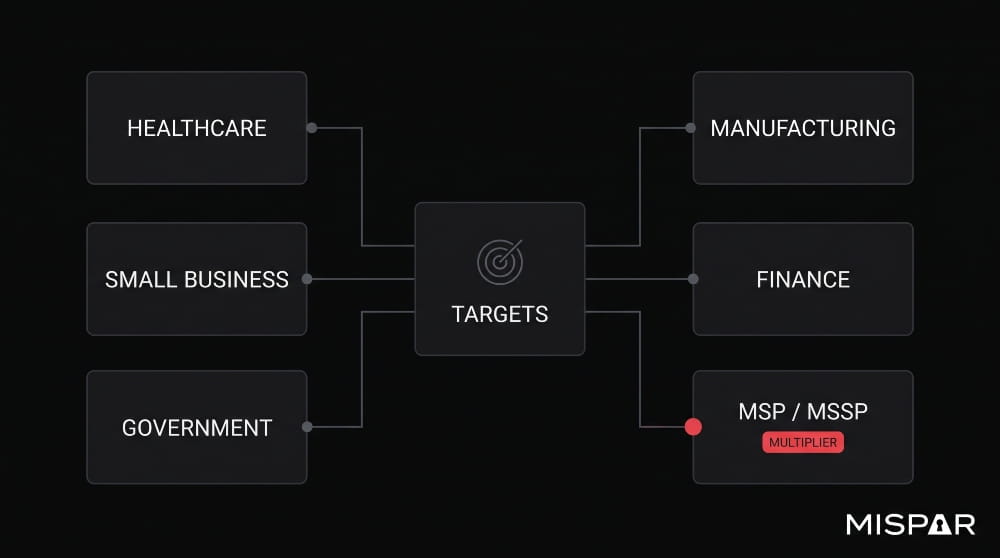
Ransomware groups target any organization they can profit from, but they favor sectors where downtime is intolerable and security resources are thin. The pattern is opportunistic: attackers scan for exposed systems and stolen credentials rather than choosing victims one by one.
Healthcare and hospitals
Healthcare is a frequent target because outages can endanger patients, which creates intense pressure to restore systems quickly. Hospitals also run legacy medical devices, connect to many third parties, and hold data that is valuable for extortion. Change Healthcare showed how one compromised intermediary can disrupt claims and pharmacy operations nationwide.
Small business ransomware attacks
Small businesses are targeted because they hold valuable data but often lack dedicated security staff. Sophos found only about one in three smaller organizations stopped an attack before data was encrypted. The recovery bill can threaten a small company’s survival in a way it would not for a large enterprise.
Government and local government
Local governments run essential services on tight budgets and aging systems, and they face public pressure to restore them. In Sophos’s survey, 72% of local and state government victims paid the ransom, the highest of any sector. That willingness to pay marks them as attractive targets.
Manufacturing, financial institutions and critical infrastructure
Manufacturers lose money for every hour a production line is down, which makes them likely to pay quickly. Financial institutions hold sensitive data and face strict regulation, so breaches carry extra consequences. Critical infrastructure operators, from energy to water to logistics, are targeted both by profit-seeking criminals and by groups with other motives, and their operational technology is often hard to secure.
MSPs and MSSPs as multiplier targets
Managed service providers and managed security providers are high-value targets because they hold privileged access to many customers at once. One successful intrusion can become dozens of victims, as the Kaseya attack showed. Providers need to defend their own environment as carefully as they defend their clients, including the credentials their staff use to reach customer systems.
How to Prevent a Ransomware Attack
The most effective way to prevent a ransomware attack is to layer defenses across the whole attack chain: patch exposed systems, protect every login with phishing-resistant MFA, segment the network, limit privileges, and keep tested offline backups. No single control is enough, because attackers only need one gap.
Core controls: patching, MFA, backups, segmentation, least privilege
Patching comes first because exploitation is now the leading entry route, so internet-facing systems like firewalls and VPNs need the fastest fixes. MFA should cover all remote access, admin accounts, and email. Segmentation keeps an intruder in one part of the network, and least privilege limits what a stolen account can reach. Backups need to be offline or immutable, kept separate from the main environment, and tested by restoring from them, since attackers deliberately target backups.
Closing the credential gap
Even with strong patching, leaked passwords and stolen sessions give attackers a quiet way in. Organizations should watch for exposed credentials and force resets quickly, since compromised credentials often surface on criminal markets before they are ever used. MFA reduces this risk but is not absolute, as attackers have several methods of MFA bypass, including adversary-in-the-middle phishing and stolen session cookies. Phishing-resistant methods, such as hardware security keys or passkeys, are far harder to defeat.
Email security and user training
Filtering email for malicious links and attachments removes a large share of phishing before it reaches anyone. Training works best when it is short, frequent, and tied to a simple way to report suspicious messages. The goal is not to make employees perfect, but to make reporting fast, since a quick report can stop an intrusion before the attacker establishes persistence.
Can threat intelligence prevent ransomware attacks?
Threat intelligence cannot prevent ransomware on its own, but it improves prevention by telling defenders what attackers are doing before they act. Useful intelligence includes advisories on actively exploited vulnerabilities, indicators tied to specific ransomware groups, and alerts that an organization’s credentials or data have appeared on criminal forums. Its value comes from being acted on, with patches, resets, and blocks.
How MDR helps prevent and respond
Managed detection and response, or MDR, gives organizations round-the-clock monitoring and human-led response, which matters because most encryption happens off-hours. Sophos reports a significant drop in attacks progressing to ransomware deployment and data exfiltration once fully managed MDR incidents were included in its dataset. For organizations without a 24/7 security team, MDR fills the coverage gap that attackers deliberately exploit.
Does Microsoft Defender protect against ransomware?
Microsoft Defender includes real protections against ransomware, such as behavior-based detection and controlled folder access, and it is a solid baseline. It is not a complete defense, though, because many ransomware attacks use stolen credentials and legitimate admin tools that endpoint antivirus alone may not flag. Defender works best as one layer alongside MFA, patching, backups, and monitoring.
Government strategies and frameworks
Several public frameworks give concrete guidance. CISA’s #StopRansomware resources provide checklists for prevention and response, and the NIST Cybersecurity Framework organizes controls into functions from identifying assets to recovering from incidents. Organizations can use these to build a plan and measure progress, especially when they need to show due diligence to insurers or regulators.
How to Detect a Ransomware Attack Early
Detecting a ransomware attack early means finding the attacker before encryption, when stopping them is still cheap. Because dwell time is short, detection depends on around-the-clock monitoring and signals that appear before the final payload.
Early warning signs and indicators
Warning signs include unexpected logins from new locations, disabled antivirus or backup agents, new administrator accounts, unusual use of remote administration tools, and large outbound data transfers. Security teams also watch for credential-dumping activity and for attackers deleting shadow copies or backup catalogs. Any one of these can be benign, but several together in a short window deserve immediate investigation.
Leaked credentials and dark web mentions as pre-attack signals.
Some of the earliest signals appear outside the network. Credentials from infostealer logs and breaches are traded on criminal markets, and extortion groups post victims on leak sites. Seeing company logins or data in those places warns that an attack may be in preparation or already underway. Dark web monitoring and credential monitoring watch those sources continuously, so an exposed login can be reset before it is used.
Detection through endpoint, network and identity monitoring
Effective detection covers three areas. Endpoint monitoring catches malicious processes and mass file changes. Network monitoring spots lateral movement and large data transfers. Identity monitoring watches for impossible logins, privilege changes, and abnormal access patterns, which matters because so many attacks start with a valid account. Retaining logs long enough to investigate is part of this, since missing logs can make a breach impossible to scope.
Ransomware attack simulation and red-team testing
A ransomware attack simulation tests whether controls and people respond as expected, without causing real harm. Red teams emulate the techniques of known groups in a controlled way, checking whether alerts fire, whether backups restore, and whether the response plan holds up under pressure. Tabletop exercises with leadership are a cheaper way to test decision-making, such as who authorizes shutting systems down and who talks to regulators.
What to Do After a Ransomware Attack: Response and Recovery
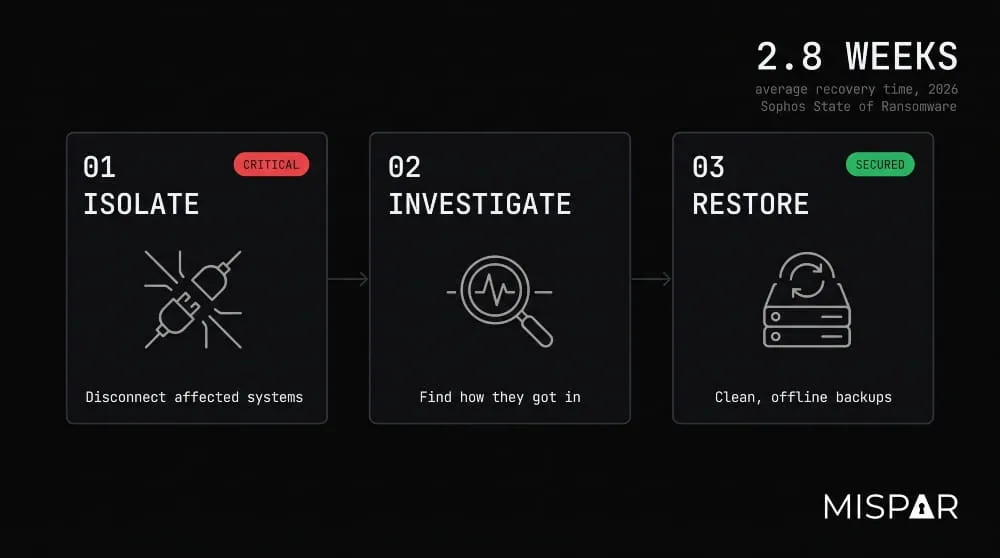
After a ransomware attack, the priority is to contain it by isolating affected systems, then preserve evidence, bring in incident response experts, and notify the right parties. Calm, ordered steps in the first hours usually decide how bad the outcome becomes.
First hour: isolate, preserve evidence, who to call
Disconnect affected machines from the network, but avoid powering them off if you can, since memory can hold evidence. Disable compromised accounts and isolate backups so they cannot be reached. Then call your incident response team or retainer, your cyber insurer, and legal counsel, in that order. Do not use the compromised email or network to coordinate, because attackers may be watching.
Ransomware attack response plan and incident response steps
A good response plan follows a clear sequence: contain, investigate how the attacker got in and what they took, eradicate their access, restore from clean backups, and then harden the gaps. Skipping the investigation step is a common mistake, because restoring systems while the attacker still has access invites a second attack. The plan should name decision-makers and contact details in advance.
Reporting a ransomware attack
Report the attack to law enforcement and the relevant authorities. In the US, that means the FBI’s Internet Crime Complaint Center and CISA, and other countries have equivalent national cyber agencies. Reporting helps investigators track groups and can unlock decryption keys or recovery assistance. Many regulations and insurance policies also require notification within a set number of hours or days, so check obligations early.
Data recovery and how to restore business operations
Restore from known-clean, offline backups, prioritizing the systems the business needs most. Rebuild rather than clean where there is doubt, reset every credential the attacker could have touched, and verify that the backups themselves were not tampered with. Restoring data does not resolve the data-theft side of the attack, so plan to notify affected customers and monitor for leaked data.
Average recovery time
Recovery times vary widely. Sophos’s 2026 research found more than half of victims were operating again within a week, while the average recovery period was roughly three weeks. Full recovery, including rebuilding trust and completing investigations, often takes longer.
Should you pay?
Law enforcement agencies generally advise against paying, because payment does not guarantee working decryption, does not prevent stolen data from being published, and can fund further attacks. Some payments may also violate sanctions rules, so legal advice is essential before any negotiation. The decision belongs to leadership with counsel and incident responders, and the best protection is not having to make it, which comes from tested backups and fast detection. Verizon reports that 69% of organizations made no ransom payment.
Ransomware Attack Protection for MSSPs and Their Clients
For MSSPs, ransomware protection starts with identity: attackers usually go after credentials first, so watching for exposed logins across every client is the earliest and cheapest defense. Managed security providers sit in a unique position because they can see patterns across many environments that no single client could.
Why attackers target credentials first, and where managed services fit
A valid login is the quietest way into an environment, and stolen credentials are easy to obtain from infostealer logs and breach data. An MSSP can add value by continuously checking client domains for leaked or stolen credentials and acting before attackers do. That complements, rather than replaces, patching, MFA, and endpoint protection.
Detection and response coverage across clients
Since ransomware strikes off-hours, providers need 24/7 coverage and a clear split of responsibilities. If you are deciding how a managed service fits, what is an MSSP explains the model, and MSSP vs SOC explains how it differs from running an in-house operations center. Consistent coverage across clients means one client’s leaked credential is caught before it becomes an incident.
Monitoring as an early-warning layer
Mispar gives MSSPs a white-label platform to monitor clients’ exposed credentials and dark web activity under their own brand. That adds an early-warning layer that targets the first step of many ransomware attacks.
Frequently Asked Questions (FAQ)
What is a ransomware attack in simple terms?
A ransomware attack is when criminals lock or encrypt your files and demand money to unlock them, often threatening to publish stolen data as well. It is a type of malware attack designed to force payment.
How does ransomware get onto a computer?
Ransomware usually arrives through phishing emails, stolen passwords used to log in remotely, or unpatched software flaws. In many cases, the attacker gains access first and deploys the ransomware later, rather than delivering it in a single email.
How long does a ransomware attack last?
The encryption can take minutes to hours, and the intrusion before it often lasts days. Sophos measured a median dwell time of three days. Recovery typically takes weeks.
Can ransomware encrypt backups?
Yes, if backups are connected to the main network. Attackers deliberately seek out and delete or encrypt backups before launching encryption, which is why backups should be offline or immutable and regularly tested.
Are ransomware attacks increasing?
Yes. Ransomware appeared in 48% of breaches in Verizon’s 2026 report, up from 44% the year before, even as fewer victims pay.
What do I do after a ransomware attack?
Isolate affected systems, preserve evidence, call your incident response team, insurer, and legal counsel, and report to law enforcement. Investigate how the attacker got in before restoring from clean backups.
Do ransomware attackers get caught?
Sometimes, but not often. Law enforcement has disrupted major groups, seized infrastructure, and recovered some payments, yet many operators sit in jurisdictions that do not cooperate, and groups often rebrand. Prevention and detection remain more reliable than relying on arrests.